
How to edit with AI using Envato stock photos
Learn how to edit with AI on Envato stock photos, customizing images instantly by removing objects, changing backgrounds, and creating polished visuals without leaving the platform.
Envato: Get every type of asset for any type of project, and access to AI tools. Start now
This guide explains what an AI voice generator is, how it works, and why it’s transforming voiceover production. Learn how Envato VoiceGen helps creatives turn text into realistic narration quickly, reduce costs, and scale content creation with flexible, high-quality AI-generated voiceovers.
Voiceover is everywhere. From YouTube tutorials and social media ads to online courses and product walkthroughs, narration has become a core part of modern content.
Traditionally, creating voiceovers required hiring voice talent, booking recording sessions, managing revisions, and waiting for final delivery. While professional voice actors remain valuable, these workflows can be slow and expensive for creatives who need to move quickly.
This is where an AI voice generator comes in. An AI voice generator converts written text into realistic speech using artificial intelligence, enabling creatives to produce narration in minutes rather than days.
Envato VoiceGen is an AI voice generator designed to help creatives turn scripts into natural-sounding voiceovers instantly. Whether you’re producing YouTube videos, explainer content, online courses, or marketing campaigns, VoiceGen makes it easy to generate professional narration without complex production workflows.
An AI voice generator turns written text into realistic voiceovers in minutes. Instead of recording audio manually, you can generate professional narration instantly for videos, ads, courses, and more.
With tools like Envato VoiceGen, an AI voice generator helps you:
If you need fast, flexible, and professional voiceovers, an AI voice generator is a powerful alternative to traditional voiceover production.
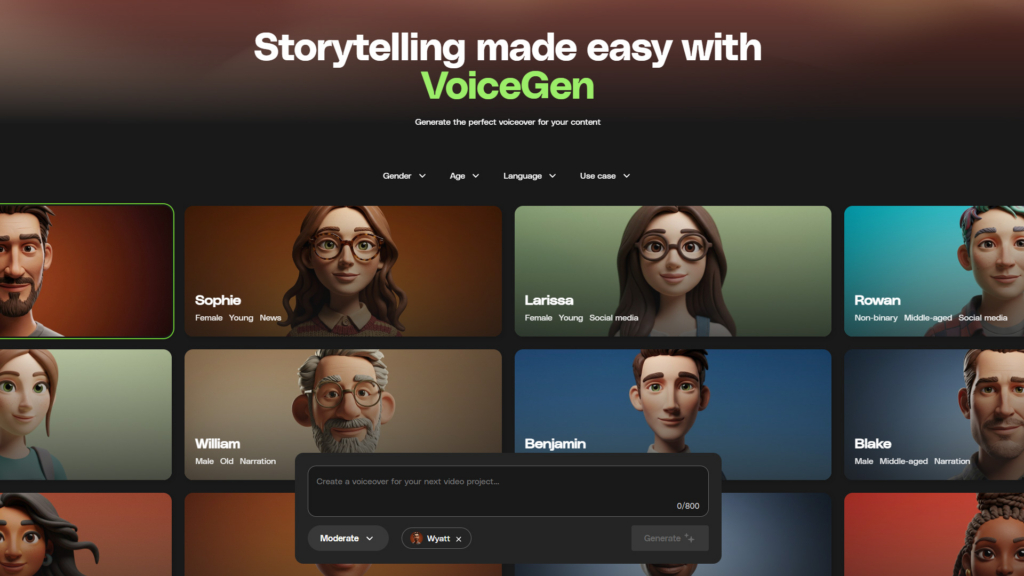
An AI voice generator is a tool that converts written text into natural-sounding speech using artificial intelligence. Instead of recording voiceovers manually, creatives can simply input a script and generate narration instantly.
Modern AI voice generators use advanced text-to-speech (TTS), voice cloning, and machine learning models trained on real human voices, producing speech far more natural than robotic TTS.
Creatives use AI voice generators for many types of content, including:
Because AI voice generators can generate audio in seconds, they are especially useful for teams producing content at scale or testing multiple versions of a script.
VoiceGen is an AI voice generator, along with a number of other GenAI tools that you can access with an Envato subscription. It converts written scripts into realistic narration in seconds, helping you move from idea to finished audio without complex production steps. VoiceGen is designed for creative professionals who need usable, project-ready voiceover, fast.
VoiceGen is built for video creators and other creatives who rely on consistent voiceovers that can be scaled easily for their project needs. That includes filmmakers, YouTube creators, explainer video producers breaking down products or services, e-learning developers building course modules, social media teams creating ads and reels, and agencies or marketers delivering client campaigns.
VoiceGen removes friction from voiceover production. You don’t need to hire talent for early drafts, manage recording sessions, or wait for revisions just to test an idea. It speeds up turnaround times and makes professional-sounding narration more accessible, whether you are producing one video or an entire content series.
AI voice generators have become popular because they dramatically simplify voiceover production.
Here are some of the key advantages:
Like most modern AI voice generators, VoiceGen follows a simple workflow that converts text into voice in just a few steps.
Input → Adjust settings → Generate → Review → Export
Here is how it plays out in practice:
You stay in control of the creative direction. That includes your script and wording, the selected voice, tone, and delivery style, overall speed, and how the narration fits your project’s purpose.
VoiceGen handles the heavy lifting behind the scenes. It optimizes natural phrasing, smooths pronunciation, balances speech pacing, formats the audio, and prepares a clean, usable output. This lets you focus on the message, while the AI manages the technicals.
Key features to look for in an AI voice generator include voice realism, voice variety, customization controls, voice cloning capabilities, commercial licensing, and fast workflow integration.
VoiceGen turns written text into natural-sounding narration in seconds. Paste directly from your script, generate audio instantly, and use it for drafts, final projects, or rapid iteration when you need to test multiple versions quickly.
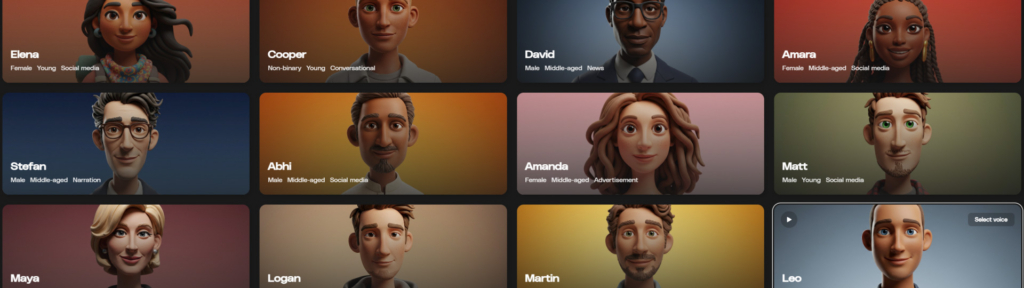
Choose from a wide range of diverse AI voices with different dialects, tones, and speaking styles. Whether you need conversational, authoritative, energetic, or calm delivery, you can match the voice to your brand and audience. You can even filter your AI voice selection based on: gender, age, language, and use case.
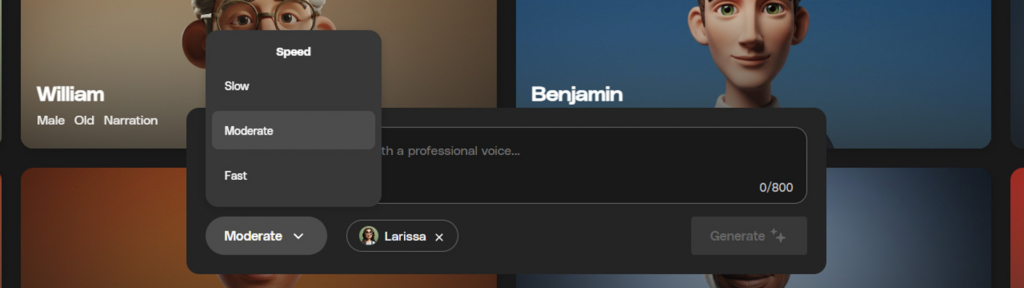
Fine-tune pacing and delivery without rewriting your script. Adjust speed for educational content, high-energy ads, or cinematic storytelling, and dial in the tone to better reflect your message. Great if you need to speed up audio for things like disclaimers, but keep the same voice.
VoiceGen makes experimentation easy. Regenerate versions quickly, test different voices, and compare delivery styles in minutes so you can find the best fit for your project without slowing down your workflow. Client loves the dialogue, but not the voice? Now you can easily change the voice with one click!
Not all AI voice generators offer the same capabilities. When selecting an AI voice generator for your projects, consider the following factors:
Envato VoiceGen is designed with these capabilities in mind, making it a practical AI voice generator for creatives, marketers, and production teams.
As mentioned, VoiceGen fits seamlessly into a wide range of creative workflows, making it easy to produce professional narration across several different project formats and industries.
VoiceGen is ideal for YouTube content creators, filmmakers, explainer videos, advertising and marketing, and e-learning. It works especially well for faceless channels, tutorials, and commentary videos, where clear delivery and fast turnaround matter most.
With the wide range of voices available on VoiceGen, you have an entire ensemble of voice actors at your fingertips. This is great if you need several voices for many different characters. Perfect for animation and also works well if you just need some audio to pair with storyboards or concepts.
From social media ads to promo videos and brand storytelling, VoiceGen helps marketers to create campaign-ready narration in minutes. It is especially useful for rapid iteration when testing different messaging angles.
For SaaS (Software as a Service) walkthroughs, startup pitch videos, and product demos, VoiceGen helps you produce quality narration without waiting for recording sessions. You can quickly test different tones and pacing to match your brand voice.
Course creators and training teams can generate structured, professional voiceovers for modules, instructional guides, and internal training materials. Adjust speed and clarity to suit educational content and improve the learning experience.
VoiceGen is built with real-world creative use in mind. Commercial use is allowed under Envato’s AI terms, so you can confidently use generated voiceovers in monetized content, marketing campaigns, and business projects.
You own the outputs you create, giving you flexibility to use them across platforms and deliver them to clients. VoiceGen is designed to align with Envato’s licensing standards, making it suitable for professional and client work without added complexity or uncertainty. Want to learn more? Check out how Envato’s licensing works.
Like any AI tool, results depend heavily on the quality of your input. Clear, well-structured scripts tend to produce the most natural-sounding voice-overs. If your wording is vague or overly complex (or just has typos), you may need to refine it for better delivery.
A very specific emotional nuance or a dramatic performance may require additional script adjustments to help guide the tone more precisely. AI-generated results can also vary slightly between generations, so testing a few versions often helps.
For high-end cinematic projects or heavily stylized performances, you may still want to enhance the audio with post-production editing tools. That said, for most creative and commercial use cases, VoiceGen delivers fast, reliable, ready-to-use narration.
If you run into issues with pronunciation, tone, or delivery, check out our guide on how to troubleshoot AI voiceovers for practical tips and fixes.
Getting started with VoiceGen is straightforward and fast. Let’s quickly cover each step from start to finish.
Be intentional with your wording. Avoid vague phrasing and think about pacing as you write, so the narration flows naturally. Currently, VoiceGen is limited to 800 characters of text per generation, so you may need to generate your script in different parts.
Select a voice that fits your project, whether that is educational, promotional, or conversational. VoiceGen offers a wide range of voices, and you can even filter them by your project needs.

Small changes to pacing and delivery can dramatically improve the realism and clarity of the voiceover. Select from slow, moderate, and fast speeds — regenerate immediately at a different speed if needed.
Once you are ready, just click Generate to create your voiceover. From there, you can play it back and listen. And you can always tweak and regenerate it, if needed. Testing a few variations often leads to the best results.
Time to first result: Minutes.
Pro tip: Be specific about style, tone, and purpose from the start to achieve better-quality outputs in your first generation.
To get the best results from an AI voice generator, your script needs to be clear, natural, and easy to read aloud. Small adjustments in how you write can make a big difference in how realistic your voiceover sounds.
Here are a few simple guidelines to follow:

When comparing an AI voice generator to traditional voiceover production, the key differences come down to cost, speed, flexibility, and how easily you can make revisions. Here’s how they stack up:
| Factor | AI voice generator (VoiceGen) | Traditional voiceover workflow |
|---|---|---|
| Cost | Lower cost with no need for talent fees, studio time, or paid revisions. | Higher cost due to voice talent, studio sessions, and revision fees. |
| Speed | Generate voiceovers in minutes from a script. | Can take days or weeks from booking to final delivery. |
| Flexibility | Easily edit scripts, adjust tone or speed, and regenerate instantly. | Requires scheduling pickups or requesting revisions from talent. |
| Revisions | Fast, internal iteration with no coordination required. | Involves multiple stakeholders, approvals, and back-and-forth communication. |
AI voiceover is powerful for scalable content, early-stage drafts, internal training materials, and many professional applications where speed and efficiency matter most. For highly emotional storytelling or character-driven performances, professional human voice actors may add nuance, but VoiceGen’s adjustable tone, speed, and delivery personality cover most creative and commercial use cases.
VoiceGen does not replace traditional voiceover in every scenario, but it dramatically expands what is possible. For many creatives and businesses, it offers a cost-effective, professional solution for modern content.
Voiceover has always been a core part of digital storytelling, and AI voice generators are making it faster and easier than ever to produce professional narration. Envato VoiceGen removes many of the traditional barriers to entry by making professional narration fast and accessible. It speeds up creative workflows, simplifies revisions, and gives you more control over your audio.
If you are producing content at scale or simply want a faster way to bring scripts to life, VoiceGen is worth exploring. Experiment with different voices, refine your scripts, and see what you can create!
An AI voice generator is a tool that converts written text into speech using artificial intelligence. These tools allow creatives to generate voiceovers for videos, ads, and educational content without recording audio manually.
AI voice generators use text-to-speech models trained on large datasets of human speech. These models analyze written text and generate realistic audio that mimics natural human pronunciation and pacing.
VoiceGen produces natural sounding AI voiceovers with varied tones and dialects. Realism improves with clear scripts and well chosen voice settings.
Yes. You can download the audio file and refine it further in your preferred audio or video editing software.
VoiceGen offers multiple AI voices with different dialects and intonations. Available options may expand over time.
You own the generated output, and it can be used in your projects according to Envato’s licensing terms.
Learn how to edit with AI on Envato stock photos, customizing images instantly by removing objects, changing backgrounds, and creating polished visuals without leaving the platform.

Discover how Envato's AI sound generator creates custom sound effects from text prompts so creators can skip library searches and edit faster.

Learn how AI photo relighting works in Envato Shortcuts. Change lighting, mood, and shadows in seconds with guided AI workflows.

Discover how sonic branding AI tools help you create unique brand sounds, from audio logos to UI effects, and build a consistent, memorable sonic identity across platforms.

