
Prompts for cinematic sound effects
A cinematic sound effect isn't just the event — it's the material, the space, and the emotion. This guide covers prompts for the most common cinematic sounds, from rain to whooshes.
Envato: Get every type of asset for any type of project, and access to AI tools. Start now
Discover Envato's AI Sound generator to create custom sound effects from text prompts instantly.
Envato’s AI Sound generator is an AI sound effect generator that creates custom sound effects from a text prompt and optional controls, so creatives can produce the exact SFX they need without searching a library.
This AI sound generator guide explains how to generate sound effects using AI, from writing better prompts to integrating generated audio into your workflow.
Great sound design can completely change a video. A simple action becomes more cinematic. Scenes begin to gain energy, atmosphere, and realism. The only issue is that finding the right sound effect often takes way longer than it should.
That is where this AI sound effect generator guide comes in. Instead of endlessly scrolling through libraries and previewing sounds for something “close enough,” creatives can now generate custom sounds for a specific moment. This makes iteration and experimentation faster than ever, especially when working under tight deadlines.
In this guide, we will break down how Envato’s AI Sound generator works, what kinds of sound effects it can create, how to write better prompts, and how creatives can best integrate AI-generated SFX into their workflow.
As part of Envato’s all-in-one creative asset toolkit, this AI sound generator is designed for fast creative workflows. Just describe the sound you want and generate something tailored specifically for your video. It can also generate multiple audio variations of the same idea, making it easier to avoid repetitive audio and experiment with different styles or moods.
Envato’s AI Sound generator is particularly useful for:
Rather than replacing traditional sound design tools, this AI sound effect generator helps speed up the process of getting usable audio for whatever your creative project is.
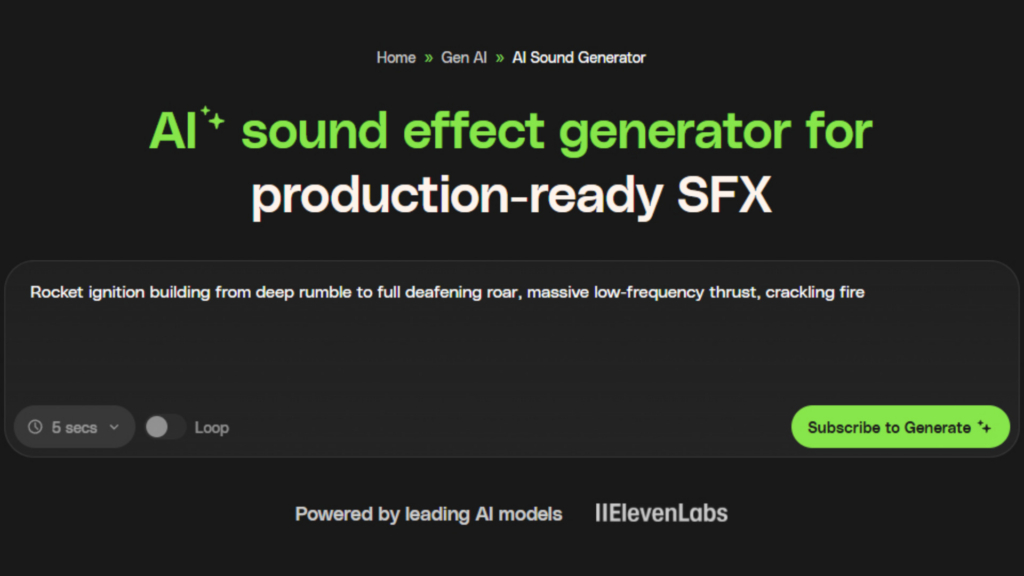
Envato’s AI Sound generator can generate a wide range of sound effects. Whether you need subtle sound-sweetening clicks or large cinematic impacts, our AI sound effects generator is tailored to help creatives generate sound effects with AI.
Some of the most common sound effect categories include:
One of the biggest advantages of Envato’s AI Sound generator is how quickly it helps fill creative gaps during editing. Instead of stopping your workflow to search through hundreds of files, you can generate sound effects with AI, tailored to the exact timing and style of your scene. (And then continue editing, without missing a beat!)
Envato’s AI Sound effects generator is designed to be fast and simple for creatives to use. The workflow typically looks something like this:
That workflow no longer ends when you hit download. Envato’s AI sound generator now sits alongside the image, video, music, and voice tools in one connected AI experience, so the sound you generate can feed straight into whatever you’re making next. Score a video generation without switching tabs. Layer a fresh whoosh over a clip you generated ten minutes ago. Every output becomes a starting point rather than a dead end, so your sound design stays part of the project instead of a separate errand.
Learn more about Envato’s new AI experience.
The quality of the result often comes down to how clearly you describe the sound. For example, prompts that include the source, material, intensity, or mood usually produce better-sounding results.
You control:
Meanwhile, the AI handles the heavy lifting behind the scenes:
This makes this sound generator a must-have for fast editing workflows where timing and quality matter. Instead of interrupting your creative flow to search for the “perfect” sound effect, you can generate multiple options quickly, then select one and keep on moving.
At the core of Envato’s AI Sound effects generator is text-to-sound generation. Describe the sound effect you want, and the AI generates custom audio based on your prompt. This makes it possible to create highly specific sounds quickly!
One of its biggest strengths is how quickly you can experiment. You can regenerate different takes, explore subtle changes in tone, length, or intensity, and create multiple variations of the same sound idea. This is especially useful for avoiding repetitive edits or testing different creative directions during revisions.
Set the duration of your sound effect in the prompt settings, and enable seamless looping when you need ambiance or a texture that runs under a longer scene without an audible seam.
For creatives new to AI prompting, it helps simplify the learning curve. Using clear prompt structures and descriptive wording makes it easier to get usable results faster. Over time, you can refine your prompts to generate more consistent and targeted sound effects with less trial and error.
Once you generate a sound effect you like, you can export it directly into your workflow. The generated audio files are designed to drop easily into the video editing app of your choice, without any extra setup or effort.
Every sound effect you create is saved automatically, so nothing disappears the moment you close a tab. Head back to your generation history to re-download an earlier take, compare two variations side by side, or pull a sound from last month’s project into this week’s edit. It’s especially useful when a client circles back to an option you’d already moved past.
As with most AI tools, the quality of your results depends heavily on your prompt. The more precisely you describe a sound, the more likely the generator will be able to generate what you want.
A good sound effect prompt usually includes:
Example prompts to copy and adapt:
Heavy cinematic metal impact with low bass, slow decay, trailer-styleRetro arcade UI click with digital texture, short and crispShort wooden door knock, close mic, warm room toneDistant rain on a tin roof, soft wind, late evening atmosphereHigh-pass whoosh sweeping left to right, cinematic, 2-second durationRobotic servo motor, mechanical whir, futuristic and clean Cartoon: Bouncy boing with comedic pitch bend, playful and exaggeratedNotice how each prompt stays fairly concise while still describing tone, texture, and context.
A few simple habits can dramatically improve your results:
In many cases, small wording changes can completely shift the feel of the generated sound. Experimentation and regeneration are part of the process. Check out more ways you can transform your sound design using prompts.
Strong prompts follow a predictable structure. The more clearly you describe the sound, the closer the output lands to what you imagined. Use this framework as a starting point.
Follow the source + action + material + mood + environment structure
This five-part formula is the most reliable way to get usable results from any AI sound generator:
Example: “Heavy metal door slamming shut in a concrete warehouse, gritty and cinematic with long reverb tail.”
It fits naturally into a wide range of creative workflows. Here are some use cases:
For video editors and motion designers, our AI sound effect generator can quickly generate:
These types of sounds help add energy and rhythm to edits without getting distracted searching for sound effects.
Fast-turn content often needs equally fast sound design. It can help create:
Worth knowing: several of the video models behind Envato’s AI video generator now produce their own audio, from dialogue and lip sync to layered background ambience. That covers the base of the scene. What it doesn’t reliably give you is the deliberate stuff, such as the accent on a logo reveal, the whoosh timed to your cut, or the UI click that matches your brand. Generate those separately and layer them in, and you get a mix that sounds designed rather than assembled.
For indie game developers, it can speed up the process of building sound environments. Examples include:
Instead of waiting until late production stages, creatives can start experimenting with audio much earlier.
One of its biggest advantages is its ability to quickly generate many versions of a specific sound. This makes it easier to:
Because sounds can be regenerated so quickly, creatives can spend less time searching and more time refining the overall feel of a project.
Even with a powerful AI sound generator, the difference between a usable result and a generic one often comes down to user habits. Here are the most common mistakes creatives make, and how to avoid them.
Prompts like “scary sound” or “cool whoosh” leave too much room for interpretation. The AI has no anchor for source, texture, or mood, so the output tends to feel generic. Always include at least one concrete descriptor — material, environment, or intensity — to give the model something specific to work with.
Trying to cram multiple sounds into one prompt (“footsteps on gravel with a door creaking and distant thunder”) usually produces a muddy, unfocused result. AI sound generators perform best when each prompt targets one clear sound idea. Generate complex scenes by layering multiple single-sound outputs in your DAW instead.
The first generation is rarely the best one. Many creatives accept an “okay” sound and move on, missing the variations that would have fit the scene better. Regenerate two or three times and compare — small wording tweaks often shift the texture significantly.
AI-generated sounds are raw ingredients, not finished assets. Dropping them straight into a timeline without trimming, fading, or EQing usually makes them sit awkwardly in the mix. Treat generated SFX the same way you’d treat a library sound — light editing is almost always required.
A technically perfect sound can still feel wrong if it doesn’t match the visual pacing or environment. Before generating, watch the scene back and note the timing, mood, and acoustic space you need. Then build that context into the prompt.
Creatives building a sound palette for a series often forget to reuse prompt structures, which leads to tonal drift across episodes or videos. Save your best-performing prompts as templates and adapt them rather than starting from scratch each time.
Asking an AI sound generator to recreate a recognizable branded sound (a specific game’s UI, a film’s signature impact) is both ethically and legally murky — and tends to produce poor results anyway. Describe the feel you want instead of referencing the source material.
Traditional sound design workflows often involve a lot of searching. You’ll browse through libraries, listen to dozens (or even hundreds) of sound effects, settle for something “close enough,” then repeat the process again for the next edit. While this approach still can be practical, it can be slow and repetitive during fast-paced creative work. It drastically changes that workflow.
Instead of:
The process becomes:
| Approach | Speed | Cost | Customization | Best for |
|---|---|---|---|---|
| Envato’s AI Sound generator | ~1–2 minutes per sound | Included with Envato subscription | High — prompt-driven, unlimited variations | Specific, niche, or hard-to-find sounds; fast iteration |
| Traditional SFX libraries | 10–30 minutes of searching per sound | Subscription or per-asset | Low — limited to what exists in catalog | Common sounds, established categories |
| Hiring a sound designer | Days to weeks | $$$ per project | Highest — fully bespoke | Final mixes, signature audio branding |
| Recording original foley | Hours per session | Equipment cost + time | Highest — real-world specific | Authentic textures, hero sounds |
This makes certain parts of the workflow significantly faster, especially when you need:
For example, instead of searching for the perfect cinematic whoosh or UI click, you can generate several versions tailored to your scene and iterate from there. This all being said, using an AI sound generator does not replace creative sound design. The human side of the process still matters:
Think of our AI sound generator as a fast sound creation tool, not a replacement for editing and creativity. It helps creatives get usable audio faster while allowing you to focus on how everything in the edit fits together.
| Use Envato’s AI Sound generator when | Use a traditional library when |
|---|---|
| You need a highly specific or niche sound | You need a common, well-documented sound, such as a standard door slam or basic applause |
| You want multiple variations of the same effect | You want a pre-mastered, production-ready file with no editing required |
| You’re iterating fast during client revisions | You’re building a cohesive set from a single curated source |
| You need to match a unique tone, mood, or texture | |
| Your library search has hit a dead end |
Between traditional sound libraries and AI-powered sound generation, which should you use? The real answer: both. (As is the case with most creative technology.) Each has strengths that shine in different scenarios, and together they offer the most creative flexibility.
Sound libraries are unbeatable when you need polished, production-ready audio. If you’re cutting a trailer and need a cinematic whoosh now, a library clip will be clean, consistent, and ready to drop in.
AI sound effects, on the other hand, thrive when you need unique, context-specific sounds. Think ultra-niche moments like “metallic footsteps echoing in a deep canyon” or “vintage keys falling down wooden stairs.” Instead of searching endlessly, you just prompt and generate.
But why use one when you can use both? Libraries give you a trusted foundation of high-quality sounds, while AI generation fills in the gaps with custom sound effects that you need in a pinch.
Here’s a quick comparison:
As mentioned earlier, the real creative power happens when you combine AI sound effects from Envato’s AI Sound effect generator with the reliability of a traditional library, like Envato. Here are a few real-world example workflows that show how they complement each other:
This hybrid workflow gives you the best of both worlds and is a direct result of how creative tools continue to evolve. Using alternating workflows like this will help give you an edge not only with your own independent creative work but also with client projects!
This AI sound effects generator is designed for real creative workflows, including professional and client projects. Commercial use is allowed under Envato Labs User Terms and the Envato Elements License.
Licensing itself has gotten quieter. Licenses are applied automatically when you download, and assigning an item to a project is optional rather than a required step, so you’re covered without stopping to fill in a form mid-edit. If you do need clean records for a client handoff, you can select multiple assets in a Workspace, assign a license name, and download the certificates together in a single zip.
As with any AI-generated asset workflow, creatives should review Envato’s AI Product Terms for the most up-to-date details regarding ownership, usage rights, and commercial distribution. The overall goal is to keep it aligned with Envato’s broader licensing standards and creative ecosystem.
Getting started with our AI sound generator is simple. The key is to begin with a clear idea for your sound effect and refine from there.
Start with one focused sound concept instead of trying to describe an entire scene at once.
Once you have the core idea, begin layering in details like:
Small prompt adjustments can dramatically change the result.
Generate multiple takes and compare them side by side. Often, subtle wording changes lead to very different textures and tones.
Once you’ve found a sound you like, export it into your editing or motion design workflow, or save it to a Workspace first so it stays with the rest of the project. Nested Workspaces let you structure things the way you actually work, by client, campaign, or production stage, so a folder of transitions for one video doesn’t get tangled up with the ambience you generated for another. When you’re ready to move everything into your NLE, you can download an entire Workspace in one go rather than pulling files down one at a time.
From there, layer your sound with music, ambience, or additional effects for a better final result.
Pro tip: A simple prompt structure like source + action + material + mood is often the fastest way to get good results!
The most interesting shift isn’t in the sounds themselves. It’s in what sits around them.
Sound generation used to be a side trip. You’d leave your edit, find or make a sound, bring it back, and hope it still fit. Now that image, video, music, and sound generation share the same space at Envato, that round trip mostly disappears. You can generate a scene and score it in the same session, build a small palette of effects for a series and keep them in one Workspace, or take a sound you made for one project and use it as the jumping-off point for the next.
Model quality keeps improving, and it will continue to do so. But the bigger change for creatives is that generated audio is becoming a normal part of the edit rather than a detour from it.
Our AI sound generator helps streamline one of the most time-consuming parts of the creative process: searching for the right sound effect. By generating custom sound effects on the spot, from simple prompts, creatives can move faster and experiment more freely. This means spending far less time digging through sound libraries. While AI can accelerate the workflow, the creative decision-making will still need to come from the editor, designer, or sound artist shaping the final result!
Access to our AI sound generator is included with your Envato subscription plan. AI generations will vary depending on your subscription plan.
| Approach | Speed | Cost | Customization | Best for |
|---|---|---|---|---|
| Envato (AI generation) | ~1–2 minutes per sound | Included with Envato subscription | High — prompt-driven, unlimited variations | Specific, niche, or hard-to-find sounds; fast iteration |
| Traditional SFX libraries | 10–30 minutes of searching per sound | Subscription or per-asset | Low — limited to what exists in catalog | Common sounds, established categories |
| Hiring a sound designer | Days to weeks | $$$ per project | Highest — fully bespoke | Final mixes, signature audio branding |
| Recording original foley | Hours per session | Equipment cost + time | Highest — real-world specific | Authentic textures, hero sounds |
Use clear descriptions that include the source, action, material, mood, or environment.
Yes, commercial use is allowed under Envato Labs User Terms and the Envato Elements License.
That workflow no longer ends when you hit download. Envato’s AI sound generator now sits alongside the image, video, music, and voice tools in one connected AI experience, which means a sound you generate can feed straight into whatever you’re making next. Score a video generation without switching tabs. Layer a fresh whoosh over a clip you generated ten minutes ago. Every output becomes a starting point rather than a dead end, so your sound design stays part of the project instead of a separate errand. Learn more about Envato’s new AI experience.Generated sound effects are exported in .mp3 format.
Envato’s AI sound generator works especially well for cinematic impacts, whooshes, UI sounds, ambience, and transition effects.
Yes, Envato’s AI sound generator is designed to quickly generate and iterate on multiple sound variations.
Refer to Envato’s official AI Product Terms for the latest guidance on ownership and usage rights.
Refine the prompt, simplify the wording, or generate additional variations until the sound better fits your project.
Heavy cinematic metal impact with low bass, slow decay, trailer-styleRetro arcade UI click with digital texture, short and crispShort wooden door knock, close mic, warm room toneDistant rain on a tin roof, soft wind, late evening atmosphereHigh-pass whoosh sweeping left to right, cinematic, 2-second durationRobotic servo motor, mechanical whir, futuristic and cleanBouncy boing with comedic pitch bend, playful and exaggeratedHow to write better AI sound generator prompts
Every sound effect you create is saved automatically, so nothing disappears the moment you close a tab. Head back to your generation history to re-download an earlier take, compare two variations side by side, or pull a sound from last month’s project into this week’s edit. It’s especially useful when a client circles back to an option you’d already moved past.
Sound effects that sit on top of AI video clips.
A cinematic sound effect isn't just the event — it's the material, the space, and the emotion. This guide covers prompts for the most common cinematic sounds, from rain to whooshes.

The best AI sound effect generators for 2026 — compared for quality, control, pricing, and commercial licensing safety.

Discover how sonic branding AI tools help you create unique brand sounds, from audio logos to UI effects, and build a consistent, memorable sonic identity across platforms.

Envato AI tools guide covering video, image, audio and voice generation. Learn how to use AI to speed up creative workflows without adding complexity.

