How to create AI packaging design with the chaos packaging trend

A step-by-step guide to AI packaging design using bold chaos packaging principles and tools.

Miss Chatz 10min read 14 Apr 2026
Chaos packaging AI design

Packaging design has always been about grabbing attention, but today’s landscape demands more than just “nice-looking” visuals. Brands need bold, scroll-stopping, shelf-dominating concepts — and that’s exactly where AI packaging design and the rise of chaos packaging come in.

Chaos packaging is a deliberately loud, high-energy style built on clashing colors, layered graphics, distorted typography, and unpredictable layouts. It looks messy at first glance, but when done right, it’s carefully controlled chaos that stands out instantly.

By combining this trend with AI packaging design tools, you can move faster from concept to execution. Instead of starting from a blank canvas, you generate raw visual directions, refine them with professional tools, and shape them into production-ready packaging.

In this tutorial, you’ll learn how to create chaos-inspired packaging using Envato’s AI tools, asset library, and a professional Illustrator and Photoshop workflow.

What is AI packaging design?

AI packaging design is the process of using artificial intelligence tools to generate, explore, and refine packaging concepts, combining automation with traditional design workflows to create faster, more experimental outcomes.

Unlike traditional workflows, where every element is built manually, AI allows you to rapidly generate visual directions, styles, and assets. Designers then refine those outputs, ensuring the final packaging is both creative and commercially viable.

When paired with chaos packaging, AI becomes especially powerful. It helps you explore bold, unconventional ideas quickly, while still giving you full creative control during refinement.

The chaos packaging trend: why it works

Chaos packaging is gaining traction across industries like beverages, streetwear, and indie food brands — especially those targeting Gen Z audiences.

This style works because it:

  • Breaks visual rules in a controlled way.
  • Creates instant shelf impact.
  • Feels authentic, raw, and expressive.
  • Reflects youth culture and experimental branding.

Despite its wild appearance, successful chaos packaging still follows key design principles like hierarchy, contrast, and readability.

Tools you will need

To create an AI packaging design using chaos packaging, you’ll need:

AI packaging design – Screenshot of the Envato GraphicsGen AI tool interface, displaying various graphic examples like a robot, a car, and a cityscape, with options for generating different styles of images.
  • GraphicsGen (Envato AI tools): generate chaotic visuals and concepts
  • Adobe Illustrator: refine vectors, typography, and dielines
  • Adobe Photoshop: apply textures, lighting, and final composition
  • Envato assets: fonts, mockups, templates, and graphics

This combination gives you both speed (AI) and precision (design tools).

Step-by-step workflow: from AI concept to chaos packaging

Before generating anything, define your concept clearly.

Step 1: Define your chaos packaging design brief

For this tutorial:

  • Brand: Chaos Pop
  • Product: Experimental sparkling soda
  • Audience: Gen Z and indie beverage fans

Now define the creative direction. Your packaging should feel:

  • Energetic
  • Playful
  • Chaotic
  • Experimental
  • Visually loud

Think in contrasts — neon colors, graffiti textures, surreal illustrations, and layered visuals.

Without this step, AI outputs will feel random instead of intentional.

A webpage displaying a grid of various soda can mockup graphic templates from Envato, with search filters and navigation options visible.

Step 2: Generate AI packaging design visuals

Open GraphicsGen and begin exploring visual directions:

  • Instead of jumping right into packaging layouts, take a moment to understand the brand first. Focus on creating illustration styles and visual themes that fit your brief. Think of this stage as sketching, but with AI as your sketchbook.
  • Try prompts like “Chaotic surreal fruit explosions and neon colors” or “Experimental graffiti-style graphics.” Watch the ideas flow out like a shaken soda can.
  • Generate several variations and look for the ones that feel full of life.
  • Pay attention to bold color palettes, surprising layouts, gritty or painterly textures, and quirky characters that add personality. You’re not looking for perfection here. You’re searching for energy.
  • On GraphicsGen, toggle the Transparent Background on. When you find one or two visuals that capture that loud, playful, slightly wild brand spirit, you’ve found your creative spark. Download the files as SVG (for Illustrator) or PNG (for Photoshop).

Here are some sample AI graphics prompts. Paste them in, tweak them, and make them your own:

Various isolated graffiti-style berries, including blueberries and strawberries, each drawn individually in rough black spray paint. The forms are hand-drawn with distorted, uneven shapes and thick, aggressive lines. Heavy overspray, speckled texture, and soft spray halos surround each berry. Visible paint drips, splatters, and gritty buildup create a raw, punk, distressed look with rough, imperfect edges.”

A collection of hand-drawn graffiti symbols scattered. All are rendered in rough, textured black spray paint. The symbols include hearts, arrows, crowns, stars, scribbles, question marks, smiley faces, X’s, circles, wavy lines, and abstract marks. Each element looks imperfect and raw, with visible paint drips, overspray, smudges, and uneven pressure. They seem created quickly with a spray can. The style is urban and grunge, with high contrast between the black paint and the transparent background. The texture should feel dusty, gritty, and slightly worn. The composition is loose and playful, with symbols arranged organically rather than in a grid. It evokes spontaneous street graffiti tagging. Subtle noise, grain, and paint splatter details enhance realism.

A webpage displaying graffiti-style graphic elements, including colorful symbols and black and white berries, with accompanying descriptions and navigation.

Step 3: Build a visual language for your chaos packaging

After you’ve fine-tuned your ideas, the next step is to nail down a cool visual look for your AI graphics. Pick your favorite designs and zoom in on the unique details that stand out. Check for recurring elements like the main colors, common shapes, illustration style, and the overall vibe of the designs. Spotting these traits helps you establish a consistent visual language that will guide all your design choices, ensuring your final packaging looks put together and intentional.

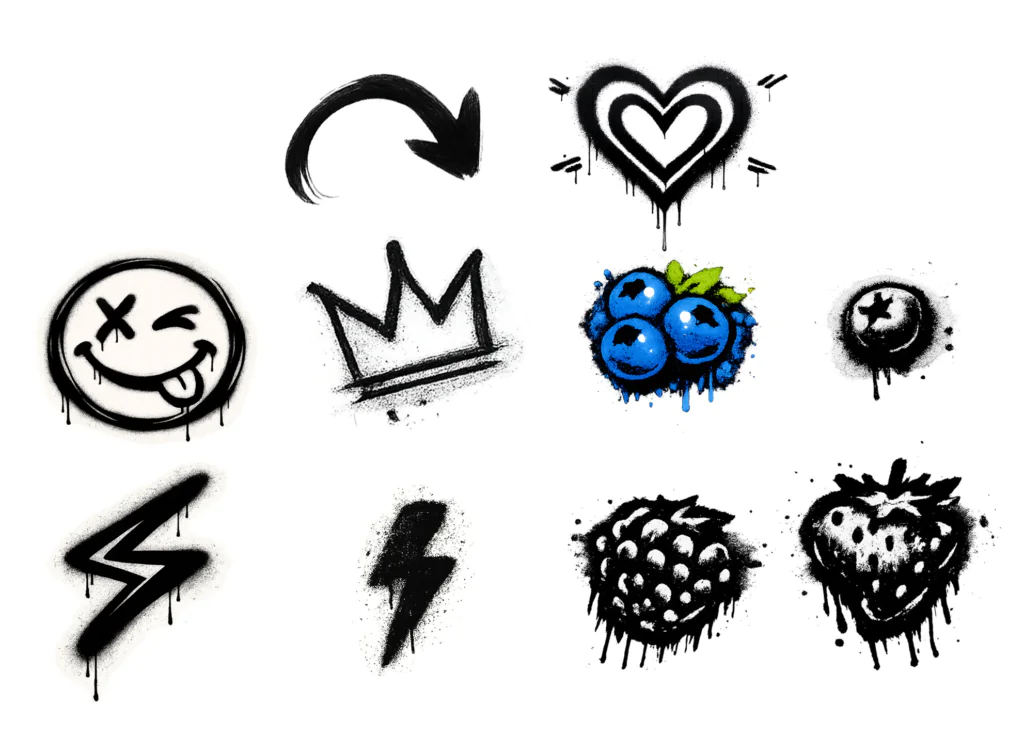
For this project, let’s lean into a graffiti-inspired theme, using raw, textured black spray paint graphics layered over a vibrant gradient background. The main visual cues come from the wild spray-paint stencils, paired with quirky elements like winking smiley faces and funky blueberries. The style is all about that energetic urban stencil-graffiti vibe mixed with exaggerated, playful fruit details. By homing in on these aspects, you’ll create the core visual style for your “Chaos Pop” packaging.

A grid of eleven graffiti-style spray paint illustrations on white: a curved arrow, a heart, a smiley face, a crown, blue blueberries, a black blueberry, two lightning bolts, a raspberry, and a strawberry.
A vibrant collection of graffiti-style spray paint illustrations, featuring symbols like hearts, crowns, smiley faces, lightning bolts, and berries, all with characteristic drips and splatters.

Step 4: Choose fonts and assets from Envato

Once the main idea is established, the next step is to add structure by selecting standout fonts and design elements from the Envato library. For chaos packaging, fonts should match the energetic and expressive nature of the visuals rather than blend into the background. Bold hand-drawn fonts, graffiti-style lettering, or distorted typefaces can help create a sense of movement and personality. Chunky retro fonts can also enhance a nostalgic feel. Mixing different styles is key to building a clear hierarchy, with contrasting weights and unique shapes keeping the design dynamic while still maintaining readability.

For this concept, a sleek soda can mockup from Envato’s library can be paired with expressive brush fonts to achieve a raw, hand-sprayed aesthetic. A vibrant neon gradient background can further enhance the chaotic visual style, adding contrast and energy to the overall design.

Step 5: Build your packaging layout using a template

Now it’s time to get practical. Head over to Envato’s library to grab a solid packaging template and ensure your art actually fits real-world production constraints. Just search for things like soda can label templates, beverage packaging layouts, or general product label designs.

These files are great because they come pre-loaded with all the technical boring stuff like dielines, bleed areas, and safe zones. By dropping your graphics and typography directly into the template, you can start building out your layout with total confidence that nothing important is going to get cut off at the printer.

Graphic design for a soda can mockup with a yellow, blue, and red color scheme. It features text 'soda can Mockup DEEPLAB' and a citrus slice, overlaid with design grid lines.

Step 6: Refine your AI packaging design in Illustrator and Photoshop

Once the template has been selected, the next step is to move the design onto it and begin refining the artwork. It’s often helpful to use both Illustrator and Photoshop, depending on the task. Illustrator handles the technical foundation, making it ideal for typography adjustments, maintaining crisp vector graphics, and ensuring the label layout aligns perfectly with the dielines. Photoshop, on the other hand, is better suited for adding depth and character. It works well for introducing gritty textures, refining color grading, and applying lighting effects or compositing visuals to give the packaging a stronger visual impact. Combining both tools enables a flexible, efficient workflow.

After working across both applications, Photoshop can be used to finalize the layout when the design relies heavily on texture and visual blending. It simplifies the process of merging graffiti elements and adjusting neon color treatments on the soda can mockup. It also provides greater control over final compositing, ensuring all chaotic elements sit correctly within safe zones and feel cohesive before export.

Nine graffiti-style icons on a yellow to pink gradient background, including an arrow, star, heart, strawberry, blueberries, lightning bolt, smiley face, crown, and raspberry.

Step 7: Balance chaos with hierarchy

The key to making the chaos packaging trend effective lies in balancing high-energy visuals with clear readability. While bold spray paint textures and neon colors create a strong visual impact, the design must still communicate essential information such as the brand name, product type, and flavor variant.

To prevent the layout from becoming overwhelming, techniques such as increasing contrast around key text or scaling up the brand name can guide the viewer’s attention. In some cases, simplifying overly busy areas is necessary to create visual breathing room. Even the most chaotic packaging must communicate quickly and clearly, especially when competing for attention on a crowded shelf.

A Photoshop screenshot showing a layers panel and a colorful graffiti-style design with text 'CHAOS POP' and 'BERRY BLITZ', berries, and other spray-painted elements on a yellow to pink gradient background with grid lines.

Step 8: Add textures and finishing effects

To take the design to the next level, focus on adding finishing touches that bring depth and realism to the packaging. Small details, such as grainy paper textures, metallic foil effects, or spot UV highlights, can help key elements stand out. Subtle gradients and lighting can also be used to simulate how the packaging would catch light in a real-world setting. These enhancements transform a flat concept into a design that feels tangible, polished, and ready for the shelf.

A graffiti-style poster for 'Chaos Pop Berry Blitz Experimental Sparkling Soda' featuring spray-painted text, a strawberry, blueberries, a lightning bolt, a smiley face, and a crown on a yellow to pink gradient background.

Step 9: Create a realistic packaging mockup

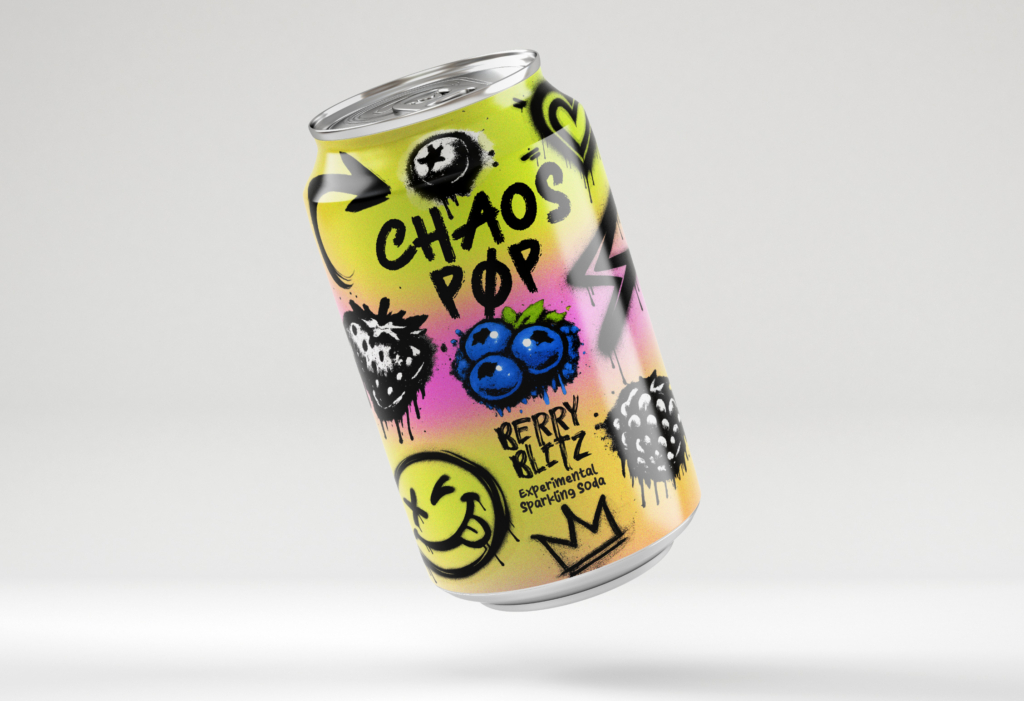
To wrap things up, we’re applying the final artwork directly onto the high-res beverage can mockup we grabbed from Envato. It’s such a game-changer to see the design wrap around the can’s 3D curves in real time. This is where you can really tell if that “Chaos Pop” energy translates to a physical product. Using a professional mockup like this lets you preview exactly how the labels will catch the light and sit on a store shelf, making it way easier to spot any last-minute tweaks before you finalize the marketing visuals. Now that everything is perfectly mapped onto the surface, the design finally feels like something you could actually grab and drink!

A can of Chaos Pop Berry Blitz Experimental Sparkling Soda with a vibrant, graffiti-style design featuring blueberries, strawberries, and blackberries.
Unleash the flavor with Chaos Pop Berry Blitz Experimental Sparkling Soda! Featuring a bold, graffiti-inspired design and a burst of berry goodness.

Pro tips for designing chaos-style packaging

  • Use chaos strategically, not everywhere.
  • Limit your palette to 3–5 strong colors.
  • Focus on shelf impact and readability.
  • Combine AI exploration with manual refinement.
  • Build reusable design systems for future projects.

Common mistakes in AI packaging design

Even when you’re designing chaos packaging, there are some common mistakes that can ruin a design if you’re not careful.

  • Skipping the design brief leads to unfocused visuals.
  • Overcrowding the layout reduces clarity.
  • Using too many fonts creates visual noise.
  • Ignoring dielines causes production issues.
  • Letting visuals overpower branding weakens impact.

Just keep those essentials in check, and the chaos will work for you, not against you.

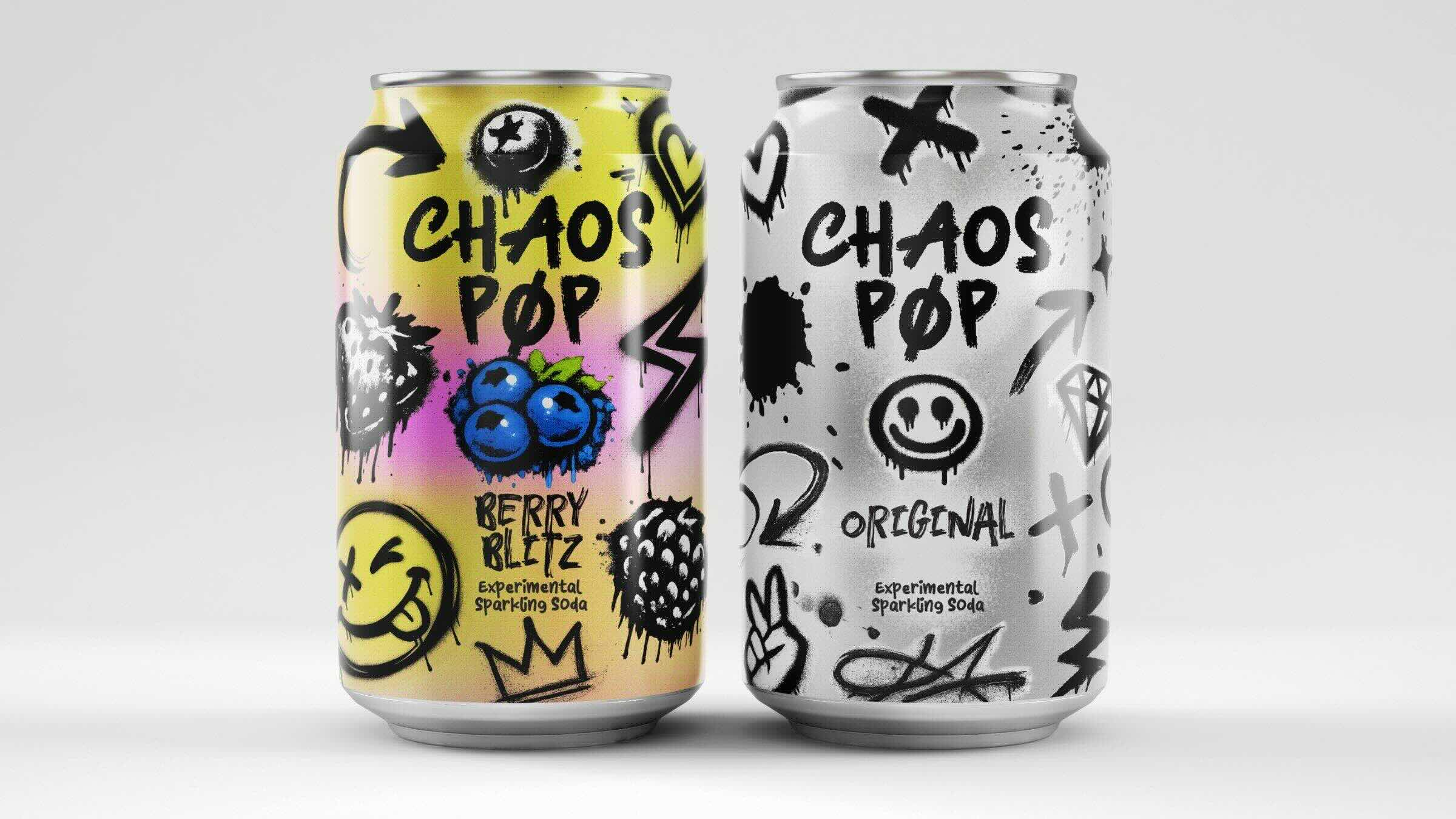
Two Chaos Pop soda cans. The left can is yellow and pink with graffiti and blueberries, labeled 'Berry Blitz'. The right can is silver and white with graffiti, labeled 'Original'.
Unleash the flavor with Chaos Pop! Dive into the vibrant ‘Berry Blitz’ or stick to the classic ‘Original’ – both bursting with experimental sparkling soda goodness and rebellious street art style. Which one are you grabbing?

AI packaging design FAQ

Start experimenting with AI packaging design

AI packaging design is changing how creatives approach product design. Instead of starting from scratch, you can explore bold directions quickly and refine them into professional outcomes.

The chaos packaging trend shows that breaking the rules — when done intentionally — can create powerful, memorable designs. By combining AI tools with structured workflows, you can turn raw creative energy into packaging that not only stands out but also works in the real world.

If you are ready to experiment, start generating, refining, and building your own chaos-inspired packaging system.

Related Posts