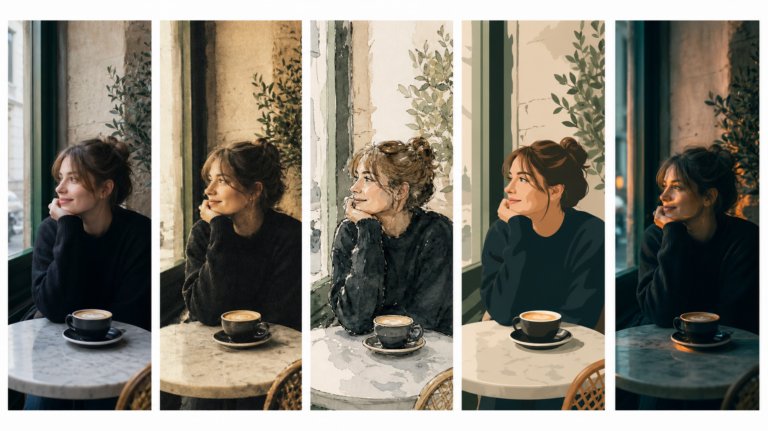
The best AI tools for image recreation
AI image recreation covers style transfer, reference-based generation, variations, and scene recreation. This guide compares the tools that handle each workflow for professional creative work.
Envato: Get every type of asset for any type of project, and access to AI tools. Start now
Learn how to create AI-powered product mockups with Envato Shortcuts. Generate apparel, packaging, poster, merchandise, print, and device mockups in minutes.

Creating product mockups used to mean downloading PSD files, editing Smart Objects, and spending hours trying to make designs look realistic.
For many projects, it also meant organizing product photography, sourcing props, booking locations, and creating multiple versions of the same concept just to visualize how a design might appear in the real world.
Today, AI-powered product mockups make that process dramatically faster.
Instead of building mockups manually, you can upload a logo, illustration, packaging design, poster artwork, or digital interface and generate realistic visuals in minutes. A single design can become apparel, merchandise, packaging, posters, print advertising, or digital device presentations without requiring a photoshoot or complex editing workflow.
Whether you’re creating client presentations, validating product ideas, launching a brand, or building ecommerce assets, product mockups help turn concepts into visuals people can immediately understand.
Product mockups are visual previews that show how a design, logo, illustration, interface, or brand asset will look when applied to a real-world product.
Rather than presenting flat artwork on a blank canvas, product mockups place designs into realistic environments and products. This helps clients, stakeholders, customers, and creative teams visualize the finished result before anything is manufactured, printed, or launched.
For example:
Traditionally, these visuals required product photography, Photoshop skills, or downloadable mockup templates.
Today, AI product mockups can generate realistic results automatically, helping creatives spend less time on production and more time refining ideas.
AI-generated product mockups aren’t just faster.
They fundamentally change how creative teams experiment, present, and validate ideas.
Some of the biggest advantages include:
A single uploaded logo can become a hoodie, coffee cup, product box, notebook, poster, and laptop presentation within minutes.
That’s a huge advantage when you’re testing ideas or working against a deadline.
One of the strengths of using an AI-powered product mockup generator is the ability to generate multiple product categories from a single source design.
Popular types of product mockups include:
Instead of creating separate workflows for every product category, Envato Shortcuts provides dedicated AI workflows tailored to each mockup type.
Shortcuts are guided creative AI workflows designed to simplify common image generation and editing tasks.
Instead of starting with a blank prompt and trying to describe every detail manually, you select a specific creative objective and follow a structured workflow designed around that outcome.
For product mockups, that means choosing the type of product you want to visualize and allowing AI to handle much of the technical production work.
Rather than becoming an expert in prompt engineering, you can focus on creative direction and presentation.
Finding the product mockup generator workflows only takes a few seconds.
Start inside Envato’s AI image generator.
Select Shortcuts within the image generation controls.
Selecting Shortcuts opens the collection of guided AI workflows.
You’ll find dedicated product mockup generator workflows, including:
Choose the Shortcut that best matches the product you want to create.

Shortcuts aren’t built around one generic AI interface. They’re designed as a growing set of specialised AI workflows, each focused on a different type of creative task.
| Shortcut | Best used for |
| Style transfer | Reimagining aesthetics without rebuilding compositions |
| Relight | Shifting mood, realism, and atmosphere |
| Background swap | Moving subjects into entirely new environments |
| Character swap | Replace characters in images while preserving the scene, composition, and visual style |
| B-roll generator | Generating cinematic supporting footage and atmospheric visual sequences |
| Replace/add text | Updating typography directly inside compositions |
| Outfit change | Exploring fashion styling, wardrobe variations, and character looks |
| Product photography | Creating polished commercial visuals |
| Digital devices mockup | Presenting work across screens and devices |
| Posters and prints mockup | Visualizing print designs in realistic settings |
| Merch mockup | Developing promotional merchandise concepts |
| Storyboard | Building connected narrative sequences |
The important part isn’t just the feature list. It’s the fact that each workflow understands the creative logic behind the task itself.
| Mockup Shortcut | Best for |
| Apparel mockups | Clothing brands |
| Merchandise mockups | Promotional products |
| Packaging mockups | Product launches |
| Poster mockups | Advertising campaigns |
| Print mockups | Signage and marketing |
| Device mockups | Apps and websites |
Although each Shortcut focuses on different products, the overall workflow remains the same.
Start by uploading the artwork, logo, packaging design, illustration, interface, or graphic you want to apply.
The best results usually come from:
The uploaded design becomes the foundation for your generated product mockups.
Next, choose the type of product you want to create.
Each Shortcut includes a curated collection of products and scenes specifically designed for that category.
The AI automatically adapts your design to fit the selected object while maintaining realistic perspective, lighting, shadows, and material textures.
Every mockup workflow includes an optional field for placement instructions.
This is one of the most powerful features because it gives you more control over how the design appears.
For example:
These instructions help the AI understand your creative intent and often produce stronger results.
Once you’ve selected a product and added any placement instructions, generate the image.
The AI analyses the uploaded design and creates a realistic mockup that includes:
The strongest results feel like genuine photography rather than digital composites.
One of the biggest advantages of an AI product mockup generator is speed.
Instead of committing to a single concept, generate multiple versions and compare them side by side.
You might test:
Often, the strongest idea emerges after exploring several options.
Once you’ve found a version that works, download the image and use it within your project.
Product mockups are commonly used for:
The Apparel mockup Shortcut focuses on wearable products and fashion applications, allowing brands to visualize clothing before production.
Available products include:
These apparel mockups are ideal for:

For example, a streetwear company can upload a logo once and instantly visualize it across multiple garments.
Instead of manually editing templates, the AI generates realistic apparel mockups that maintain natural fabric folds, perspective, and garment shape.
Apparel mockups are particularly valuable during the early stages of product development because they allow brands to evaluate ideas before investing in production. Instead of ordering samples, scheduling photoshoots, or printing test garments, designers can quickly see how graphics, logos, and branding elements appear across different clothing styles.
This is especially useful when comparing multiple creative directions. A logo that looks great on a black hoodie may feel completely different on a cream sweatshirt or a minimalist cap. By generating several variations, brands can identify the strongest visual approach before committing resources.
Apparel mockups are also useful beyond e-commerce. Designers often use them in pitch decks, client presentations, and brand guidelines. Seeing a logo applied to real clothing helps stakeholders understand how a brand exists in the real world rather than simply as a flat design file. The result is a more realistic presentation that makes creative concepts easier to evaluate and approve.
The Merch mockup shortcut focuses on merchandise mockups and promotional products commonly used by businesses, events, creators, and marketing teams.
Available products include:
These merchandise mockups are particularly useful when creating branded collections.

For example, an event organizer can visualize attendee merchandise before ordering physical products. A startup can create branded marketing assets without purchasing samples.
Because the AI understands product shapes and surfaces, merchandise mockups often feel more realistic than traditional flat template approaches.
Merchandise mockups are often used to extend a brand beyond its core products. While a logo may begin on a website or business card, customers frequently interact with brands through physical promotional items such as mugs, notebooks, bags, and event giveaways. Visualizing those products early helps ensure branding remains consistent across every touchpoint.
The Shortcut is particularly useful for event organizers, creatives, startups, and marketing teams who need to quickly produce large collections of branded assets. Instead of creating each item individually, a single uploaded design can be applied across multiple merchandise products to create a cohesive visual system.
This workflow also encourages experimentation. You might discover that a design originally intended for a notebook works surprisingly well on a water bottle or keychain. Because AI generation is fast, teams can explore more ideas without increasing production time, resulting in stronger, more creative merchandise concepts.
Poster mockups and print mockups help designers visualize how work appears in real-world environments.
Instead of presenting artwork on an artboard, you can show clients exactly how a campaign may look once installed.
Available print environments include:
Placement instructions can help guide composition.
For example:
This additional context often helps stakeholders understand creative concepts much faster than viewing flat designs.

One of the biggest challenges when presenting print work is helping people understand scale. A poster viewed on a laptop screen rarely has the same impact as one displayed in a realistic environment. Print mockups solve this problem by placing designs into contexts where audiences would actually encounter them.
For agencies and freelance designers, this can dramatically improve presentations. Instead of showing a campaign as a collection of flat files, you can demonstrate how creative work appears on billboards, transit displays, retail signage, or outdoor advertising installations. This often helps clients evaluate concepts more confidently because they can immediately see how the design functions in the real world.
Print mockups are also useful for internal reviews. Marketing teams can compare multiple campaign directions before investing in production, helping identify which concepts are most visually effective before any media placement is purchased.
Digital products need product mockups, too.
The Digital devices mockup Shortcut focuses on device mockups designed for websites, apps, software products, dashboards, and digital experiences.
Available device mockups include:
These device mockups are especially useful for:
For example, instead of presenting a mobile app screenshot on a blank background, you can place it inside a realistic smartphone mockup.

Device mockups have become an essential part of presenting digital products. Whether you’re showcasing a mobile app, software dashboard, e-commerce website, or online portfolio, the way a design is presented can influence how professional and polished it appears.
Displaying a user interface inside a realistic smartphone or laptop helps create context around the experience. Rather than viewing a screenshot in isolation, audiences can imagine how the product might be used in everyday situations. This often creates a stronger emotional connection than a simple screen capture.
Device mockups are particularly valuable for product launches, case studies, portfolio projects, and marketing campaigns. They help transform static interface designs into presentation-ready visuals that feel more like finished products. For freelancers and agencies, this can make work appear more professional while helping clients visualize the final experience more clearly.
Packaging mockups help brands visualize products before manufacturing begins.
This makes them particularly valuable for product launches, rebrands, and packaging design projects.
Available packaging mockups include:
Packaging mockups are often among the most important stages of product development because packaging serves as a customer’s first interaction with a brand. Before a product is opened, the packaging communicates quality, positioning, and brand personality.

This makes mockups particularly useful when evaluating different design directions. A label that works well on a flat design file may feel completely different once applied to a bottle, jar, box, or bag. Viewing designs on realistic packaging helps teams assess hierarchy, readability, branding, and shelf presence before production begins.
For agencies and packaging designers, these mockups can also improve client communication. Instead of asking stakeholders to imagine how the artwork will appear on a finished product, they can review realistic visualizations that closely resemble the final result. This often leads to faster approvals and more confident design decisions while reducing costly revisions later in the process.
Because AI makes experimentation inexpensive, teams can explore more creative directions before making final decisions.
Even though AI handles much of the technical work, a few best practices can significantly improve results.
The clearer the uploaded artwork, the stronger the final mockup.
Detailed instructions help the AI understand your intended placement and composition.
The best product mockups often appear after several iterations.
Packaging designs work best on packaging. Interfaces work best on screens. Logos often work best on merchandise and apparel.
One uploaded design may work surprisingly well across multiple mockup types.
Both approaches serve different purposes.
| Product mockups | Product photography |
| Faster creation | Requires a photoshoot |
| Easy to scale | Additional production required |
| Great for concepts | Ideal for a final hero imagery |
| Lower production costs | Higher production costs |
| Fast experimentation | Maximum accuracy |
| Multiple versions quickly | New scenes require new shoots |
Product mockups don’t replace product photography.
Instead, they help teams explore, validate, and present ideas before investing in physical production.
Product mockups have traditionally required specialized templates, editing skills, and significant production time.
AI changes that workflow.
Instead of spending hours building visuals manually, you can upload a design, choose a product category, add placement instructions, and generate realistic results in minutes.
The result isn’t simply a mockup.
It’s a more efficient way to communicate creative ideas, explore possibilities, and bring products to life before they exist.
A product mockup is a visual representation of a design on a real product. It helps designers and brands show how logos, artwork, packaging, or interfaces will appear before production.
Yes. AI can automatically apply designs to products while handling perspective, lighting, shadows, and realistic presentation.
Absolutely. Product mockups help ecommerce brands visualize products, create marketing materials, test concepts, and launch products faster.
Transparent PNG files, logos, vector exports, and high-resolution artwork generally produce the strongest results.
Yes. Envato Shortcuts is an AI-powered product mockup generator that creates mockups for apparel, merchandise, posters, print, packaging, and devices from uploaded designs.
Many different categories are supported. You can create apparel, merchandise, packaging, posters, prints, and device mockups using dedicated Shortcut workflows.
No. Envato Shortcuts generates mockups through guided AI workflows, eliminating the need for traditional PSD mockup editing.
Yes. One of the biggest advantages of AI-generated product mockups is the ability to quickly generate multiple concepts from a single uploaded design.
AI image recreation covers style transfer, reference-based generation, variations, and scene recreation. This guide compares the tools that handle each workflow for professional creative work.

We tested 9 AI image generators on identical artistic prompts (same style-transfer task, same day) to see which one actually paints like an artist.
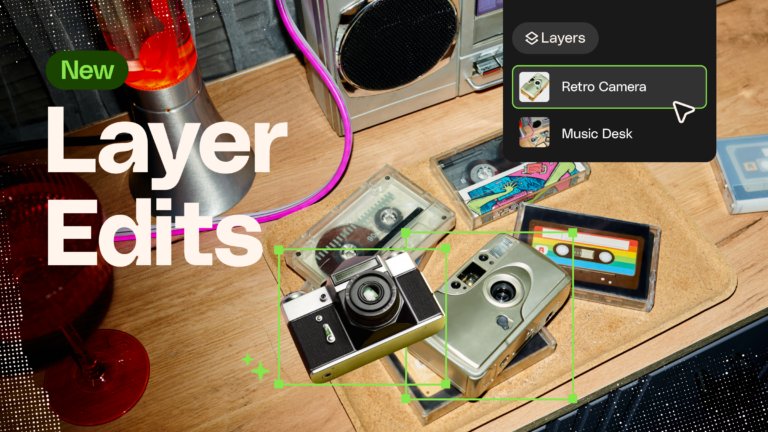
Learn how to separate an image into editable layers with Envato Layers, then move, resize, transform and export individual elements.
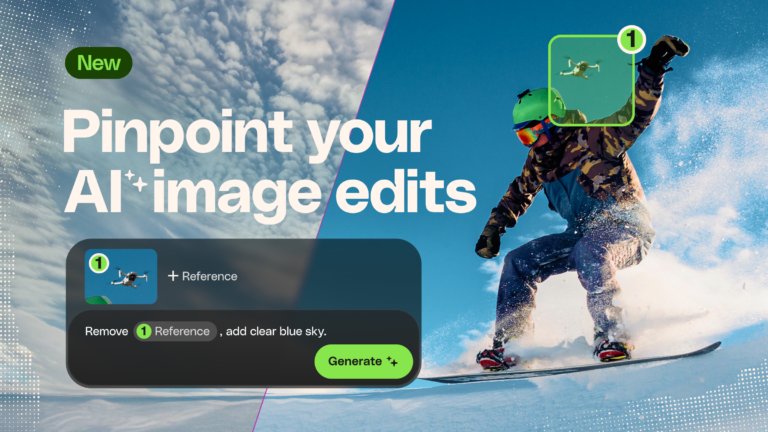
Learn how to edit an image with AI using Envato’s image annotation tool to select specific areas, make precise changes, and control where edits appear.

