AI sound generator guide: How to create sound effects with AI
Discover how Envato's AI sound generator creates custom sound effects from text prompts so creators can skip library searches and edit faster.
Envato: Get every type of asset for any type of project, and access to AI tools. Start now
Image recreation isn't generation from scratch — it's reworking what already exists. Here are the tools that handle it best.
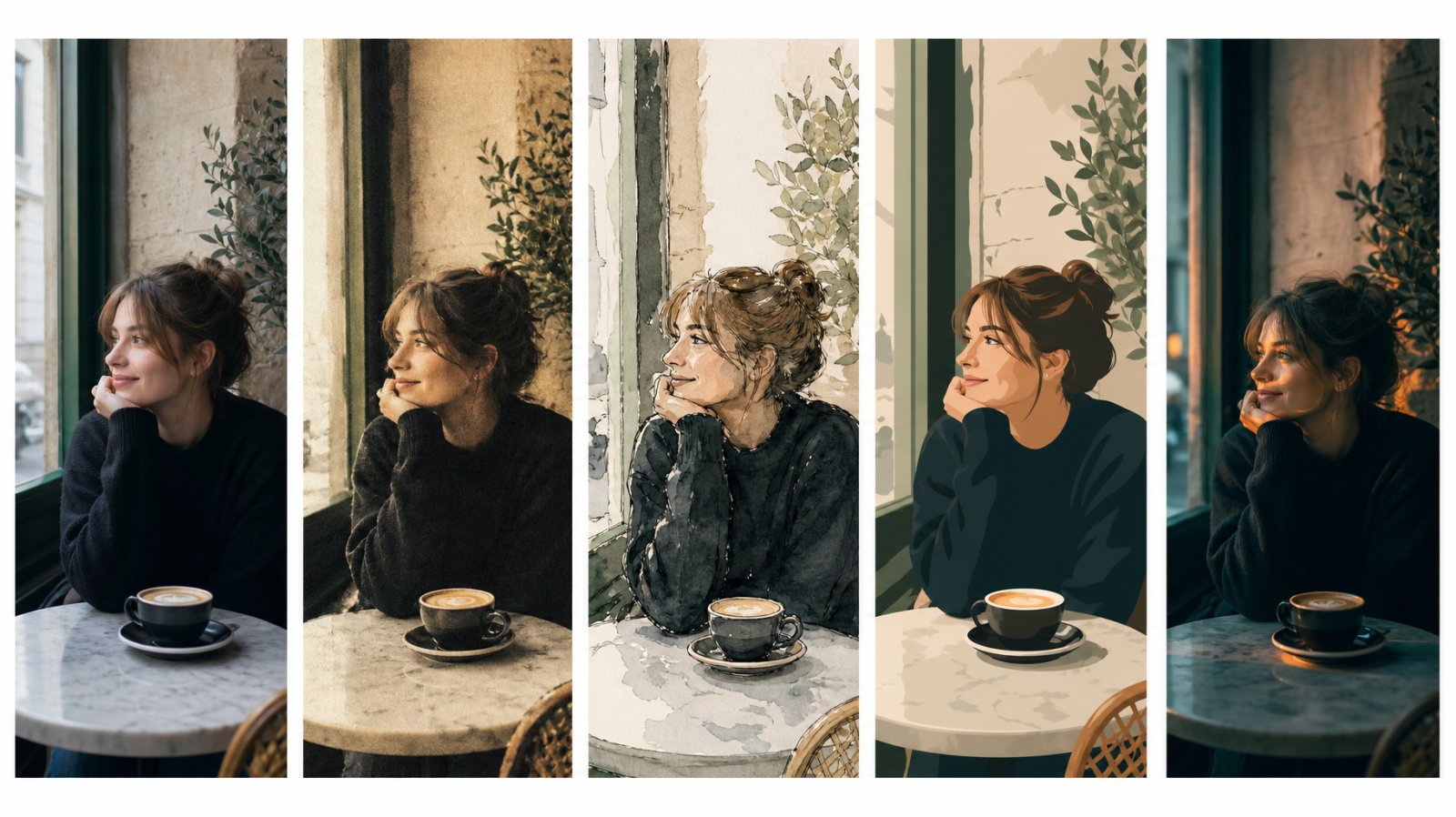
Image recreation isn’t generation from scratch — it’s reworking what already exists. Here are the tools that handle it best.
You already have the image. Maybe it’s a photograph that needs a different aesthetic. A brand asset that needs to match a new campaign direction. A reference frame that needs to become a full series. A client’s moodboard image that you need to recreate without copying it. The job isn’t “make me something new” — it’s “take what exists and make it into something else.”
AI image recreation covers a range of workflows that all start from an existing visual rather than a blank prompt: style transfer, reference-based generation, AI variations, character and scene recreation, and image-to-image transformation. The best AI tools for image recreation handle these jobs with enough fidelity and control to produce output that’s usable in professional work — not just visually interesting but accurate enough to the reference that the creative intent survives the translation.
This guide compares the tools that handle image recreation in 2026, evaluated on style fidelity, reference control, how well they integrate into a broader editing workflow, and commercial licensing.
The term covers several distinct workflows, and knowing which one you need determines which tool fits best.
Style transfer applies the visual style of one image — its color palette, texture, rendering approach, mood — to another image or a new generation. You keep the content but change the aesthetic. This is the most common AI image recreation workflow for brand and campaign work, where visual consistency across assets matters more than any individual image.
Reference-based generation uses an existing image to guide a new generation. Instead of describing everything in text, you upload a reference and the model uses it as a visual anchor — maintaining composition, color direction, or subject characteristics while generating something new around those constraints.
AI variations generate multiple alternative versions of an existing image. Same subject, same general composition, but different angles, lighting conditions, or stylistic treatments. This is the fastest way to explore creative directions without re-prompting from scratch.
Character and scene recreation maintains a specific element — a person, a product, an environment — while changing everything else around it. Swap the character but keep the scene. Swap the background but keep the subject. Change the lighting but keep the composition. These are targeted recreation workflows built around specific production tasks.
Envato handles AI image recreation through several connected workflows that all live inside the same workspace — which is the core advantage over tools that treat each recreation task as a separate product.
The style transfer Shortcut is the most direct recreation tool. Upload an image, choose from style presets, upload a separate style reference image, or describe the target aesthetic in a custom prompt — the AI applies the new style while preserving the source composition. You can generate multiple variations and compare before committing. For brand teams recreating assets across a campaign, this workflow handles the job that would traditionally require rebuilding each asset manually in the new direction.
Envato’s AI image generator supports reference-based generation directly — upload one or more reference images alongside your text prompt, and the model uses them as visual anchors. The multi-reference system lets you get specific: “make @image1 wear the hat from @image2” targets exactly which element comes from which reference, so the model isn’t guessing at what you want blended. This level of compositional control is unusually precise for a reference-based system.
Over 100 style presets offer another path to recreation. Rather than uploading a reference image, you select a curated aesthetic — cinematic, editorial, analog film, vector, watercolor, and dozens more — and the preset shapes the generation’s rendering approach. This is faster than reference-based recreation when you know the general direction but don’t have a specific source image to match.
Envato’s character swap and background swap Shortcuts handle the scene-level recreation tasks — changing who’s in the frame while keeping the environment, or changing the environment while keeping the subject. And because the generator, the editor, the Shortcuts, and the stock library all share the same workspace, you can start from a stock photo, apply a style transfer, swap the background, refine a detail, and download the result — all without switching tools. Every generated or edited asset comes with a lifetime commercial license.
For creative professionals who need recreation as part of an ongoing production workflow — not a one-off experiment — this integrated approach is the most complete option available.
Adobe’s approach to image recreation centers on Generative Match — their style transfer system. Upload a style reference image, and Firefly applies its visual characteristics (color, texture, mood, rendering approach) to new generations from your text prompts. The style reference library includes curated options, or you can upload your own.
Firefly also offers Structure Reference, which uses an existing image’s composition as a guide for generation — maintaining spatial layout, depth, and element placement while generating new content within that framework. This is particularly useful for recreating a shot’s composition in a different style or context.
Within the Adobe ecosystem, Generate Similar (available in the Figma plugin and Firefly web app) creates variations of an existing image directly. The results are stylistically consistent with the source, making it useful for exploring alternatives without re-prompting.
The strength of Adobe’s recreation tools is their integration with the broader Creative Cloud workflow. If you’re already working in Photoshop or Illustrator, Firefly’s recreation features connect directly. The limitation is that the recreation tools are spread across multiple surfaces — Firefly web app, Photoshop, Figma plugin — rather than unified in one workspace. Generative credit limits also apply, which can constrain high-volume recreation work. All Firefly output is commercially licensed under Adobe’s terms.
Midjourney handles image recreation through its image-to-image and reference systems, all accessed through Discord or the Midjourney web interface. Upload an image URL alongside your prompt, and the model uses it as a generation anchor.
Midjourney’s style reference (–sref) parameter applies the aesthetic of a reference image to new generations with strong fidelity — particularly for artistic and illustrative styles. For character consistency, Omni Reference (–oref on V7) maintains a character’s appearance across multiple generations, enabling consistent visual narratives and campaign assets. The older –cref parameter still works on V6 but isn’t compatible with the current default model.
The output quality is high, especially for stylized and artistic work. Midjourney’s aesthetic bias — a tendency toward visually striking, high-contrast, painterly output — works in its favor for creative image recreation. For photorealistic recreation, results can be less predictable.
The main limitation is workflow isolation. Midjourney generates images but doesn’t edit them. Any post-recreation refinement — removing an artifact, adjusting a detail, extending the canvas — requires exporting to another tool. There’s no integrated stock library, no editing layer, and no guided workflows for specific recreation tasks. Commercial use is permitted under Midjourney’s paid plan terms.
OpenAI’s GPT Image system, built into ChatGPT, handles image recreation conversationally. Upload an image and describe how you want it recreated — in a different style, with different elements, in a new context. The conversational interface makes it intuitive for exploratory recreation, and follow-up messages let you iterate on the result.
GPT Image is strongest for creative recreation that doesn’t require precise compositional control. “Recreate this product shot in a retro 1970s advertising style” or “make this portrait look like a watercolor painting” produce genuinely interesting results. For precise style matching — where the output needs to hit a specific brand aesthetic or maintain exact compositional elements from the reference — the lack of structured controls (no style reference parameters, no composition anchoring) makes results less predictable than dedicated recreation tools.
The workflow is entirely standalone. Generation and recreation happen inside ChatGPT, but editing, refinement, and integration with other assets requires moving to a separate tool. Commercial use is permitted for ChatGPT Plus and Enterprise subscribers.
The right tool depends on which recreation workflow you’re doing.
For style transfer — applying a new aesthetic to existing content — Envato’s style transfer Shortcut and Firefly’s Generative Match both handle this well. Envato’s advantage is the guided workflow and integrated editing; Firefly’s is its connection to the Creative Cloud ecosystem.
For reference-based generation — using an existing image to guide new output — Envato’s multi-reference system with @mentions offers the most precise control. Midjourney’s –sref and Omni Reference (–oref) parameters are strong for artistic work. Firefly’s Structure Reference handles compositional anchoring well.
For AI variations — exploring alternatives from a single source — Envato and Firefly both generate multiple variations from one prompt or reference. Envato’s advantage is that promising variations can be refined immediately in the editor without exporting.
For character and scene recreation — swapping subjects or environments while maintaining the rest — Envato’s Shortcuts (character swap, background swap) are dedicated workflows built specifically for these tasks. Other tools can approximate this through careful prompting, but without purpose-built workflows the results are less consistent.
If you’re only doing one type of recreation work, most of these tools will get you there. But if your week involves a style transfer for a campaign, a character swap for a pitch deck, a background change on a stock photo, and three rounds of variations on a client concept — the tool that handles all of that without making you export, re-upload, and context-switch between four different apps is the one that saves you the most time. That’s where Envato’s integrated approach pulls ahead.
If you want to go deeper on specific workflows, our guides to replacing objects in photos with AI, AI background design, and extending images with AI all cover adjacent territory — and yes, they all connect back to the same workspace.
AI image recreation refers to reworking existing visuals using AI — applying new styles, generating variations, using reference images to guide new generations, or swapping elements within a scene. It starts from something that already exists, not a blank prompt.
Envato’s style transfer Shortcut and Adobe Firefly’s Generative Match both handle style transfer well. Envato’s is a guided workflow with integrated editing; Firefly’s connects into the Creative Cloud ecosystem.
You upload an image alongside your text prompt, and the model uses it as a visual guide. Depending on the tool, the reference can anchor style, composition, character appearance, or all three. Envato’s multi-reference system lets you specify which element comes from which reference.
Envato’s character swap Shortcut and Midjourney’s Omni Reference (–oref) both handle character consistency. Envato’s approach is a guided workflow; Midjourney’s is parameter-based and more manual but offers strong fidelity for artistic styles.If you want to go deeper on specific workflows, our guides to replacing objects in photos with AI, AI background design, and extending images with AI all cover adjacent territory — and yes, they all connect back to the same workspace.
Generation creates from a text prompt alone. Recreation uses an existing image as a starting point — as a style reference, a compositional anchor, or a source for variations. Recreation gives you more control over the output because the reference constrains the model.
Yes. Style transfer tools can take a photograph and render it as a watercolor, a cinematic still, a vector illustration, or any other aesthetic direction. The composition is preserved while the visual treatment changes.
On Envato, yes — lifetime commercial license on all generated and edited output. Adobe Firefly, Midjourney, and ChatGPT Plus all permit commercial use under their respective terms.
Discover how Envato's AI sound generator creates custom sound effects from text prompts so creators can skip library searches and edit faster.

We tested 9 AI image generators on identical artistic prompts (same style-transfer task, same day) to see which one actually paints like an artist.
AI isn't making full movies yet; it's reshaping VFX, editing, and dubbing. Here's where it helps filmmakers today, and where it doesn't.
A practical, step-by-step guide to making a short AI film — from script and shot lists to character consistency, voice, sound, editing, cost, and legal rules.

