How AI is transforming filmmaking today
AI isn't making full movies yet; it's reshaping VFX, editing, and dubbing. Here's where it helps filmmakers today, and where it doesn't.
Envato: Get every type of asset for any type of project, and access to AI tools. Start now
Every camera movement tells the viewer where to look and how to feel. Here's how to direct them in AI video.
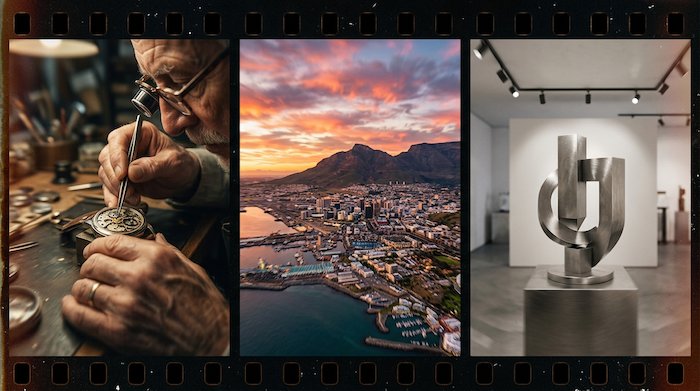
A static shot and a slow push-in can contain the exact same subject, the same lighting, the same color grade — and tell completely different stories. The static shot observes. The push-in creates intimacy, draws the viewer closer, implies something is about to happen. Camera movement is the difference between footage and filmmaking, and it’s one of the first things that separates AI video that looks generated from AI video that looks directed.
The good news for anyone who’s worked with a real camera: AI video generators now understand cinematographic language with genuine precision. Prompt a dolly-in and you’ll get perspective shift with parallax, not a digital zoom. Prompt a tracking shot and the foreground will blur past at a different rate than the background. The models have learned how cameras actually move through space, which means your existing knowledge of AI video camera movements translates directly into better output.
This guide covers the core camera movements available in AI video generation, what each one does narratively, and the prompt structures that produce the most controllable results — with Envato’s AI video generator as the primary reference, where 14 camera movement presets and prompt-based control work together.
Before getting into the specific movements, it’s worth understanding the two approaches available in most AI video tools — because they suit different situations.
Presets are the faster path. Envato’s AI video generator includes 14 camera movement presets — zoom in, zoom out, dolly movements, vertical reveals, drone shots, handheld effects, and more. Select one, write your scene description, and the model handles the camera behavior. This works well when you know the movement you want and don’t need to fine-tune the speed, timing, or trajectory.
Prompt-based control gives you more precision. Instead of selecting a preset, you describe the camera movement in your text prompt alongside the scene. This lets you specify pace, direction, what gets revealed, and how the movement interacts with the subject. It takes more prompting skill, but produces more specific results — especially for complex or combined movements.
The practical approach for most professional work is to start with presets for quick iterations, then switch to prompt-based control when you need the output to match a specific creative vision. Our guide to AI video prompts covers the full prompting framework if you want the deep dive.
These movements direct the viewer’s attention toward something specific. They create intimacy, tension, or emphasis — pulling the audience into the frame rather than showing them the whole picture.
The camera moves physically toward the subject, creating perspective shift as the background wraps around the frame. Unlike a zoom, a push-in changes spatial relationships — foreground elements slide past, background compression increases, and the subject grows in the frame while the world behind them subtly shifts. Use this to increase emotional intensity, draw attention to a detail, or transition from an establishing context into a focused moment.
Prompt example
“Slow push-in on a watchmaker’s hands assembling a movement, shallow depth of field, warm workshop lighting, gears and tools softening in the foreground as the camera advances”
The camera doesn’t move at all — instead, the focal plane shifts from one depth to another, transferring attention from a foreground element to a background element (or vice versa). This is the subtlest way to redirect the viewer without cutting or moving the camera. It works well for revealing a secondary subject, shifting narrative emphasis, or creating a “notice this” moment without the visual weight of a camera move.
Prompt example
“Rack focus from coffee cup in sharp foreground to woman reading by window in soft background, natural morning light, gentle transition”
A fast, dramatic zoom into a subject — more stylistic punctuation than subtle technique. It adds sudden energy, surprise, or comedic timing. Use it sparingly. A crash zoom works as a beat in a sequence; as a default movement, it exhausts the viewer quickly.
Prompt example
“Crash zoom into the singer’s face mid-note, motion blur on the edges, stage lights flaring, fast and aggressive”
These movements do the opposite — they pull the viewer outward, showing them more of the world the subject exists in. They’re essential for establishing shots, scene transitions, and any moment where the environment is part of the story.
The camera moves backward, away from the subject, progressively revealing the surrounding environment. The subject shrinks in frame while the world opens up around them. This is the classic reveal movement — intimate close-up widening into an unexpected setting — and one of the most reliable ways to end a sequence. The parallax effect matters here: objects near the camera move faster than the background, creating genuine depth separation that reads as cinematic rather than a simple scale animation.
Prompt example
“Pull back from a child’s face watching fireworks, steadily revealing the crowd around them and the full skyline display, night setting, warm ambient light from the fireworks”
The camera sweeps upward (or downward) from an elevated position, combining vertical movement with a slight horizontal drift. It simulates the physical behavior of a camera mounted on a crane arm — a movement that in traditional filmmaking requires significant equipment. In AI video, a well-prompted crane shot produces the same sweeping, epic quality. Best for establishing shots of cities, landscapes, crowds, or any scene where scale is the story.
Prompt example
“Crane up from street level, sweeping above the rooftops to reveal a coastal city at sunset, golden light on the water, slow and grandiose”
The camera stays in place and angles up or down, emphasizing height, scale, or the relationship between two vertically separated elements. A tilt up from feet to face reveals a character with deliberate pacing. A tilt down from a skyscraper’s top to the street below establishes vertigo-inducing scale. Simpler than a crane in that the camera itself doesn’t move — it pivots on its axis.
Prompt example
“Slow tilt up from the base of a redwood tree, trunk filling the frame, revealing the canopy and sky, dappled sunlight filtering through branches”
When something in the frame is moving, the camera needs to move with it — or deliberately choose not to. These movements track subjects through space, creating energy, momentum, and the feeling of being inside the action rather than watching it from a fixed vantage point.
The camera rotates horizontally from a fixed position — the cinematographic equivalent of turning your head. A pan follows a subject moving across the frame, scans across a landscape, or reveals something adjacent to the current view. It’s the most fundamental horizontal movement and, because of its simplicity, the one where pace matters most. A slow pan across a desert has a completely different emotional register than a fast pan following a car.
Prompt example
“Slow pan right across a cluttered artist’s studio, paintbrushes, canvases, reference prints pinned to the wall, warm tungsten light, documentary feel”
The camera moves alongside a subject, matching their speed and direction. The subject stays sharp and relatively stationary in frame while the environment slides past — creating the immersive feeling of traveling with someone through a space. Tracking shots are the backbone of walk-and-talk sequences, chase scenes, and any moment where momentum is the point.
Prompt example
“Tracking shot following a cyclist through a narrow European street, matching speed, cobblestones and shopfronts blurring in background, warm afternoon light”
Similar to a pan in direction, but fundamentally different in execution. In a truck, the entire camera moves sideways — sliding left or right parallel to the subject. The result is a continuously shifting perspective where foreground and background elements move at different rates. Trucking shots are ideal for scanning along a row of products, following a walking subject from the side, or moving through an environment where constant perspective change adds visual interest.
Prompt example
“Truck left along a library shelf, books in sharp foreground sliding past, a reader visible in the gaps, soft warm lighting”
Some movements exist primarily to create a three-dimensional feeling — to remind the viewer they’re looking into a space, not at a flat image. These are the movements that separate AI video clips from animated photographs.
The camera circles around the subject, keeping them centered while the background rotates behind them. This creates a strong three-dimensional separation between subject and environment, making the subject feel sculptural and present. Orbit shots are a staple of product showcases, character introductions, and any moment where you want the viewer to feel like they could reach into the frame and touch the subject.
Prompt example
“Slow orbit clockwise around a ceramic vase on a pedestal, soft studio lighting, the background smoothly rotating, gentle shadow movement on the surface”
The entire camera moves straight up or straight down — like an elevator — while keeping the lens pointed forward. Unlike a tilt, where the camera pivots on its axis, a pedestal physically changes the camera’s height. The effect is a vertical reveal that maintains a consistent perspective rather than an angled one. Use it to rise above an obstruction, reveal what’s on the other side of a wall, or match a character standing up from seated.
Prompt example
“Pedestal up, rising from behind a stone wall to reveal a hidden courtyard garden, sunlight, vines on the walls, fountain in the center”
A high-altitude movement that simulates aerial photography — the camera moving forward, backward, or sideways from well above the scene. Drone shots in AI video create the kind of sweeping, landscape-scale footage that traditionally requires physical drone hardware, flight permits, and good weather. Envato’s presets include dedicated drone movement options, and Seedance 2.0 handles the parallax and depth particularly well at aerial scale.
Prompt example
“Aerial drone shot pushing forward over a winding coastal road at golden hour, cars visible below, ocean on the right, long shadows from the cliffs”
The most cinematic AI video output often comes from combining two movements in a single prompt. A push-in with a slight pan. A crane up that transitions into a forward dolly. An orbit that gradually tightens into a close-up. These compound movements create the kind of fluid, dynamic shots that feel intentionally directed rather than algorithmically generated.
The key is describing both movements and their relationship clearly. “Slow push-in while panning slightly right to follow the subject’s gaze” gives the model two simultaneous instructions with a clear spatial logic connecting them. Models like Seedance 2.0 and Kling O1 handle compound movements with more stability than earlier generations — the camera behavior maintains physical consistency rather than drifting into impossible geometry.
Compound prompt example“Slow crane up combined with a gentle push forward, rising from a flower-filled meadow to reveal a mountain range at dawn, mist in the valleys, warm golden light on the peaks”
A word of caution: more movement isn’t better movement. A locked-off static shot with subtle environmental motion — steam rising, leaves drifting, fabric catching the wind — can be more powerful than a complex camera move if the scene calls for stillness. The best camera movement is the one that serves the story. If you’re working on a cinematic visual project, choosing when the camera should stay still is as important as knowing how to make it move.
A few prompting habits that consistently produce better AI video camera movements with Envato’s generator and similar tools:
Specify pace, not just direction. “Pan right” and “slow, deliberate pan right” produce different results. The speed of the movement carries emotional weight — slow movements feel contemplative or tense; fast movements feel urgent or energetic. Always include a pace modifier.
Describe what gets revealed, not just where the camera goes. “Pull back to reveal the crowd” gives the model a narrative purpose for the movement. “Pull back” alone lets it decide what matters, and it might not choose what you would.
If you want to go deeper on prompt structure for AI video — including scene composition, lighting, and how to chain clips into sequences — our AI video generator guide covers the full workflow from first prompt to finished output. And for projects where the video starts as a still image, the image-to-video workflow using Envato Shortcuts gives you even more control over the starting composition before motion enters the picture.
Most AI video generators handle pans, tilts, push-ins, pull-backs, tracking shots, orbits, crane shots, truck movements, pedestals, drone aerials, rack focus, and crash zooms. Envato offers 14 camera movement presets plus full prompt-based control.
Use specific cinematography terms (dolly, crane, tracking) rather than vague instructions. Include pace, describe what gets revealed by the movement, and match the movement to the emotional intent of the scene.
A pan rotates the camera from a fixed point (like turning your head). A truck physically moves the camera sideways, creating parallax where foreground and background elements shift at different rates.
Yes. Dedicated drone presets are included, and Seedance 2.0 handles aerial parallax and landscape-scale depth well. Prompt with altitude, direction, and what the aerial shot reveals for the best results.
Presets are one-click selections that apply a predefined camera behavior. Prompted movements are described in text, giving you more control over speed, direction, and what gets revealed. Presets are faster; prompts are more precise.
Yes. Describe both movements and their relationship in the prompt — for example, “slow push-in while panning right.” Newer models like Seedance 2.0 handle compound movements with more physical consistency than earlier generators.
When the subject’s movement tells the story — steam rising, fabric in wind, facial expressions. A still camera with environmental motion can be more powerful than a complex camera move if the scene calls for observation over direction.
AI isn't making full movies yet; it's reshaping VFX, editing, and dubbing. Here's where it helps filmmakers today, and where it doesn't.
A practical, step-by-step guide to making a short AI film — from script and shot lists to character consistency, voice, sound, editing, cost, and legal rules.
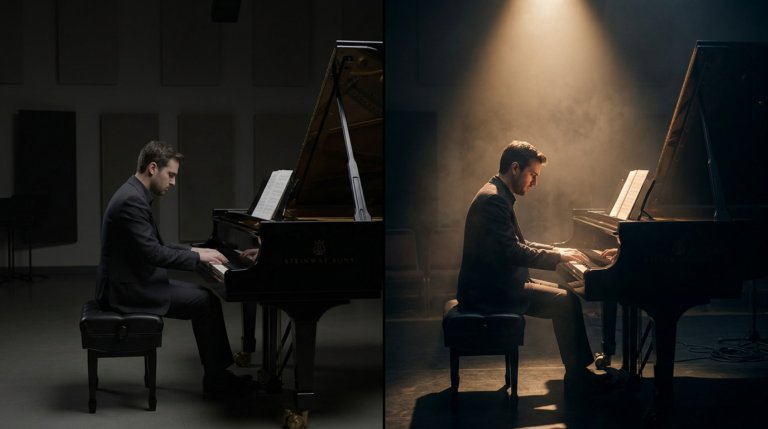
Cinematic lighting is the difference between AI video that looks generated and AI video that looks directed. This guide covers every major setup with prompt examples and techniques.

Learn what MiniMax H3 is, the creative capabilities MiniMax is introducing, and why this latest AI video model matters for creative workflows.

