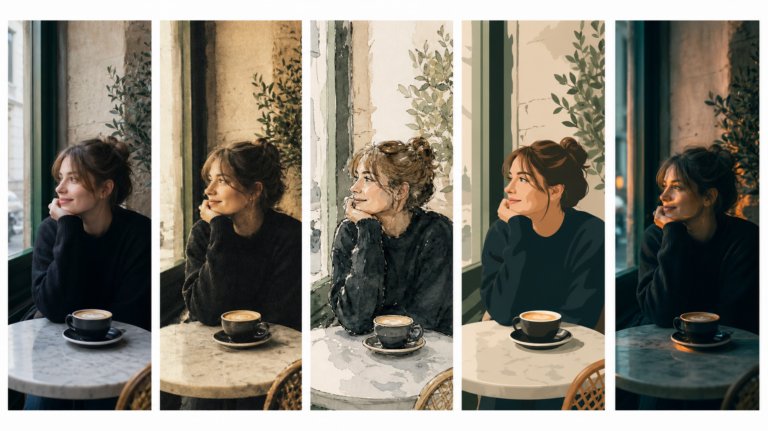
The best AI tools for image recreation
AI image recreation covers style transfer, reference-based generation, variations, and scene recreation. This guide compares the tools that handle each workflow for professional creative work.
Envato: Get every type of asset for any type of project, and access to AI tools. Start now
A comparison of 16 platforms for sharing AI art in 2026, covering each one's disclosure rules, audience, and cost, plus how output licensing decides whether AI work can be used commercially.

You can share AI art on all sixteen of these in 2026: Civitai, PixAI, Midjourney, Leonardo AI, Instagram, Threads, TikTok, X, Pinterest, Behance, ArtStation, DeviantArt, Dribbble, Reddit, Discord, and Lemmy. What changes is what each one asks of you first. Instagram and TikTok want realistic AI work labeled and detect it when you don’t. Behance, DeviantArt, and ArtStation want disclosure at upload. The four AI-native platforms don’t ask at all.
So the real question isn’t where you’re allowed to post. It’s which room you want to be in. Some will talk craft with you, while others will quietly filter you out. Here’s which is which.
If you’ve made an AI image you’re proud of, finding somewhere to put it is harder than it should be. Some communities will engage with the craft. Others will ignore it, filter it, or ask you to leave. This guide sorts the platforms by what you’re trying to achieve, and documents what each one actually requires of you before you upload.
The platform you pick shapes the feedback you get, the audience you reach, and whether the work leads anywhere commercially. The 16 platforms in this guide fall into four groups:
Civitai and Reddit are the strongest for technical feedback. Instagram and TikTok are the strongest for audience growth. Behance is the strongest for converting AI-assisted work into paid projects. Here’s how each one works in practice.
These four platforms treat AI generation as the medium rather than an exception to be justified.

Civitai is a leading platform for sharing AI-generated artwork, built around the models and processes behind the images rather than the images alone.
If you’re fine-tuning Stable Diffusion checkpoints or testing custom LoRAs, this is where the conversation happens. The technical community is direct and knowledgeable. Expect feedback on your metadata, sampling steps, and base model choice rather than compliments on the composition.
Worth knowing going in: Civitai hosts a large volume of NSFW and mature content, filterable through account settings. It has also drawn criticism over how it handles models that reproduce real people’s likenesses and living artists’ styles, particularly around licensing. It is not a neutral venue. If you’re building a professional brand, read its current content and licensing policies before you upload or distribute anything commercially.
Best for: Technical feedback, reproducible workflows, model and LoRA sharing, and learning from creators who publish their full recipe.

PixAI concentrates on anime, illustration, and character work, and its community skews heavily toward those styles.
The platform runs on its own credit-based system, so you tend to generate and share in the same place. That suits iterative work, where you’re refining a character or a style across many versions rather than posting single finished pieces.
Best for: Anime and character design, niche illustration styles, and generation challenges that earn platform credits.

Midjourney pairs a leading generative model with an official web showcase that functions as an inspiration gallery for millions of daily prompts.
Visibility is the thing to understand before you start. Unless you’re on a plan that includes Stealth Mode, your generations appear in the public community feed by default. Prompt transparency is the cultural norm, so users expect to see your prompt and settings alongside the image.
Midjourney’s Community Guidelines require safe-for-work content, prohibit misleading or harmful uses of generated images, and specifically prohibit reposting other people’s creations without permission.
Best for: Prompt experimentation, style mixing, aesthetic inspiration, and feedback from other Midjourney users.

Leonardo AI runs a community feed that works less like an audience and more like a room of generative artists critiquing each other’s technique. The emphasis is on skill development rather than reach, which makes it useful for concept work and experimentation.
The feed supports artwork created with custom models, as well as edits and motion features, making it a natural home for showcasing what you’ve built within Leonardo’s own toolset.
Privacy matters here. On the free plan, generated content is public by default; paid plans allow private generation.
Best for: Concept art, game asset exploration, prompt experimentation, and sharing Leonardo-specific workflows.
The takeaway on AI-native platforms: These are the fastest places to improve. They will not build you a broad audience the way Instagram or TikTok can. Their real value is reproducibility. If the people you want to reach care how you built something rather than just how it looks, this is where to spend your time.
If you want followers, not fellow prompt engineers, your reach is much bigger. So it is your responsibility to disclose.
Instagram remains the default home for visual creators, and Meta has built out a labeling system you need to understand before posting.
Meta applies an AI info label across Instagram, Facebook, and Threads, triggered either by your own disclosure at upload or by automated detection of industry-standard provenance signals in the file, including C2PA and IPTC metadata. Disclosure is required for realistic AI-generated or significantly altered images, audio, and video. In 2026, Instagram added a separate profile-level AI creator label for accounts that regularly use AI creation tools, which sits alongside the existing per-post label rather than replacing it.
The practical conclusion: Don’t plan on staying under the radar. Detection reads the metadata, and self-labeling consistently performs better than flagging after publication.
Strategy to try: Single AI images tend to plateau fast. Carousels that walk through the build perform better. Slide 1, the finished piece. Slide 2, the initial sketch or first generation. Slide 3, the prompt and settings. Process is the content.
Reality check: Reaching an audience with AI work in 2026 is harder than it was in 2024. Algorithmic novelty has worn off. Engaged communities still form around specific aesthetics rather than around AI as a category.
Best for: Audience growth, visual branding, commissions, and building a recognizable style.
Threads runs on the same Meta labeling policy as Instagram, so your disclosure obligations are identical. What differs is the tone: conversation on Threads about AI work tends to be less combative than on X and less performative than on Instagram, at the cost of meaningfully smaller reach.
Best for: Discussion, process notes, and testing ideas with a lower-friction audience before committing them to Instagram.
TikTok rewards the process over the artifact. An AI reveal lands better when viewers see the prompt, the failed attempts, the editing, and then the result.
TikTok requires an AIGC label on realistic AI-generated content, including entirely generated images and video of real or fictional people, places, and events, and content where someone appears to do or say something they didn’t. TikTok was the first major video platform to implement C2PA Content Credentials, so it also applies the label automatically when it detects synthetic media metadata. There’s a useful nuance for artists: where the AI element is obvious rather than realistic, such as a clearly illustrated or stylized piece, labeling is recommended rather than strictly required.
Content strategy: Build around narrative and process. Sketch-to-scene transformations, prompt tutorials, generative fill speed-builds, and looping animations assembled across frames all perform.
Best for: Process video, transformations, tutorials, and fast audience discovery.
X hosts an active population of AI researchers, indie developers, and prompt engineers. It’s where tool releases, model news, and workflow discoveries circulate first.
The platform permits synthetic and manipulated media while prohibiting harmful uses of it, and may apply its own synthetic media label. There’s no mandatory disclosure requirement for artwork.
Content strategy: Specific hashtags still work here. #AIArt, #StableDiffusion, and #MidjourneyArt carry real traffic, and tagging model creators tends to earn reposts.
Best for: Networking, AI discussion, prompt sharing, and staying current.

Pinterest is a visual discovery engine rather than a conversation. Treat it as a traffic source, not a community.
Pins have a long tail. Where a post on X or Instagram loses visibility within hours, a well-optimized pin can drive traffic for months or years. That makes Pinterest disproportionately useful for pointing people at a portfolio or shop.
Pinterest identifies AI-generated images through detection signals and user reports. Disclosure isn’t mandated, but pin descriptions are the sensible place to note it.
Content strategy: Optimize pin titles and descriptions with concrete style keywords. AI illustration performs best against established visual-search demand: character design, fantasy art, interiors, fashion, and moodboard aesthetics.
Best for: Visual discovery, moodboards, and driving long-tail traffic to your portfolio or store.
If the goal is a client rather than a like, these four matter more than everything above.

Behance sits inside Adobe’s ecosystem and is the strongest option for designers and illustrators integrating AI into professional work. It’s built for portfolio presentation, which means art directors and hiring managers actually browse it.
AI projects are permitted, and Adobe asks you to flag AI-assisted and AI-generated work. Behance supports Content Credentials, so if you built the piece using Photoshop’s Generative Fill, Firefly, or Illustrator’s vector AI, the platform automatically reads and displays those credentials on the project page. That’s the clearest available way to show a client the difference between a raw generation and a hybrid design work.
Presentation is what separates a Behance project from an image dump. Rather than uploading 20 generations, build one structured case study:
For step 6, tools like Envato’s AI image editor let you place finished artwork into device, print, and apparel mockups without rebuilding the scene from scratch.
Why it works: Hiring managers are looking for people who can integrate professional tools into a process, not people who can type a prompt. A project that shows the decisions between the brief and the final asset reads as authored work.
Best for: Designers, illustrators, art directors, agencies, and commissions. Lead with creative direction and intent rather than with the tools.

ArtStation is the primary portfolio platform for games, film, and entertainment art, and it has the most complicated relationship with generative AI of anywhere in this guide. Its position also changed recently, so anything you read from 2023 or 2024 is out of date.
The standing rules: ArtStation’s content guidelines do not prohibit AI in the creation process, but its Terms of Service require you to tag AI-created work with CreatedWithAI, and tagging is mandatory for anything created with generative AI and sold through the ArtStation Marketplace. Non-compliant products can be delisted. Users can filter AI-tagged work out of the homepage, search, and marketplace.
What changed: on 2 September 2026, ArtStation made AI-training protection the default. The NoAI tag is now enabled by default on new projects and has been applied retroactively across existing uploads and profiles, and ArtStation is working with Cloudflare to block known AI crawlers and automated scraping. In the same announcement, ArtStation stated that the current CreatedWithAI label and filtering tools “are not enough” to keep generated content from burying professional work, and that further changes to discovery are coming.
Nothing announced bans AI content. But the platform has publicly committed to reducing the amount of AI-generated work that surfaces in discovery, which means posting there is a bet on rules that are actively being rewritten. Combine that with an audience of professional concept artists who broadly don’t welcome prompt-only output, and unedited generations can cost you reputationally, even when they’re correctly tagged.
Best for: Professional portfolios where generative tools are one step inside a largely manual process. Not the place to start if AI generation is the work itself.

DeviantArt took a different route, launching its own generator, DreamUp. After criticism of its original opt-out arrangement, it changed course so that deviations are not authorized for third-party AI training by default, and artists must opt in. It also introduced a NoAI meta tag, now a widely used signal that content shouldn’t be used for training. AI-generated posts carry a label.
Disclosure is mandatory. You select the AI category at upload, which lets other users filter out synthetic work from their browsing. Community sentiment is genuinely mixed, so engagement varies widely by group.
Best for: Illustration communities, fantasy and character art, and creators who want social interaction alongside gallery presentation.

Dribbble is a design portfolio first, weighted heavily toward UI, UX, and product work. AI imagery appears but usually in a supporting role, as texture or placeholder content inside an interface rather than as the piece itself. There’s no mandated AI disclosure. Posting pure AI illustration here mostly means posting to the wrong audience.
Best for: UI/UX and product design portfolios where AI supports the work rather than being the work.

Reddit remains one of the best places to get specific, honest feedback, because it organizes by exact interest rather than general audience. Rules are set per subreddit and vary enormously:
Read the sidebar before you post. On Reddit, that’s not a formality.
Best for: Honest technical feedback, workflow troubleshooting, and finding a niche.
Discord works similarly with more immediacy. The official Midjourney, Civitai, and Leonardo servers are the fastest route to live feedback, prompt trading, and help with a broken workflow. Rules are set per server.
Best for: Real-time critique, collaboration, and unblocking technical problems.
Lemmy is a decentralized Reddit alternative with smaller AI art communities and rules set per instance. Reach is limited, but rules tend to be explicit and moderation predictable.
Best for: Small niche communities with clearly posted rules.
There is no universal AI art rulebook. Requirements range from mandatory self-labeling with automated enforcement to nothing at all.
| Platform | Type | AI content allowed? | Disclosure required? | Best for | Cost |
|---|---|---|---|---|---|
| Civitai | AI-native | Yes, natively | Not required as AI. Model and workflow metadata is a community expectation, not a policy | Technical feedback, LoRAs, model sharing | Free + paid features |
| PixAI | AI-native | Yes, natively | Not required as AI. Platform content rules still apply | Anime, character design, illustration | Free + credit system |
| Midjourney | AI-native | Yes, natively | Not required as AI. Generations are public in the community feed by default without Stealth Mode | Prompt experimentation, style mixing | Paid subscription |
| Leonardo AI | AI-native | Yes, natively | Not required as AI. Free-plan generations are public by default | Concept art, game assets, prompt exploration | Free tier + paid |
| Social | Yes | Required for realistic AI content. Self-label at upload, plus an automated AI info label on detection | Audience growth, visual branding | Free | |
| Threads | Social | Yes | Required. Same Meta labeling policy as Instagram | Discussion and process notes | Free |
| TikTok | Social | Yes | Required for realistic AI images, audio, and video. C2PA-based auto-detection also applies. Recommended but not mandatory for obviously stylized work | Process video, tutorials, discovery | Free |
| X | Social | Yes, with limits on harmful synthetic media | Not mandated for artwork. The platform may apply its own synthetic media label | Networking, AI discussion | Free + paid tiers |
| Social / discovery | Yes | Not mandated. Pinterest identifies AI images via detection signals and user reports | Style discovery, long-tail traffic | Free | |
| Behance | Portfolio | Yes | Required at project level. Content Credentials read and displayed automatically for Adobe workflows | Client work, commercial portfolios | Free with an Adobe account |
| ArtStation | Portfolio | Yes, with conditions and changing rules | Required. CreatedWithAI mandatory, and enforced for Marketplace sales. NoAI now on by default for all work | Hybrid work where AI is one step | Free + Pro |
| DeviantArt | Portfolio / community | Yes | Required. AI category selection at upload. NoAI meta tag available; third-party training is opt-in | Illustration, fantasy, character art | Free + Core |
| Dribbble | Portfolio | Yes, though uncommon | Not mandated | UI/UX and product design | Free + Pro |
| Forum | Varies by subreddit | Set per subreddit. Some communities ban AI work outright | Honest technical feedback | Free | |
| Discord | Community | Varies by server | Set per server | Live critique and collaboration | Free + Nitro |
| Lemmy | Community | Varies by instance | Set per community | Small niche communities | Free |
Note: Policies verified against each platform’s published guidelines and terms of service in September 2026. Platform rules in this area change frequently. Check the current policy before you post.
Provenance metadata is now doing real work. Content Credentials, built on the C2PA standard, travel with an image and record how it was made. Support is uneven: TikTok and Meta both read C2PA signals to trigger automatic labeling, and Behance reads them to display tool credits, while other platforms ignore them entirely. That inconsistency is exactly why more platforms now ask creators to disclose directly rather than rely on metadata alone.
Four habits keep you clear:
Rather than spreading thin across all 16, pick against the outcome you want.
If you’re a working illustrator or designer, there’s a distinction beneath all of this worth holding on to: showing that you can generate images and showing that you can solve a creative problem are different claims, and clients are buying the second one.
Sharing platforms set the rules for posting. Your generator sets the rules for selling. If the work is going into a client deliverable, the license attached to the output matters more than the platform you post it on.
This is where a subscription generator behaves differently from a consumer one. Envato’s AI Image generator issues a non-exclusive, commercial, worldwide, royalty-free, and perpetual license for what you generate, on one condition: the output has to be incorporated into an End Product that is larger in scope and different in nature than the generation itself. A raw generation isn’t an End Product. A landing page, a packaging design, a video, or a campaign asset built around it is. Editing a generation with ImageEdit doesn’t satisfy that condition on its own, so the edited version still needs to be contained within something larger.
Envato doesn’t assign you ownership of the output, and you keep the rights to whatever you submit as input. The full conditions are in Envato’s AI Product Terms, and our comparison of AI image generators for commercial use covers how this differs across tools.
Why it matters for the platforms above: it changes what you can do after you post. A Behance case study built from licensed generations is straightforward. A bare generation listed as a print on a POD marketplace sits outside the End Product condition, whatever the marketplace’s own AI policy permits.
Most backlash against AI work isn’t about the work. It’s about perceived dishonesty. These habits address both the automated flags and the human ones.
Name the generator, model, and any significant LoRAs where they’re relevant. “Midjourney v6” or “SDXL with a custom architectural LoRA” sets expectations and reads as respect for the ecosystem rather than concealment.
Reposting another creator’s output without permission causes real problems, and Midjourney’s guidelines prohibit it explicitly.
Don’t prompt in the style of a named living independent artist. Describe the style instead, using art-historical terms, lighting, medium, and rendering descriptors. “Chiaroscuro oil painting, volumetric lighting, 35mm film grain” gets you a similar result without appropriating a specific person’s identity. Our guide to image generation visual styles covers the vocabulary.
The AI creators who do well on every platform in this guide show how the work was made: the prompt, the iterations, the failures. It gives people something to engage with beyond a verdict on the image.
Use the platform’s own disclosure control, keep Content Credentials attached, and say so in the caption. Ambiguity is what algorithms and audiences alike punish.
This is the difference that matters most for designers. Sketching, compositing, retouching, typography, layout, and art direction are what turn a generation into an authored piece. Envato’s AI Image generator fits that workflow as a source stage, with ImageEdit handling refinement in place, and the output license built for work that ends up in a client deliverable.
It reads as concealment; platforms increasingly detect the AI anyway, and it forfeits the provenance record at exactly the moment you’d want to point to it.
Some communities oppose AI work on principle, and that position is legitimate. Honest labeling and a visible process won’t change those minds, but they reliably change the reception everywhere else.
There’s no single best platform. Civitai is strongest for technical feedback and model sharing, Instagram and TikTok for audience reach, and Behance for client work. Pick against your goal rather than looking for a consensus answer.
For realistic AI-generated or significantly altered content, yes. Meta applies an AI info label across Instagram, Facebook, and Threads based on your disclosure or on automated detection of C2PA and IPTC provenance signals in the file. Instagram also added a profile-level AI creator label in 2026 for accounts that regularly use AI tools. Self-labeling reads considerably better than being flagged after the fact.
On AI-native platforms like Civitai and Midjourney’s showcase, sharing prompts is the norm and generally drives engagement. On general social platforms, a short process note usually outperforms a full prompt dump. People want the story, not the syntax.
Yes, with conditions, and the conditions are tightening. ArtStation’s content guidelines don’t prohibit AI in the creation process, but its Terms of Service require a CreatedWithAI tag, mandatory for AI work sold through the Marketplace, and non-compliant products can be delisted. In September 2026 ArtStation enabled NoAI training protection by default across new and existing work and stated that current AI labeling and filtering are not sufficient, with further discovery changes planned. The audience skews toward traditional concept art, so it’s a poor first choice for prompt-led work.
On many marketplaces, yes, but two separate questions apply. Purely AI-generated images face real uncertainty under U.S. copyright law, which has generally required meaningful human authorship. And your generator’s output licence sets its own terms: Envato’s ImageGen, for instance, licenses commercial use only when the generation is incorporated into a larger End Product, which excludes selling the raw generation itself. Check the marketplace policy and the licence.
It depends entirely on the tool you generated with, not the platform you post to. Envato’s AI Image generator grants a non-exclusive, commercial, worldwide, royalty-free and perpetual license to use and modify your generations, conditional on the output being part of an End Product larger in scope than the generation itself. Ownership of the output isn’t assigned to you, and editing alone doesn’t create an End Product. Read the AI Product Terms before committing AI work to a client deliverable.
Instagram, Threads, TikTok, Behance, DeviantArt, and ArtStation all require some form of disclosure. Instagram, Threads, and TikTok also detect AI content automatically. X and Pinterest don’t mandate it but may label detected content. Civitai, PixAI, Midjourney, Leonardo AI, and Dribbble have no AI disclosure requirement. Reddit, Discord, and Lemmy set rules per community.
AI image recreation covers style transfer, reference-based generation, variations, and scene recreation. This guide compares the tools that handle each workflow for professional creative work.
Discover how Envato's AI sound generator creates custom sound effects from text prompts so creators can skip library searches and edit faster.

We tested 9 AI image generators on identical artistic prompts (same style-transfer task, same day) to see which one actually paints like an artist.
AI isn't making full movies yet; it's reshaping VFX, editing, and dubbing. Here's where it helps filmmakers today, and where it doesn't.

