
7 best practices for making a creative Instagram portfolio

Want a creative way to show off your portfolio? Let's see how you can use Instagram to display your portfolio and find gigs and partnerships.

Val Razo 11min read 27 Mar 2025
Instagram portfolio

Instagram has long been an essential platform for brand marketing, and professionals—particularly those in creative fields—have found ways to showcase their skills on it. Many creatives, such as graphic designers, video editors, and even writers, use Instagram as a portfolio for its unbeatable audience (2 billion!) and visual-first format. 

The platform offers a unique opportunity to showcase your work, attract clients, and boost your brand in a way that static portfolio websites simply can’t. While hundreds of platforms have since been created specifically for those in the creative field, Instagram provides exposure that none can match. 

In this guide, we’ll share essential best practices to help you transform your Instagram from just another social media account into a high-impact creative portfolio that generates real opportunities.

  1. Switch to a professional account
  2. Use your Instagram bio wisely
  3. Make good use of Instagram Story Highlights
  4. Showcase your portfolio with the Instagram feed
  5. Give co-mention partnerships a try
  6. Show your expertise with educational content
  7. Use the paid partnership label

How an Instagram portfolio can help you

Having a creative Instagram portfolio helps you find gigs and partnerships. Using creator marketing platforms, you can secure more partnerships while enriching your portfolio. On the Popular Pays platform, for example, agencies and brand marketers discover available talent for their campaigns by searching for niche-relevant keywords and refining by geo-location, engagement rates, and follower demographics. Once they’ve established a list of candidates, they’re likely to further evaluate campaign fit by clicking through and checking out the creators’ Instagram profiles as a type of calling card.

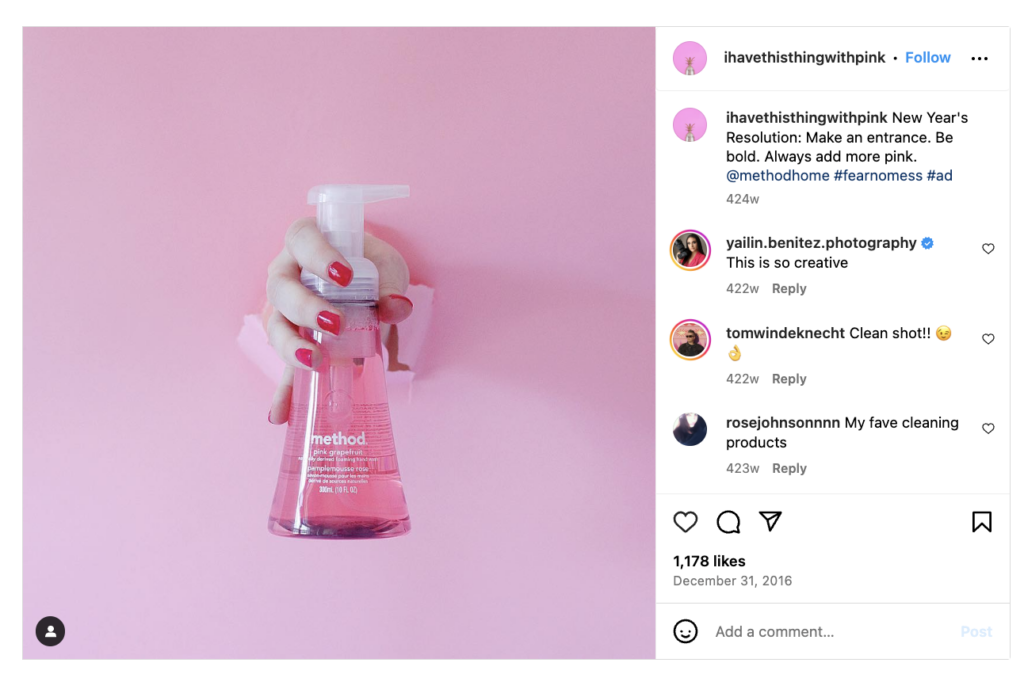
Cleaning product company Method used Popular Pays to contact 45 creatives and hire them to make bright, funky content showcasing Method’s products. The campaign resulted in 146 pieces of content, as shown in the example below.

Instagram portfolio from ihavethisthingwithpink
Image source: @Ihavethisthingwithpink

Once you’ve participated in a few sponsored content campaigns, your Instagram feed likewise serves as a type of social proof, demonstrating to potential brand partners that you know how to do the job well.

In fact, an Instagram portfolio can help both freelancers and agencies achieve growth. Here are the main reasons:

  • Instagram’s user base is enormous and engaged. It isn’t just a social platform—with 81% of people using Instagram to research products and services—it’s a discovery engine. Unlike personal websites, where clients must search for your portfolio manually, Instagram’s algorithm pushes content to relevant audiences, giving your work more visibility. Moreover, 90% of users follow at least one business or creative professional.
  • Instagram is a visual platform that suits creatives. Unlike platforms like LinkedIn or X, where text-based posts dominate, Instagram allows individual creatives and agencies to present their work in full resolution through carousels, reels, and stories. It’s perfect for branding projects, illustrations, photography, motion graphics/animations, and UI/UX design.
  • Instagram has built-in features to help you organize and promote your work. It also provides several tools to help you curate your professional portfolio without the need for creating a separate website, whether you’re doing it as a side hustle or as your full-time job.

Now that we’ve established why Instagram is an ideal portfolio tool let’s explore how you can optimize your account and showcase your work effectively.

1. Switch to a professional account

Switching to a professional account is essential if you use Instagram for business purposes. This unlocks Instagram Insights, contact buttons, and category labels, making it easier for potential clients to find you and helping you understand what type of content performs best.

A professional account also gives you access to advertising and promotional features, helping you expand your reach and attract new opportunities. 

Having a separate business account for your Instagram portfolio and a personal account for regular social media use is a good idea. This way, you can keep your personal branding coherent and maintain your Instagram feed design while still being free to post on your private account. 

2. Make the most of your Instagram bio

Your bio is your elevator pitch. It should be clear, concise, and action-oriented.

Instagram bio for Cagla Caglar
Image source: Cagla Caglar
  • Who you are: Your name or business identity.
  • What you do:  A one-line summary of your expertise.
  • A call to action: “DM for commissions” or “View my media kit.”
  • A portfolio link: Use Linktree or Instagram’s link sticker to direct visitors.

An optimized Instagram bio can help you get discovered on search, even if your audience doesn’t know your name yet. Using keywords in your bio can help your account appear as one of the results when someone wants to find you, allowing you to reach an audience actively searching for your services.

Example:
Freelance Illustrator | Branding & Editorial Art
Helping brands tell visual stories.
Portfolio: [yourwebsite.com]
DM for commissions.

Using the example above, if someone searches for “illustrator,” your profile may pop up as a suggestion. If you don’t use keywords in your bio, people will have to know your name or username, which blows your chances of getting discovered organically. 

3. Make good use of Instagram Story Highlights

Story Highlights allow you to categorize your work and keep it permanently accessible. Unlike regular stories that disappear after 24 hours, Highlights act as organized sections of your portfolio, like the hamburger icon on a website. 

Recommended categories:

  • Portfolio: A curated selection of your best work.
  • Service menu: What you offer, including prices (if possible).
  • Client work: Case studies, testimonials, and completed projects.
  • Behind the scenes: Your creative process and work in progress.
  • FAQs: Answers to questions potential clients may have before booking your services.  

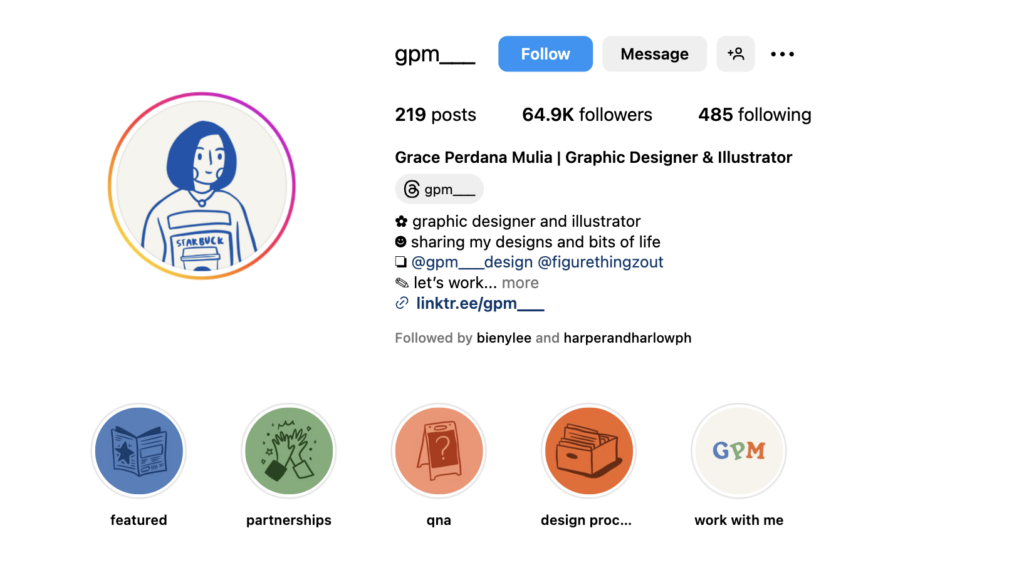
Since your Instagram Story Highlights are also among the first things visitors see when they land on your page, it’s essential to have well-designed icons, like the example below: 

Instagram story highlights for a portfolio
Image source: Grace Perdana Mulia

Having well-designed icons doesn’t just make your profile more eye-catching; it also makes it more navigable and client-friendly. 

4. Showcase your portfolio with the Instagram feed

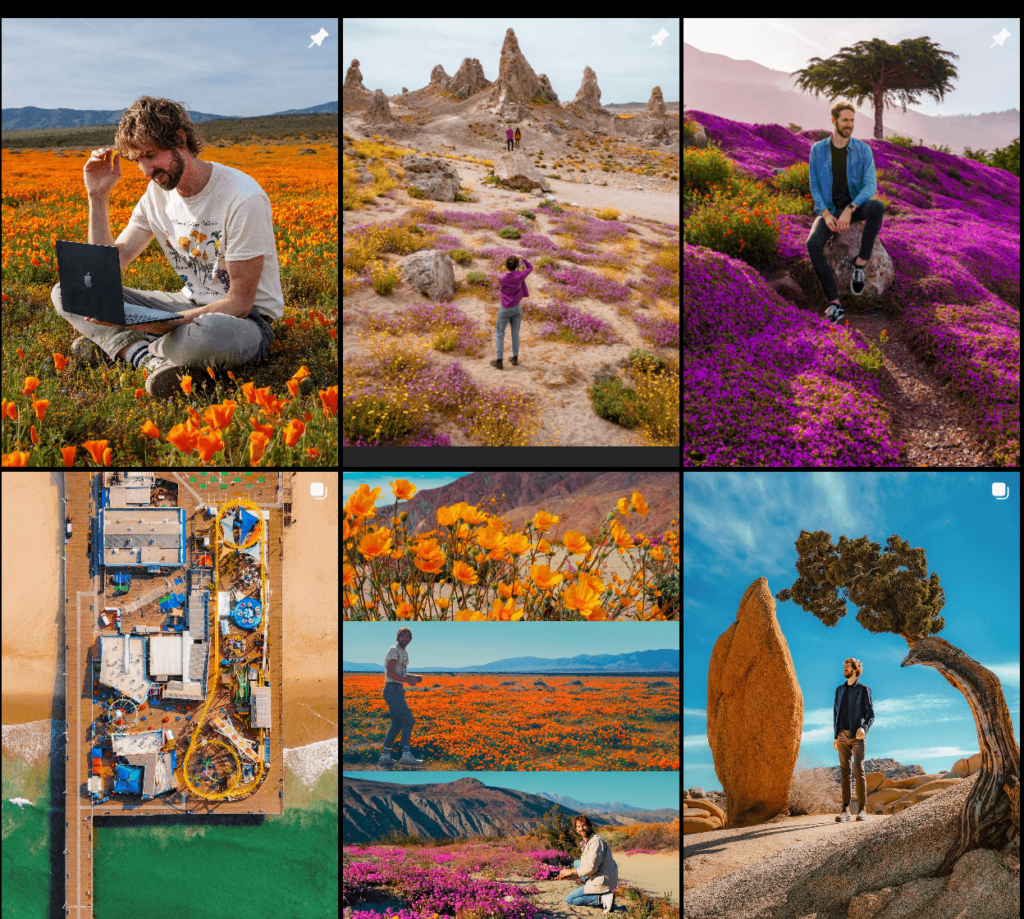
Your Instagram feed acts as your main portfolio display. A disorganized or inconsistent feed can make it difficult for potential clients to understand your style. For example, let’s look at the profile of a freelance photographer who knows how to make an authentic feed within the same color palette.

Instagram portfolio via feed
Image source: Andrew Kuttler

But if you represent a creative agency that uses Instagram for its creative portfolio, it could be difficult to stay cohesive, as everything depends on your projects. However, you can always look at portfolio design trends for inspiration and curate your feed in a way that’s visually cohesive while still showing your flexibility. 

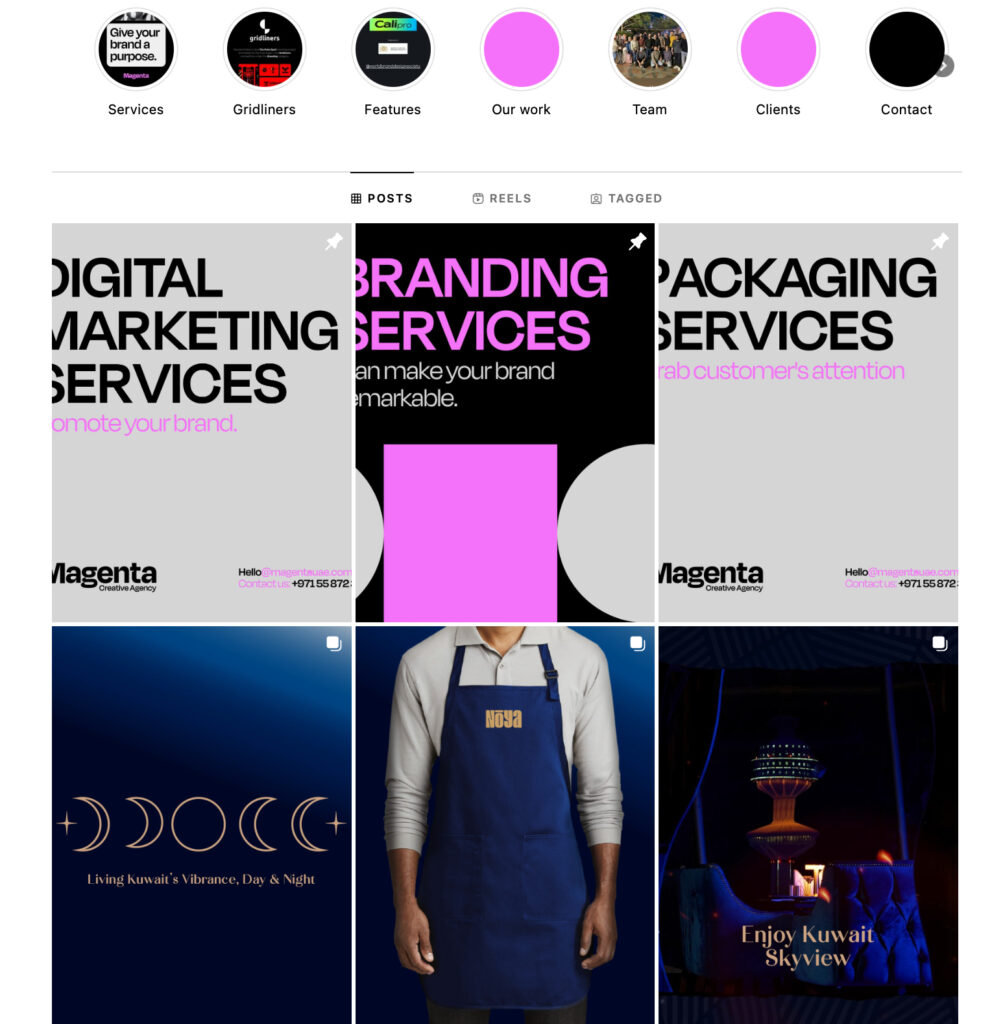
It’s also a great idea to draw inspiration from the Magenta creative agency and organize your feed with the help of social media templates: 

Instagram portfolio using social media templates
Image source: Magenta

The good thing is that you can rely on Envato’s Instagram templates to find templates that suit your agency’s brand identity. Moreover, you can customize these templates with a few clicks, which helps you maintain a cohesive Instagram feed without spending much time and effort.

All in all, here are the primary best practices for a strong portfolio feed:

  • Stick to a consistent color palette and aesthetic.
  • Use carousels to showcase multiple angles of a project.
  • Plan your layout using social media tools like Later or Planoly.

5. Give co-mention partnerships a try

Collaborating with brands, agencies, and fellow creatives can significantly increase your exposure. A simple tag or mention in a post can introduce your portfolio to a new audience.

For example:

  • If you designed a logo for a business, ask them to tag your account when they post it.
  • If you collaborated on a branding project, co-post with the agency or client.

This approach helps build credibility and expands your reach organically. Take a tip out of the influencer marketing playbook and maximize your exposure as much as possible. Take a look at how artist Jill Arteche does it: 

Using Instagram’s collaborative post feature shows the content on both the brand’s and the creator’s page, which can benefit both parties. 

6. Show your expertise with educational content

One of the best ways to establish authority is by sharing educational content. Post tips, insights, and breakdowns of your creative process.

Ideas for content:

  • Before-and-after transformations
  • Design tutorials or time-lapse videos
  • Industry trends and insights

Providing value-driven content can position you as an expert in your field and attract potential clients. For instance, the creative agency Somelight collected five essential websites for people who have a creative job in one carousel post, writing a short summary of each website. Not only does it help colleagues in the niche, but it also showcases Somelight’s experience.

And here’s how product designer and developer @nashallery shows her process through Instagram Reels: 

If you collaborate with brands, agencies, or businesses as a creative professional, Using Instagram’s Paid Partnership label can significantly enhance your content’s visibility and credibility.

Instagram’s algorithm prioritizes Posts as paid partnerships because they involve brand collaborations. Your content will likely be featured in Explore and suggested content sections. Unlike regular posts, where brands need to share your work manually, the Paid Partnership feature automatically gives them access to promote your content if they choose to.

This feature benefits both creatives and brands:

  • For creatives: It ensures your content reaches a wider audience while positioning you as a trusted professional who works with known brands.
  • For brands: It allows them to track performance through Instagram Insights or Instagram marketing tools, giving them data on engagement and reach.

Creative agencies looking to leverage the power of the partnership label can follow the example of Alejandra Salazar, founder of Croing Agency, and make a video introduction about their business, telling their brand story. It’s a perfect way to reach a wider audience while increasing brand trust as you show the real people behind your agency.

Instagram portfolio FAQs

Why create an Instagram portfolio?

For creatives, traditional portfolios often live on personal websites or platforms like Behance or Dribbble. While those remain valuable, you’re limited to an audience of people who already know your portfolio exists or are recruiting talent. 

Since people generally spend more time on social media than on dedicated portfolio showcase platforms, you’re more likely to capture their attention on Instagram, whether you’re an individual creative or a creative agency. 

What are the main features I can use for my portfolio?

Your grid alone is an excellent canvas for showcasing your best work, while Story Highlights and pinned posts can be used for frequently asked questions (FAQs). Interactive stickers are great for engaging your audience, and Meta’s ad tools can help you reach a wider audience. 

How do I switch to a professional Instagram account?

Here’s how to create a professional account to make the most of your portfolio:

  1. Select a relevant category such as Graphic Designer, Illustrator, or Photographer.
  2. Go to Settings > Account and select Switch to Professional Account.
  3. Choose Creator (for freelancers) or Business (for design studios and agencies).

How do I enable paid partnerships for my portfolio?

Here are the steps for paid partnerships:

  1. Create a post and go to Advanced Settings.
  2. Select Tag Business Partner and enter the brand name.
  3. Publish with the Paid Partnership label.

How will you display your Instagram portfolio?

Instagram is one of the most powerful tools for creative professionals. When optimized correctly, it can be a high-converting digital portfolio that attracts clients, showcases expertise, and builds credibility.

Following these best practices can turn your Instagram account into an interactive portfolio that drives real business opportunities. Discover a wealth of creative Instagram templates on Envato—just download them, plug in your content, and you’re ready to go in no time! Get more Instagram inspiration from our Instagram marketing posts and our roundup of 2025 social media trends.

Related Posts