
Introducing the Envato font preview tool: Instantly test fonts before you download

Designers, meet your new favorite typography tool.

Envato 6min read 20 Mar 2026
Envato font preview tool

Choosing the right typeface is one of the most important decisions in any design project. But until recently, testing fonts often meant downloading multiple files, installing them, and experimenting in your design software before you knew if they actually worked.

That’s why we built the Envato font preview tool.

You can now preview fonts instantly using your own custom text, adjust size, explore different styles, and even review full character sets, all directly on the Envato experience.

Even better: the new live Envato font preview tool works across the entire browsing experience, including font item pages and search results.

The goal is simple: help you explore typography faster, compare fonts more easily, and make confident design decisions without breaking your creative workflow.

TL;DR

  • Envato has launched a powerful font preview tool across the Envato font library.
  • Enter custom text and preview fonts instantly online.
  • Adjust font size with a slider or presets.
  • Compare styles, weights, and supported languages.
  • Preview fonts directly in Envato search results, in both grid and list views.
  • View glyph sheets showing every supported character.

What is the Envato font preview tool?

The Envato font preview tool is a new interactive feature that allows you to preview fonts online before downloading them.

Instead of relying on static sample images, you can now test fonts using real text and adjustable sizes to see how they’ll actually perform in your designs.

With this online font preview tool, you can:

  • Enter custom preview text
  • Adjust font size with a slider or preset options
  • Switch between available font styles
  • Check supported languages and characters
  • Review a complete glyph sheet

The Envato font preview tool creates a far more realistic preview experience, making it easier to find the perfect typeface for your project.

Why a live font preview tool matters for designers

Typography decisions are rarely simple.

A font trend might look beautiful in a promotional image, but behave very differently in real-world designs. Designers often need to test fonts with:

  • Brand names
  • Headlines
  • UI elements
  • Product titles
  • Multilingual characters

Without a live font preview tool, that usually means downloading and installing multiple fonts just to test them.

Now you can preview fonts instantly within your browser, making the process dramatically faster.

It’s a small feature that removes a surprisingly big workflow bottleneck.

How the new font preview tool works

The new previewer is designed to be simple enough for quick browsing but powerful enough for real design decisions.

1. Type your own custom text

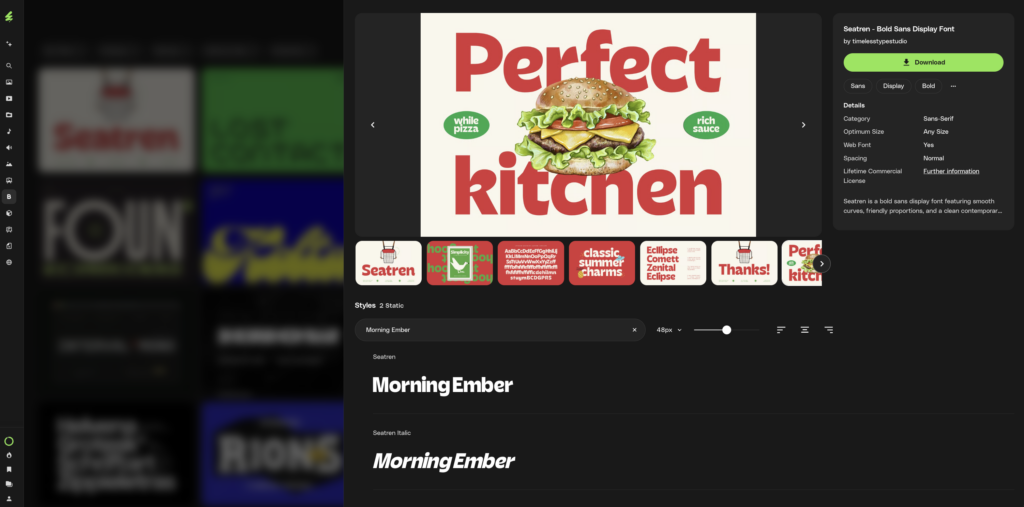
A screenshot of a font library website displaying the 'Seatren - Bold Sans Display Font.' The main graphic shows 'Perfect kitchen' in bold red with a hamburger, alongside font details, various preview cards, and a type tester showing 'Morning Ember' in regular and italic styles.

Instead of generic sample text, you can enter your own words directly into the preview field.

This lets you test typography with:

  • Brand names
  • Headlines
  • Taglines
  • Product names

For example, if you’re designing a logo for a brand called Morning Ember, you can type it directly into the preview tool and immediately see how different fonts feel.

2. Adjust the font size instantly

The font preview tool includes a size slider and preset options, letting you quickly test typography at different sizes.

This helps you evaluate how the typeface performs in different contexts, such as:

  • Large display headlines
  • Logo designs
  • Website headings
  • Small interface labels

Seeing a font across different sizes helps you judge readability and balance before committing to it.

3. Explore styles and weights

Many modern fonts come with multiple styles and weights.

The Envato font preview tool lets you switch between variations such as:

  • Regular
  • Bold
  • Italic
  • Light
  • Black

This makes it easier to evaluate whether a font family is flexible enough for a full design system.

4. Preview fonts directly in search results

One of the biggest improvements to the typography browsing experience is the ability to preview fonts directly within search results.

You no longer need to open each item page just to test a font.

Instead, you can:

  • Preview fonts while browsing
  • Compare multiple typefaces quickly
  • Test custom text across different results

The Envato font preview tool works in both grid and list views, giving you flexibility depending on how you prefer to browse.

5. Toggle author previews in list view

In list view, you can toggle author previews on or off, giving you more control over how typography is displayed when exploring fonts.

This helps keep the browsing experience clean while still allowing quick previews when needed.

6. View full glyph sheets

When selecting a font for a serious project, you often need to see all the characters it supports.

The new glyph sheet feature lets you preview the complete character set for each font, including:

  • Symbols
  • Numbers
  • Punctuation
  • Accented characters
  • Extended alphabets

This is especially useful for multilingual projects or brand systems that require extended language support.

A better font discovery experience on Envato 

With the new font preview tool, Envato now offers a significantly improved typography browsing experience.

You can now:

  • Preview fonts instantly
  • Test custom text
  • Adjust font size
  • Compare font styles
  • Preview fonts in search results
  • Review full glyph sheets

Together, these features bring the Envato typography experience closer to what designers expect from dedicated font platforms, while keeping the simplicity and accessibility that Envato users love.

Real-world example: finding the perfect brand font

Imagine you’re designing a coffee brand identity.

You’re exploring fonts on Envato and want to see how your brand name looks in different styles.

Using the online font preview tool, you can:

  1. Type the brand name into the preview field
  2. Adjust the font size to simulate a logo
  3. Switch between bold and regular styles
  4. Compare multiple fonts directly in search results

Within seconds, you can evaluate several typefaces and find the one that fits the brand personality.

No downloads. No installations. Just instant typography exploration.

Envato font preview tool FAQs

Try the Envato font preview tool today

The new live font preview tool makes it easier than ever to explore typography and find the perfect typeface for your next project.

You can now:

  • Preview fonts instantly
  • Test custom text
  • Adjust font sizes
  • Compare multiple fonts quickly
  • View full character sets

All directly inside the Envato experience.

If typography is a big part of your creative workflow, the new font preview tool is going to save you time and help you make better design decisions.

Related Posts