
Best graphic design software in 2026: 12 tools for every designer
Discover the best graphic design software for every workflow. Compare Photoshop, Illustrator, Figma, Blender, Canva, Affinity, and more to find your ideal tool.
Envato: Get every type of asset for any type of project, and access to AI tools. Start now
Discover why Affinity is free and how Envato templates, courses, and tutorials boost your workflow.
In a move that’s reshaping the design landscape, Canva has made the entire Affinity suite free for all users. Long positioned as a sleek, one-time-purchase alternative to subscription-based tools, Affinity has now become completely accessible to everyone, with no subscriptions and no hidden costs.
Yes, Affinity Designer is free, a change that could have a meaningful impact on how creatives, educators, and small studios approach their work.
This shift opens up professional-grade tools to a wider audience, reducing cost barriers that have historically limited access to design software. For many freelancers or students, it’s less about replacing other platforms and more about expanding creative options.
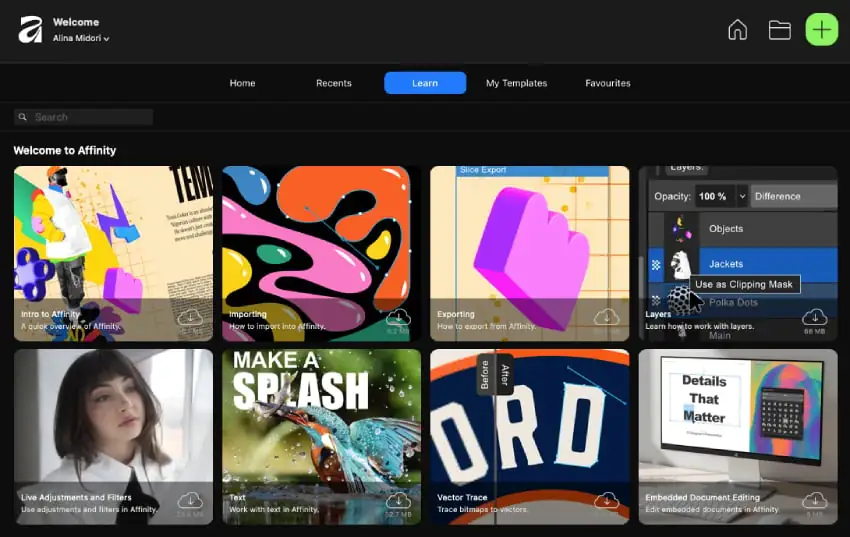
The free Affinity package, which works as a multidisciplinary design app, includes all three flagship products: Affinity Designer, Affinity Photo, and Affinity Publisher. These are full, professional tools that cover graphic design, photo editing, and page layout.
Importantly, this isn’t a limited “lite” version. It’s the same suite that previously competed directly with premium creative tools.
While Adobe’s all-app plan currently costs around US$69.99 per month, Affinity now provides a comparable workflow for free. Rather than framing it as a one-to-one replacement, think of it as a complementary option: a flexible, no-cost entry point into professional design software.
This update is significant for independent creatives who want to experiment, learn, or build businesses without incurring recurring software expenses.
Adobe Creative Cloud continues to offer deep integration, industry-standard compatibility, and AI innovation, while Affinity now provides a compelling and accessible alternative — giving creatives the freedom to choose what best fits their workflow and budget.
| Feature | Affinity (Free) | Adobe Creative Cloud (Paid) |
|---|---|---|
| Price | Free (no subscription), AI features available with Canva Pro | US$69.99/month (All Apps plan) |
| Included apps | Designer, Photo, Publisher | Photoshop, Illustrator, InDesign, and more |
| License type | Free for personal & commercial use | Subscription, account-based license |
| File compatibility | PSD, PDF, SVG, EPS | PSD, AI, INDD, PDF |
| Cross-platform | macOS, Windows, iPad coming soon | macOS, Windows |
| Learning resources | Built-in tutorials + community | Adobe Learn |
| Offline access | Available (AI features require sync) | Most features available offline |
The free Affinity suite invites more experimentation and lowers the entry barrier to professional tools. For many creatives, it complements existing workflows rather than replacing them, especially since Affinity supports common file types, including PSD, SVG, EPS, and PDF.
Key benefits:
In essence, it’s a win for creative freedom and accessibility, without diminishing the role of established tools in professional pipelines.
You don’t have to start from a blank canvas. Envato offers thousands of Affinity Designer and Affinity Publisher templates that seamlessly integrate into your workflow.
From social media graphics and business cards to brand systems, Envato’s library helps you move from concept to completion quickly. With one subscription, you get:
You can see the top templates and assets in our Affinity collection.
Pro tip: Every Envato template includes a commercial license, so you can use them for client projects confidently; no fine print required.
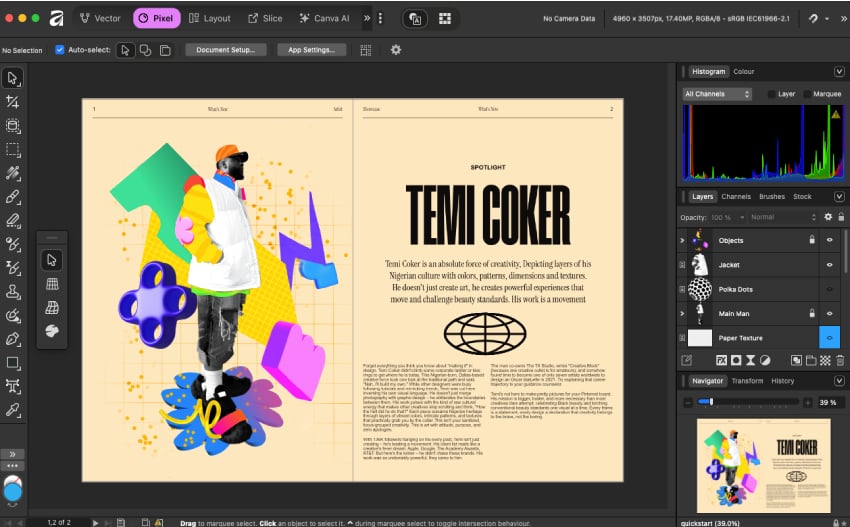
With Affinity installed, it’s time to actually master it. From beginner-friendly courses to bite-sized Affinity tutorials, these resources will help you turn curiosity into creative confidence.
The best place to start is our Affinity Designer for Beginners course, a full walkthrough that teaches you everything from layers and shapes to typography and exports.
By the end, you’ll understand how to:
Bookmark this course as your go-to resource; it’s designed to turn first-time users into confident designers.
Once you’ve covered the basics, it’s time to sharpen your skills with Envato’s Affinity tutorials. These step-by-step guides were created by experienced designers to help you practice real techniques — from removing backgrounds to crafting bold editorial layouts.
Each tutorial builds on the last, so you’ll keep growing your skills while creating portfolio-ready projects.
Affinity’s free suite pairs naturally with Envato’s ready-made assets, helping creatives work faster and more efficiently.
Affinity’s move aligns with a broader trend toward more open, flexible creative ecosystems. Removing financial barriers helps more people participate in the design economy. For professionals, it’s another tool in the toolkit; for newcomers, it’s a way to get started on a strong footing.
Rather than a competition between platforms, this moment highlights a shift toward choice and inclusivity in creative technology — and that’s good news for everyone.
So, what should you do now that Affinity is officially free? Honestly, dive in.
Start by downloading the Affinity suite and exploring the tools yourself.
Next, head over to Envato and browse through a few Affinity templates; it’s the fastest way to get real results without starting from scratch. Whether it’s a business card, social post, or portfolio layout, there’s something ready-made to spark ideas.
Is Affinity really free now?
Yes. The full Affinity suite, including Affinity Designer, Affinity Photo, and Affinity Publisher, is now available for free to all users. There are no subscription fees or hidden costs, and the free version is identical to the previously paid suite.
Can I use Affinity Designer for commercial projects?
Yes. Affinity Designer and the rest of the suite are free for both personal and commercial use, meaning you can create client projects, print materials, and sell your work without licensing restrictions.
How is Affinity different from Adobe Creative Cloud?
Affinity offers a one-time install, no-subscription model, while Adobe Creative Cloud runs on a monthly subscription that includes cloud storage, AI tools, and deeper cross-app integration. Many designers now use both — Adobe for large-scale production, and Affinity for flexibility and cost savings.
Does Affinity support Adobe file formats, such as PSD or AI?
Yes. Affinity apps open and export PSD, PDF, SVG, and EPS files, ensuring smooth collaboration between Affinity, Adobe, and Figma users. While it doesn’t fully replicate Adobe’s proprietary features, file exchange works seamlessly for most design workflows.
Do I need Canva Pro to use Affinity’s AI features?
Some AI-powered tools, such as Canva’s generative features, are integrated through Canva Pro. The core Affinity apps themselves remain fully functional and free to use offline — AI integration is optional.
Where can I find Affinity templates and design assets?
You can browse Affinity-ready templates on Envato, including mockups, fonts, and branding kits built specifically for Affinity Designer and Affinity Publisher. Every asset comes with a commercial license, allowing you to use it safely for client work.
Is Affinity available on iPad or mobile devices?
Currently, Affinity runs on macOS and Windows, with iPad versions coming soon. The desktop and mobile ecosystems will be compatible, allowing designers to work seamlessly across devices.
What are the best Affinity tutorials for beginners?
Start with Envato’s “Affinity Designer for Beginners” course on YouTube, then explore step-by-step tutorials covering layout, typography, and effects. These guides help you go from first project to portfolio-ready designs quickly.
Should I switch from Adobe to Affinity?
You don’t have to choose one or the other. Many professionals use both tools together: Affinity for quick, cost-free design work and Adobe for advanced, integrated workflows. The key is finding the mix that best supports your creative process and client needs.
Discover the best graphic design software for every workflow. Compare Photoshop, Illustrator, Figma, Blender, Canva, Affinity, and more to find your ideal tool.

Learn how to edit with AI on Envato stock photos, customizing images instantly by removing objects, changing backgrounds, and creating polished visuals without leaving the platform.

Explore the tennis aesthetic trend for 2026, from preppy style and color palettes to branding and design ideas inspired by tennis culture, fashion, and modern creative projects.

Fourteen World Cup shirts that still matter, from Brazil 1954 to Cameroon's banned vest. The design thinking behind the kits that lasted, and what they all have in common.

