Best graphic design software in 2026: 12 tools for every designer
Discover the best graphic design software for every workflow. Compare Photoshop, Illustrator, Figma, Blender, Canva, Affinity, and more to find your ideal tool.
Envato: Get every type of asset for any type of project, and access to AI tools. Start now
The Flow movie is a ground breaking Blender-made film that redefines indie animation. Let's see how it was made and what we can learn from it.
Some animated films do more than tell a story; they feel like a dream! Flow is one of those films. The soft, flowing motion, the painted aesthetic, and the way everything moves so smoothly make it special. We love it when animation tries something different, and the Flow movie does that by mixing simple designs with movement that genuinely feels alive.
And the best part? You don’t need fancy software or a massive studio budget to explore this style. Blender has all the tools to experiment with the techniques that make the Flow movie so unique. So, let’s look at what makes Flow’s animation style distinctive and show you how you can recreate some of its magic using Blender.
Flow isn’t just another animated film—it’s a visual experience! With no dialogue and a dreamlike style, Flow proves that you don’t need spoken words to tell a powerful story. Every emotion and moment is conveyed purely through movement, color, and atmosphere.
This film made history by becoming Latvia’s first-ever Oscar winner, taking home Best Animated Short. That’s huge! It proves that bold, artistic animation can captivate audiences and break new ground.
Here’s a fact we love about the film: Flow was created using Blender! With painterly visuals and fluid animation, the movie was made using open-source software that artists use daily. It shows that Blender is beyond being a hobbyist application and can create award-winning cinematic experiences.
What blows our mind about Flow is that it was made with just $4 million, while most big animated films have budgets in the tens or even hundreds of millions. Despite this, it stands alongside major productions, proving that creativity matters more than money.
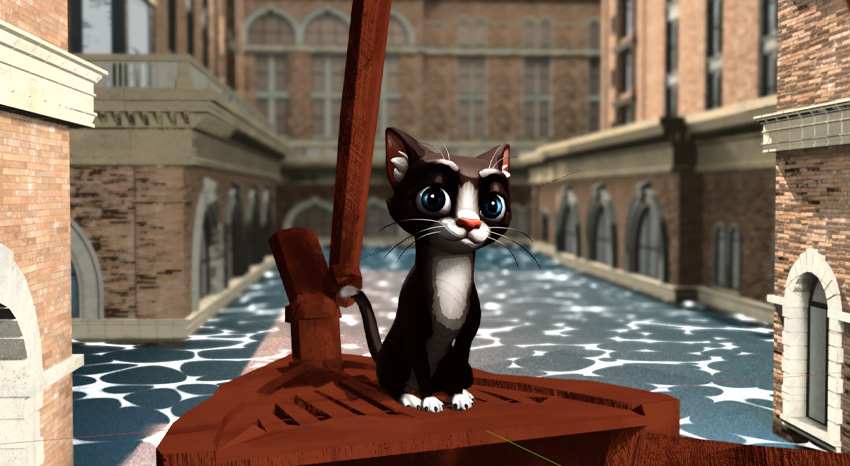
Flow pulled me in right away with its unique way of storytelling. No dialogue, no character names, just pure visual language. We follow Cat, a solitary creature trying to survive a massive flood. At first, they want nothing to do with the other animals, but survival forces them to join a Labrador, a Capybara, a Lemur, and a Secretarybird.
“The bird is the only character that the cat looks up to and respects. We chose a secretarybird from South Africa in this role because of their majestic and authoritative presence.”
@flowmovie2024
The setup hints at Noah’s Ark, but it never feels like a religious story; it’s more like a journey about trust and survival. What we love most is how the animation feels both detailed and raw. It’s beautiful, emotional, and completely mesmerizing.
One of the things we love about Flow is that it feels like a massive cinematic experience, but it was created by a small team with a limited budget.
Director Gints Zilbalodis had an unmistakable vision for a story told entirely through movement and atmosphere. So, there was no storyboarding. Instead, he built a 3D world first and let the animation and camera work evolve naturally to tell the story. This approach gave Flow its organic, almost “found footage” feel, making us feel like we’re witnessing real moments rather than staged animation.
The fact that Flow was completely created in Blender is incredible. Isn’t it wonderful to see an open-source production at work at this level? It just proves that you don’t need fancy and expensive software to make great things.
The team had the flexibility to experiment with shots and lighting using Blender’s real-time rendering and animation tools. The film’s mix of highly detailed 3D animation and impressionistic, painterly visuals is a testament to what Blender can do in the hands of skilled artists.
To bring Flow’s world to life, the team combined Blender add-ons and clever techniques, balancing detailed environments with an organic, handheld feel.
From scattering vegetation to simulating fluid dynamics and creating natural camera motion, these tools played a key role in shaping the film’s unique style:
Instead of traditional storyboarding, the Flow team used animatics to plan out the film’s sequences. This allowed them to focus on movement and pacing early in production, shaping the story through animation rather than static drawings.
This approach made perfect sense since the Flow movie is all about visual storytelling without dialogue. It allowed the team to experiment with how the characters and environment interacted in real time.
Using Blender’s flexible animation tools, the team could quickly test and refine their scenes. Here’s how they approached it:
One of the most exciting things about Flow is that you can explore its unique style in Blender, even if you’re just starting out. You can achieve a similar look with just a few key techniques by focusing on composition, lighting, and atmospheric effects. Here’s a step-by-step guide to get started:

Before diving into materials and lighting, start with a strong composition. Block out your environment with simple shapes, keeping it minimal like Flow. A well-planned layout will make the rest of the process much smoother.

If you want to build a Flow-inspired scene but don’t have time to model everything from scratch, Envato has a vast library of ready-made 3D assets, including characters, animals, buildings, and props. Download what you need, import it into Blender, and start crafting your scene! Here are some to get you started:
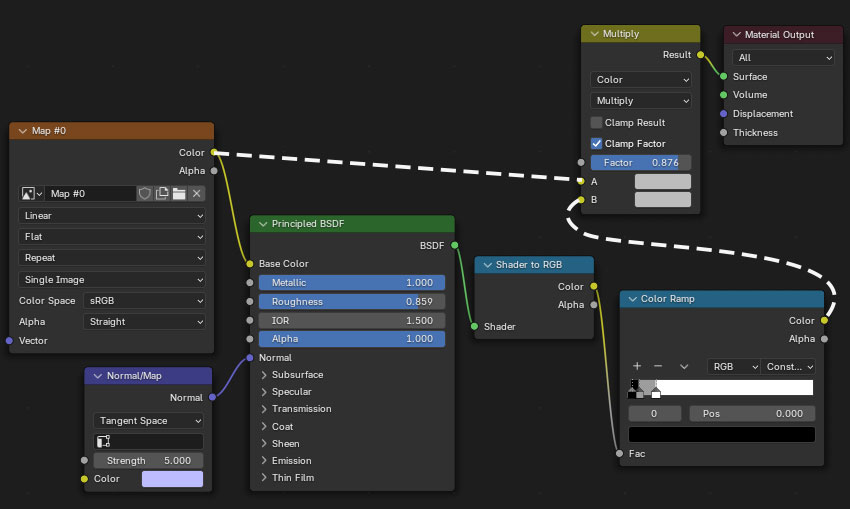
A big part of the look of the Flow movie is its soft, painterly shading. A toon shader can achieve a similar effect.


Remember to refer back to your viewport to see how the shader affects the look of your scene.

Soft, diffused lighting is key to achieving Flow’s atmospheric style.

A great way to light your scene is by using the three-point lighting setup, which helps create depth and balance. Here’s how it works:
Adding a layer of subtle fog will enhance your scene’s depth, atmosphere, and overall mood, making it feel more immersive and cinematic.

Once your scene is set, it’s time to render and bring your Flow-inspired scene to life! This is where all your hard work comes together, transforming your composition, lighting, and effects into a fully realized cinematic shot.

Flow is more than a beautifully crafted animated film—it’s a breakthrough for independent animation and a huge milestone for Blender.
Seeing an independent film, made entirely in open-source software, win an Oscar and stand alongside massive studio productions is incredible. It shows you don’t need a Hollywood budget or expensive tools to create something remarkable.
If Flow can achieve this, we’re excited to see what the next major Blender movie will accomplish. This is just the beginning, and we can’t wait to see how far Blender-powered animation will go next.

For more movie-infused assets, try Envato AI tools, or look at our recent Oscars: lessons for creatives post, learn all about the intricacies of StageCraft, discover an AI video Blender workflow, or get started with our free Blender for Beginners course.
Discover the best graphic design software for every workflow. Compare Photoshop, Illustrator, Figma, Blender, Canva, Affinity, and more to find your ideal tool.
Learn how to add LUTs in Final Cut Pro, from importing .CUBE files to adjusting intensity and combining with colour correction for better video grading results.
Learn how to use LUTs with RAW footage for accurate colour grading. A step-by-step guide to applying LUTs, preserving dynamic range, and achieving cinematic video results.
Every month, we're rounding up our favourite TikTok trends: the sounds, hooks, and concepts that are going viral right now. We'll break down the formats, show you examples, and give you practical ways to adapt them to your niche.