Movie typography in 2026: why does it suddenly look so good?
Explore movie typography trends shaping 2026, from bold film fonts to cinematic branding, with inspiring examples and practical tips for creating impactful, screen-ready typography.
Envato: Get every type of asset for any type of project, and access to AI tools. Start now
Want to create mouth-watering food videos? This guide shows you how to use VideoGen to do exactly that — complete with tips on prompts, visuals, motion, sound, and editing.
There’s something almost religious about a good food video. The slow-motion pour of chocolate, the satisfying crackle of something fresh from the oven. Somehow, the algorithm always knows when hunger strikes. And with tools like Envato VideoGen (now with Google Veo 3 in its arsenal), creating those hypnotic, drool-inducing moments has never been easier.
And that’s why we’re gathered here today. If you’d like to know how to use VideoGen to craft AI food videos with AI food prompts that beg you to reach through the screen and take a bite, you’ve come to the right place. From prompt writing to sound, this guide covers everything you’ll need to generate hunger-inducing video clips with no studio, props, or actual food required.
Let’s get cooking.
There’s no better way of staying on top of the AI trends than using the best tools available.
Envato VideoGen lets you create stunning, realistic videos in seconds using just a few words, powered by a lineup of specialized AI models designed to handle different kinds of video generation tasks.
Now including Google’s latest AI video model, Veo 3, this tool puts advanced video generation at your fingertips.
With simple text prompts, you can produce short clips that capture rich texture, dynamic motion, nuanced lighting, and a cinematic mood — perfect for everything from food videos to cinematic scenes.
Food is one of the trickiest subjects to film well. It’s all about the details, like the shine on a sauce, the texture of a crust, or the slow pull of melted cheese. VideoGen with Veo 3 handles all of that remarkably well, with features that make it especially effective for food visuals:
Creating a polished food video the traditional way usually means doing things like:
With VideoGen, most of that is handled for you. You describe what you want, and the tool handles the heavy lifting. It doesn’t replace hands-on food videography, but it’s a fantastic option when you need:
One of the most significant upgrades in Veo 3 is native audio support. You can now prompt for music, ambient sound, or even narration directly in your scene.
If you’re new to writing video prompts or just want to sharpen your approach, check out our full guide to AI video prompts for a broader look at how to craft effective scenes across all types of content.
Now, here’s a simple prompt structure you can use specifically for creating great food videos in VideoGen:
[Subject]+[Texture]+[Motion]+[Lighting]+[Camera Style]+[Mood or Setting]+[Audio]
If you want to use Veo 3 with VideoGen, ensure you have Audio toggled On. Then, when it comes to prompting, you don’t have to include all six parts every time, but the more details you give, the better VideoGen can understand what you’re after. Now let’s break the process down step by step.
Let’s walk through each part of this structure so you can craft VideoGen food videos that look great and capture the texture, motion, lighting, and sound that bring your ideas to life.
Start with the star of the show and keep it simple. Veo 3 performs best when it knows exactly what to focus on. Here are a few examples:
| A grilled cheese sandwich | Juicy steak on a sizzling pan | Closeup of a chocolate cake |
Avoid: Vague or cluttered subjects like “a full buffet with drinks and three meals.” Too much detail can confuse the model.
Tip: Stick to one dish per prompt. You can always create multiple clips and edit them together later.
Texture is what makes food videos feel real. Consider how the dish should look to trigger the viewer’s taste memory. Use sensory words like:
| Gooey | Flaky | Bubbly |
| Crispy | Creamy | Melted |
| Golden | Moist | Sticky |
Example prompt snippet:
… with gooey melted cheese stretching between two halves
Tip: If the texture looks off (e.g. too rubbery or plastic), rephrase your texture cue or simplify it to focus on one quality.
Food is at its most tempting when it’s in motion. Add action cues like:
| Dripping | Swirling |
| Pouring | Stretching |
| Sizzling | Steam rising |
| Bubbling | Melting |
Lighting sells the flavor. It shapes the mood and adds depth and realism to your scene. Try lighting cues like:
| Warm golden light | Soft natural backlight |
| High contrast shadows | Cinematic studio lighting |
Tip: Rework your lighting description if your result looks flat or too fake. Changing “bright” to “moody” can make a big difference.
Camera style tells VideoGen and Veo 3 how the viewer should experience the food. It’s the lens through which we see (and taste!) the scene. Popular food-friendly styles include:
| Overhead shot | Slow tilt |
| Macro close up | Dutch angle |
| Handheld shot | Wide-angle shot |
| Dolly-in / push-in | Shallow depth of field |
| Pull-back / reveal shot | Side profile |
Example prompt snippet:
Macro close up with shallow depth of field…
Finally, ground your dish in a setting. This adds ambiance and can suggest time of day, season, or even brand tone. Here are a few examples:
| Rustic farmhouse kitchen | Minimalist marble studio | Outdoor picnic at sunset |
This is the newest and most exciting thing about AI video generation. Thanks to Veo 3, VideoGen can now include synced audio generation, so you can prompt for background music, voiceovers, and ambient sounds. Make sure to toggle Audio “on”. Here are some tips for prompting audio:
| Soft kitchen ambiance | Sizzling in a hot pan |
| Steak searing | Soft background jazz |
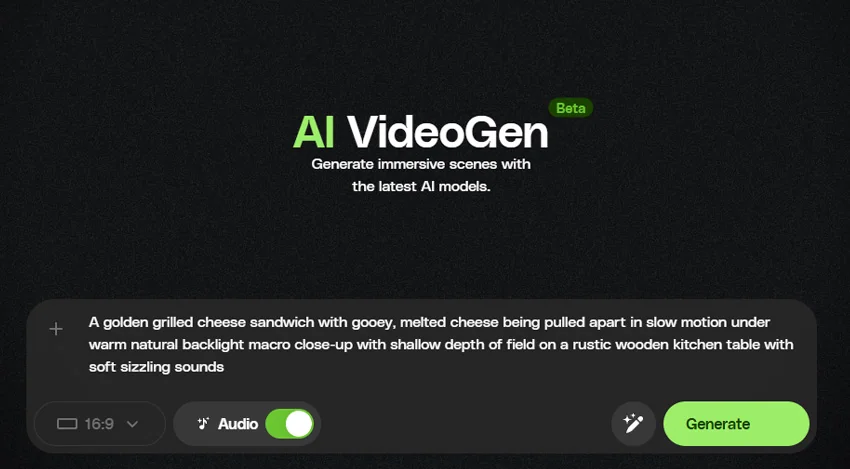
Now that you’ve explored each part of the structure, let’s recap the full prompt formula in a way that’s super easy to follow and use. Just think of it as building blocks and stack them together in order. Use this structure and you’ll be generating mouth-watering food videos in no time.
- “A golden grilled cheese sandwich”
- “with gooey, melted cheese”
- “being pulled apart in slow motion”
- “under warm natural backlight”
- “macro close-up with shallow depth of field”
- “on a rustic wooden kitchen table”
- “with soft sizzling sounds”
Now that you know how to craft the perfect prompt, it’s time to bring it to life. VideoGen makes it super easy to turn your ideas into high-quality food video content. No editing software is needed, and no production setup is required.
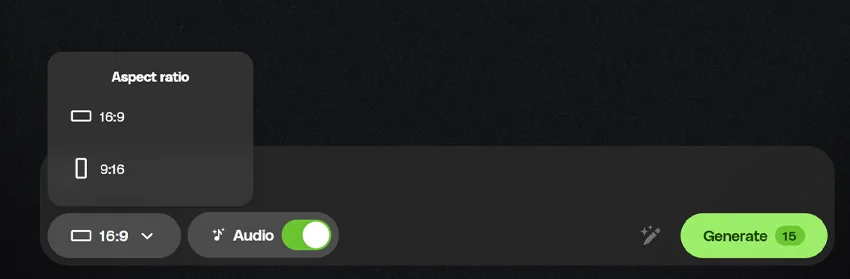
First, head to Envato VideoGen and sign in with your paid and active Envato account. You’ll land on a clean, simple dashboard where you can start a new video.

Select the aspect ratio you want for your final video, and ensure that the Audio toggle is switched on if you want your final video to have sound (note that only 16:9 is available with audio).

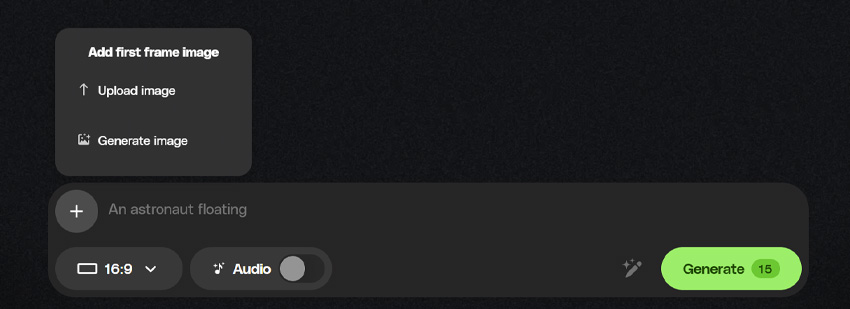
Click the plus icon (+) to create a preview image for your video’s first frame. You can:
This image sets the tone and helps guide how the AI builds the rest of the video (note that this feature is not available with audio).

Here’s where your prompt comes in. Add a detailed description of the scene you want to create in the prompt box.

Click Generate, and let VideoGen do the heavy lifting. Once that’s done, simply download your video!
Here are some ideas worth digesting for your own videos:
Perfect for: Hero shots, product launches, or Instagram hooks.
Why it works: Slow motion heightens tension and draws attention to textures.
Example prompt:
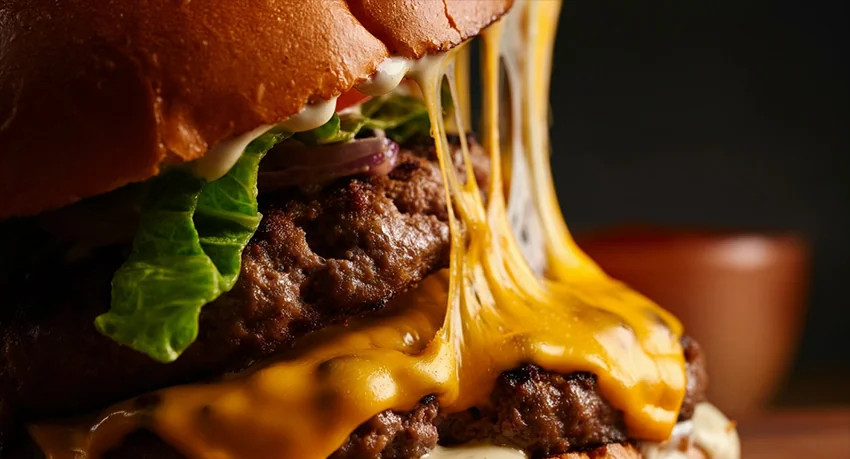
A juicy burger, melted cheese stretching slowly, warm cinematic lighting, macro close-up with shallow depth of field, modern kitchen background, with sizzling grill sounds.

Perfect for: Mood-driven B-roll, café promos, or indulgent dessert reels.
Why it works: Liquid motion + glossy textures = visual gold.
Example prompt:
A stack of fluffy pancakes with maple syrup drizzling in slow motion, sticky texture, golden backlight, handheld macro shot, rustic wooden table setting, with pouring syrup and gentle kitchen ambiance.

Perfect for: Meal prep content, wellness brands, or seasonal promos.
Why it works: Bright light, clean colors, and crisp textures give that feel-good energy.
Example prompt:
A vibrant quinoa salad being tossed with a wooden spoon, fresh ingredients, crisp texture, natural daylight from the side, overhead camera angle, modern marble kitchen, with soft utensil sounds and subtle chopping ambiance.

Perfect for: Holiday posts, cake shop ads, or event montages.
Why it works: Layered visuals + candles or sparkle effects = instant festive mood.
Example prompt:
A slice of chocolate cake being lifted from a whole cake, glossy ganache texture, soft candle glow lighting, macro shot with shallow depth of field, decorated party table, with soft clinking and birthday ambiance sounds.
Perfect for: Food truck promos, urban brand vibes, or social-first content.
Why it works: Adds personality and energy with a real-life feel.
Example prompt:
A slice of pizza being pulled from a box, melted cheese stretching, handheld camera with natural daylight, shallow depth of field, city street background, with crunchy crust and faint street noise.

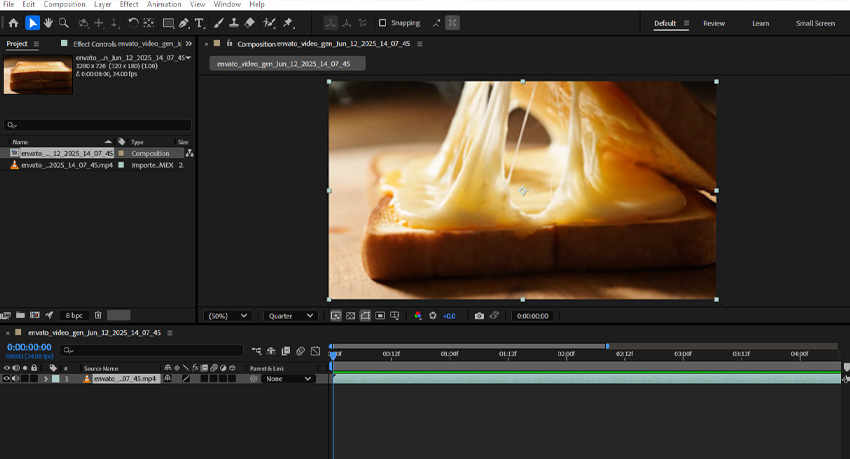
Once you’ve created your food clip, the next step is to bring it into your video project. Getting your AI-generated food clips into your projects is simple. Here’s how to do it in a few easy steps:
That’s it! Just drop the clip into your timeline like any other footage, and build your video around it. With a bit of trimming and a few tweaks, you’ll have content that looks professional, without ever turning on the stove.

VideoGen offers a flexible and highly creative way to produce professional-quality food videos without the need for lights, props, or a physical set. Using well-structured AI ad prompts, you can craft content that feels rich, cinematic, and irresistibly appetizing, while keeping creative direction clear from the first generation.
Whether you’re a motion designer, content creator, or simply experimenting with food visuals for the first time, VideoGen is a great solution. Now with Veo 3, it delivers sharp visuals and synced audio, so your ideas sound as good as they look. Start simple, explore variations, and let the results guide your creative direction. With the right prompt, a bit of editing, and a dash of sound design, you’ll be serving up stunning, scroll-stopping food videos in no time!
VideoGen is just one part of Envato’s full AI stack. So use these AI tools to generate and edit images, create realistic voiceovers, and even make your own music. And learn more in our articles on VideoGen’s features and using AI for video editing.
Explore movie typography trends shaping 2026, from bold film fonts to cinematic branding, with inspiring examples and practical tips for creating impactful, screen-ready typography.
Seedance 2.0 — ByteDance's AI video model known for its physical realism and scene complexity — is now part of the model lineup behind Envato's AI video generator. Here's what changes.
Discover bold music video fonts for 2026, with top picks and bonus styles that help creators match sound, genre, and mood with striking visual identity.
Learn how to build an AI character design workflow, from generating concepts with AI to refining and transforming them into clean, stylised 3D characters in Blender.