


Practical color grading with LUTs: a faster workflow for better results
Learn color grading with LUTs using a practical workflow for correcting footage, applying creative LUTs, adjusting strength, and creating polished looks.
Envato: Get every type of asset for any type of project, and access to AI tools. Start now
Discover the best Spaghetti Western-inspired LUTs on Envato and learn how to recreate Sergio Leone's sun-bleached, cinematic Western aesthetic.

Few film genres have a visual identity as unmistakable as the Spaghetti Western. Defined by sweeping desert landscapes, weathered faces, and slow-burning tension, these films transformed the traditional American Western into something darker, grittier, and more mythic. Directors such as Sergio Leone replaced clean-cut heroes with morally complex outlaws, using dramatic color, harsh sunlight, and vast landscapes to heighten every confrontation.
Today, that unmistakable look continues to influence filmmakers, photographers, and content creators. Whether you’re shooting a cinematic travel film, a short narrative, or a stylized portrait series, the right creative LUT can help recreate the warm, dusty palette that made Leone’s films so iconic.
While a LUT can’t manufacture endless desert landscapes or Ennio Morricone’s unforgettable scores, it can provide the color foundation that brings your footage much closer to the atmosphere of the classic Spaghetti Western.
A Look-Up Table (LUT) is a file that transforms the color and tonal values of your footage or photographs. Rather than manually adjusting exposure, contrast, and color each time you edit, a LUT instantly applies a predefined color grade.
Some LUTs are technical, converting footage from flat camera profiles into standard color spaces. Others are creative LUTs designed to emulate the appearance of specific film stocks, cinematic movements, or photographic styles.
The LUTs featured here are creative LUTs. They’re designed to recreate the warm earth tones, dusty highlights, and cinematic contrast associated with classic Spaghetti Westerns, giving you a professional starting point for your own color grade.
If you’re new to color grading, our complete guide to LUTs explains how they work, when to use them, and how they differ from presets.

Creating a convincing cinematic grade takes time, especially when you’re trying to match a recognizable film style. Creative LUTs speed up the process by establishing a consistent visual direction from the very beginning.
They’re particularly useful when editing narrative films, travel videos, outdoor adventures, or branded content where maintaining a cohesive look across multiple locations is important.
Most LUTs work seamlessly in Adobe Premiere Pro, DaVinci Resolve, Final Cut Pro, Photoshop, and other editing applications that support color grading.
Like any creative tool, the best results come from using a LUT as a starting point. Fine-tuning exposure, white balance, and contrast afterward helps ensure the final grade complements your footage naturally.
Finding high-quality LUTs has traditionally meant searching through video templates, presets, or third-party marketplaces. Envato’s dedicated LUTs category changes that by bringing together professionally created LUT collections in one place.
The new library makes it much easier to browse by visual style, mood, or creative goal. Whether you’re recreating vintage cinema, modern blockbusters, documentary realism, or classic black-and-white photography, you’ll find curated collections designed specifically for color grading.
Because every LUT is included with an Envato subscription, you can experiment freely without purchasing individual packs. It’s an easy way to test different looks, compare grading styles, and build your own creative workflow alongside millions of video templates, stock footage, graphics, fonts, and other creative assets.
Applying a LUT takes only a few clicks, though each editing application stores its color grading tools in a slightly different place. Once you’ve imported your footage, simply load the LUT into your editor’s color grading panel, then adjust exposure, contrast, and intensity until the grade complements your footage naturally.
If you’re completely new to LUTs, we’ve put together step-by-step tutorials for the most popular editing applications.
| Software | Guide |
| Adobe Premiere Pro | How to import LUTs in Premiere Pro |
| DaVinci Resolve | How to import LUTs in DaVinci Resolve |
| Final Cut Pro | How to add LUTs in Final Cut Pro |
| Adobe After Effects | How to import LUTs in After Effects |
| Affinity Photo | How to import LUTs in Affinity Photo |
Tip: Reduce the LUT intensity slightly before making exposure adjustments. Small refinements usually produce a more cinematic result than applying any LUT at full strength.
When Sergio Leone reimagined the Western during the 1960s, he didn’t simply tell different stories — he completely transformed the genre’s visual language. Filmed largely in Italy and Spain, these productions embraced harsh natural landscapes, dramatic close-ups, and colour palettes that reflected a world defined by heat, dust, and survival.
In Sergio Leone’s Spaghetti Westerns — so named because they were often filmed in Italy — color intensifies the harshness and moral ambiguity of the frontier. Sun-bleached yellows, dusty browns, ochres, and pale skies make the landscape appear dry, hostile, and almost mythic. These earthy tones connect the characters physically to sweat, dirt, and violence, replacing the cleaner heroism of traditional Hollywood Westerns with a more cynical world driven by greed and survival. Against this restrained palette, flashes of red, deep shadow, or golden sunlight gain dramatic power, helping Leone transform the Western landscape into an operatic stage for confrontation.
That visual language continues to influence modern cinema, advertising and photography because it transforms ordinary landscapes into unforgettable cinematic worlds. Every sun-bleached highlight, dusty shadow and weathered earth tone reinforces the tension, isolation and moral ambiguity at the heart of the story, proving that colour can be just as powerful as dialogue in shaping emotion.

The color palette revolves around ochres, dusty yellows, faded browns, and muted oranges. Rather than vibrant saturation, these colors evoke relentless heat and weathered landscapes.
Bright sunlight creates strong highlights and deep shadows that give scenes dramatic depth without feeling artificial. Preserving detail in both areas is key to achieving the look.
Unlike the rich blue skies often seen in classic Westerns, Spaghetti Westerns frequently feature pale or slightly desaturated skies that reinforce the dry, unforgiving environment.
Many iconic scenes take advantage of warm sunrise or sunset light. These natural golden tones add atmosphere while maintaining the restrained color palette.
Leone often used heavy shadows to heighten suspense before moments of confrontation. A carefully balanced LUT can reinforce this contrast without losing important image detail.
The Dusty Umber Vintage Western LUT provides a high-contrast signature with a warm amber bias and a muted color palette. It creates a rugged aesthetic for outdoor daylight and arid environments, emphasizing textures in weathered wood, rusted metal, and desert landscapes.
The Antique Film Archive LUT introduces a high-contrast signature with restrained saturation, evoking the characteristics of early film production. The neutral temperature and balanced color rendering ensure a faithful yet aged appearance across metallic surfaces, stone architecture, and natural landscapes.
The Amber Honey Retro Film LUT introduces an atmospheric signature reminiscent of the seventies and eighties era analog aesthetics. Balanced contrast and natural black levels maintain clarity across architectural details and urban landscapes.
Color grading is only one piece of the puzzle. To capture the atmosphere of a classic Spaghetti Western, your lighting, locations, and camera work should support the grade.
For the strongest results:
The Spaghetti Western redefined one of cinema’s oldest genres through its bold visual storytelling. Warm earth tones, dramatic sunlight, and weathered landscapes combined to create films that felt larger-than-life while remaining grounded in grit and realism.
A creative LUT won’t transport your footage to the deserts of southern Spain, but it can recreate much of the atmosphere that made Sergio Leone’s films so enduring. Start with a Spaghetti Western-inspired LUT from the Envato LUTs library, refine it to suit your footage, and build a timeless cinematic look that’s every bit as dramatic as the classics.
A Spaghetti Western-inspired LUT is a creative color grading file designed to recreate the warm, dusty color palette associated with Sergio Leone’s iconic Western films. These LUTs typically emphasize earth tones, golden highlights, and cinematic contrast.
The style is characterized by sun-bleached yellows, ochres, dusty browns, muted oranges, and pale blue skies. Together, these colors create the impression of harsh sunlight, dry landscapes, and weathered environments.
Outdoor footage captured in natural light delivers the most convincing results. Landscapes, desert environments, rural locations, and golden-hour scenes naturally complement the warm, earthy color palette.
Creative LUTs can be used in Adobe Premiere Pro, DaVinci Resolve, Final Cut Pro, Adobe After Effects, Photoshop, and Affinity Photo, as well as many other professional editing applications.
Yes. Most editors reduce the LUT intensity before fine-tuning exposure, contrast, highlights, and white balance. These adjustments help the final grade complement your footage rather than overpowering it.
Absolutely. Creative LUTs work just as well on still images as they do on video, making them a great choice for travel photography, outdoor portraits, and editorial projects inspired by classic Western cinema.
Learn color grading with LUTs using a practical workflow for correcting footage, applying creative LUTs, adjusting strength, and creating polished looks.

Discover the best French New Wave LUTs on Envato Elements and learn how to recreate the timeless black-and-white aesthetic of Jean-Luc Godard and the French New Wave.
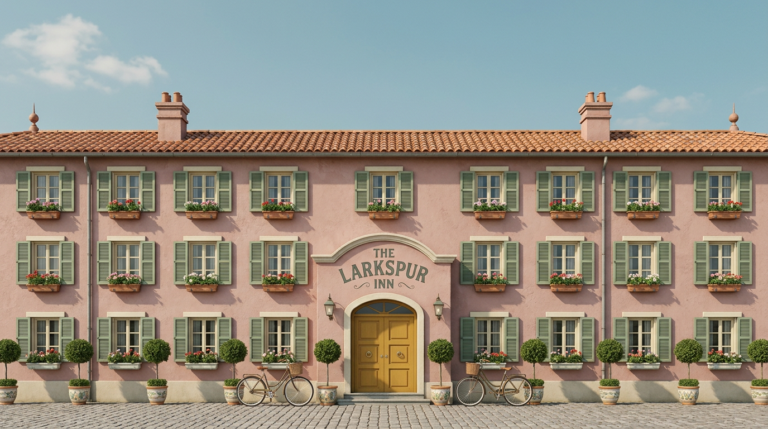
Discover the best Wes Anderson-inspired LUTs on Envato and learn how to recreate his iconic pastel palettes, warm colors, and storybook aesthetic.

Learn the difference between color grading and LUTs, when to use each, and why professional video editors combine both for faster, better-looking results.

