
AI sound generator guide: How to create sound effects with AI
Discover how Envato's AI sound generator creates custom sound effects from text prompts so creators can skip library searches and edit faster.
Envato: Get every type of asset for any type of project, and access to AI tools. Start now
The creative behavior behind every piece of work that went from 'close' to 'exactly right.'
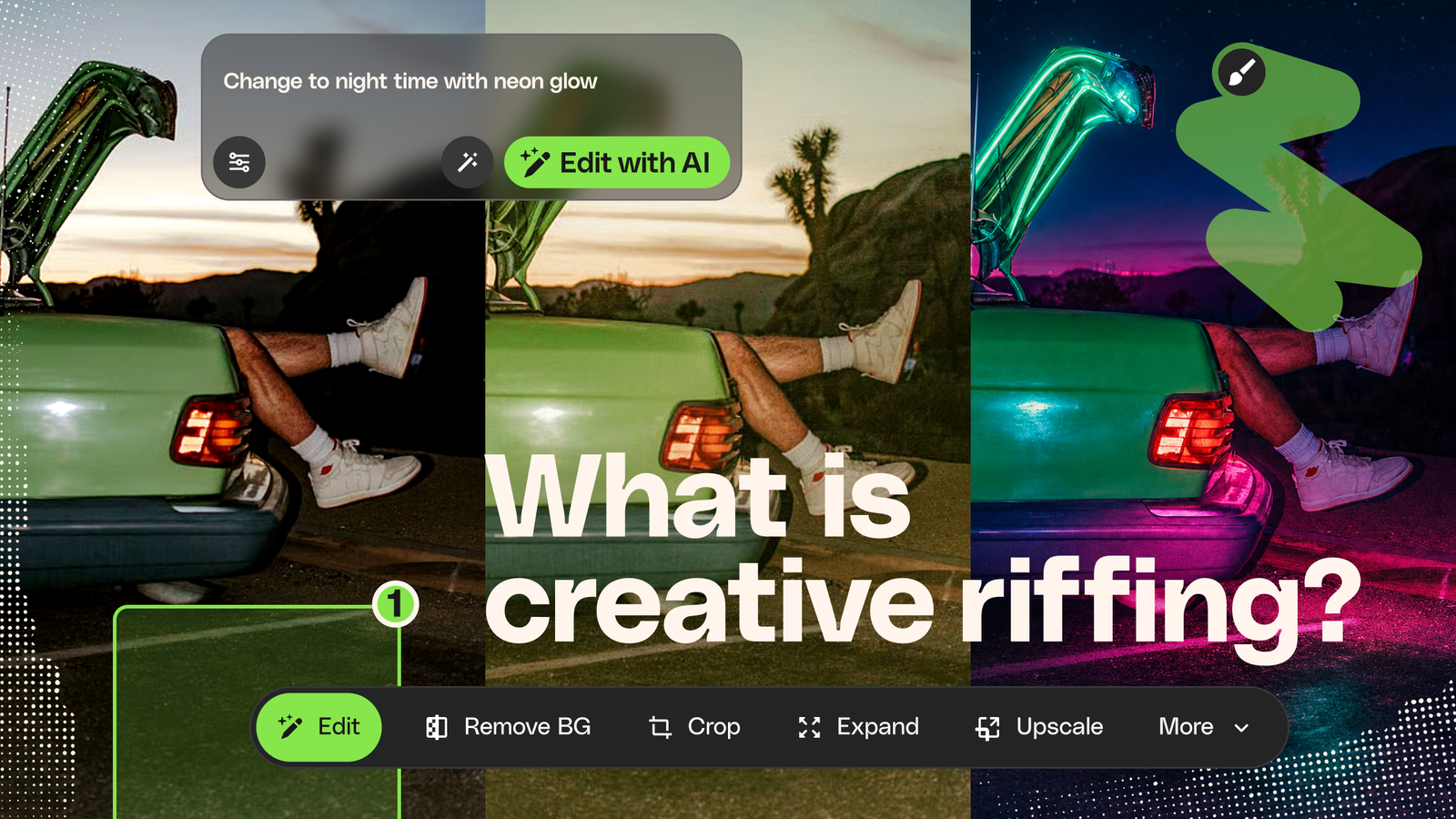
You can see it. The finished piece — right there in your head. The composition, the mood, the way the light should fall. You know exactly what it looks like.
Now you just have to get it out.
So you pull a stock image that’s in the neighborhood. Right subject, wrong atmosphere. You shift the color grade. Cooler. No — warmer. You strip the background and drop in something that actually fits the brief. You nudge the lighting until it stops feeling like a library asset and starts feeling like yours.
One more pass. And another. And then — there it is. That moment where the thing on screen finally matches the thing in your head.
Every creative pro knows that moment. And every creative pro knows the process that gets you there: starting with something that has potential, then pushing, adjusting, and evolving it through round after round of deliberate, directed changes until it’s right.
That process is creative riffing. It’s not new — creatives have been doing it across every discipline for as long as the work has existed. But the tools for doing it are changing fast, and understanding how to build your workflow around creative riffing is the difference between spending your hours searching and spending them creating.
Creative riffing is starting with something that has potential — a stock image, a video clip, a design template, an AI-generated concept — then pushing, adjusting, and evolving it until it’s right. You make a change, react to what it gives you, then go again. Sometimes you know exactly where you’re headed. Sometimes the riffing itself is how you find out. Either way, every change is deliberate, every decision is yours, and every pass brings the work closer to the finished piece — whether that finish was in your head from the start or revealed itself along the way.
Creative riffing isn’t random experimentation. But it’s not a straight line to a predetermined result, either.
Sometimes you know exactly what you’re after — the image is in your head, fully formed, and you’re closing the gap between that mental picture and the screen. Other times you start with a feeling, a direction, a half-formed instinct, and the riffing itself is how you figure out what the finished piece wants to be. Both are valid. Both are riffing.
What makes it creative riffing rather than just tinkering is the intent behind each change. You shift the color grade because something about the warmth isn’t landing. You strip the background because it’s competing with the subject. You try a completely different composition because version three sparked an idea version one never would have. Every riff is a decision — and every decision reflects your taste, your judgment, your sense of what this particular project needs.
Think about how it actually plays out. A graphic designer pulls references, finds a template that captures the general direction, then starts pushing — adjusting typography, shifting the palette, swapping elements. Somewhere around the fourth or fifth riff, something clicks that wasn’t in the original brief. That unexpected direction? That’s the piece. The raw material changed, but the creative judgment driving the changes made it theirs.
Or take video. You’re cutting a brand piece and you’ve found footage that works — the motion is right, the composition is solid — but the color temperature reads too clinical for the warmth the brand needs. So you grade it, reframe it, extend the clip by a second so the timing lands on the beat. You didn’t generate that footage from nothing. You riffed on it until it worked.
Creative riffing sits at the intersection of taste and tools. The taste — knowing when something’s not right, recognizing when it is, staying open to the surprises in between — that’s yours. The tools handle the speed.
The word borrows from music, where riffing has meant improvisation on a theme for over a century. The riff itself traces back to early African-American gospel and blues — short, repeated, chant-like melodic fragments that evolved through jazz into something foundational. Jazz musicians take a melody and reinterpret it with every performance. Blues guitarists bend the same pentatonic scale into something unmistakably personal. Hip-hop producers sample, chop, and rebuild until a borrowed loop becomes something entirely new.
The same principle runs through every visual and digital discipline. Collage artists reassemble found materials into original compositions. Film editors restructure entire performances in the cut. Designers iterate on layout after layout, refining spacing and hierarchy until the page does what it’s supposed to do.
None of this is new. What’s new is how fast creative riffing can happen. Tools that once required hours of manual adjustment now let you cycle through multiple directions in minutes — more iterations per session, more chances to explore, more room for the happy accidents that turn a decent piece into a great one.
There’s no rigid formula. Part of what makes it powerful is the flexibility. But most creative riffs share a recognizable rhythm.
It starts with a foundation. A stock photo, a video clip, a design template, an AI-generated rough concept. The medium doesn’t matter. What matters is that you’re not staring at a blank page. You’re starting from something with potential — something to react to.
Then you make a move. You shift the color temperature. You strip a distracting element. You change the aspect ratio. You try something you weren’t planning to try because the previous version put an idea in your head that didn’t exist before you started. Creative work rarely arrives fully formed — it evolves through small experiments, unexpected discoveries, and better ideas that only emerge once you’re in motion.
Then the part that separates riffing from button-pushing: you react. Does this feel closer to what you’re after? Further away? Interesting in a direction you hadn’t considered? That question — and the instinct that answers it — is the part no tool replaces.
And you go again. Sometimes two riffs get you there. Sometimes a dozen. Sometimes the sixth riff takes the whole thing sideways and you realize that’s actually the piece. The count doesn’t matter. Each pass builds on the last, and each one teaches you something about what the finished work wants to be.
There’s a tempting assumption in conversations about AI that the future of creative work is generation — type a prompt, get a result, ship it. But that assumption misunderstands how most creative professionals actually work.
The problem was never a lack of raw material. The real friction lives in the gap between a starting point and a finished piece — and creative riffing is what closes it. Not by getting you to a predetermined answer faster, but by giving you the space to discover what the answer actually is.
This is also why your starting point matters so much. A strong stock asset — well-composed, well-lit, professionally produced — gives you something worth reacting to. It’s the difference between riffing on a solid foundation and trying to coax something out of nothing. The better the starting material, the more interesting places the riffing can take you.
Stock and AI play different but complementary roles in the riffing process. Together, they’re where the momentum comes from.
Stock gives you the starting point — the professionally shot photograph, the polished template, the well-produced video clip. These are the raw materials that make the first riff possible, and quality here shapes everything that follows.
AI accelerates the iteration itself. Where you might have spent 20 minutes manually masking a background, an AI tool handles it in seconds. But the real shift isn’t just saved time — it’s what that speed does to the way you work. When each riff takes seconds instead of minutes, you explore more freely. You chase directions you wouldn’t have committed to with a slower process. You push the work into territory you didn’t expect.
Envato brings both sides together — and the new AI experience takes that further by making every output the starting point for the next riff. Generate an image, then use it as the reference for a video. Riff on that video’s tone with AI-generated music. Build variations for social without rebuilding context from scratch. Instead of jumping between disconnected tools and losing momentum every time your idea evolves, the whole process stays connected.
Find a stock image, then use Envato’s AI image editor to remove objects, swap backgrounds, adjust lighting, or generate variations — directly in the browser, without downloading the file or switching apps. Working with video? Start with footage from the catalog and use Envato’s AI video generator to extend clips, shift the tone, or riff on the original until it matches your edit.
For a detailed look at how each tool fits into different types of creative work, the Envato AI tools guide walks through the full range of workflows.
That combination — the world’s broadest catalog of stock as the foundation, with AI tools built into the same experience for iteration — is what makes creative riffing practical at the pace commercial work actually demands.
Start with something great. Riff on it until it’s right.
It’s the process of starting with an existing asset — a stock image, video clip, or template — and making deliberate, directed changes until it matches your creative vision and project brief.
No. Creatives have been riffing in Photoshop, Premiere, Figma, and every other tool for years. AI just makes each iteration faster, which means more creative directions explored in less time.
It depends on how close the starting point is to your vision. Some pieces land after two or three adjustments, others take a dozen. What matters is that each riff brings you closer.
They overlap, but creative riffing is brief-driven and outcome-driven — you’re evolving a starting point toward a specific project vision, not producing an alternate version for its own sake.
Editing implies correction. Creative riffing is more directional — you’re not fixing flaws, you’re evolving a starting point toward a specific vision through multiple rounds of intentional creative changes.
It’s one of the most practical applications. A quality stock asset gives you a strong foundation you can shape with editing tools or AI to match your specific brief, brand, or style.
Envato’s AI image editor lets you riff on stock photos directly in the browser — removing objects, swapping backgrounds, adjusting lighting, generating variations. Envato’s AI video generator does the same for footage. Both work alongside the full stock catalog.
Discover how Envato's AI sound generator creates custom sound effects from text prompts so creators can skip library searches and edit faster.

We tested 9 AI image generators on identical artistic prompts (same style-transfer task, same day) to see which one actually paints like an artist.
AI isn't making full movies yet; it's reshaping VFX, editing, and dubbing. Here's where it helps filmmakers today, and where it doesn't.
A practical, step-by-step guide to making a short AI film — from script and shot lists to character consistency, voice, sound, editing, cost, and legal rules.

