Envato: Get every type of asset for any type of project, and access to AI tools. Start now

AI graphic design tools and techniques—how to harness AI for design

Discover how AI is transforming graphic design—boosting creativity, automating tedious tasks, and enhancing precision.

Miss Chatz 13min read
AI graphic design

Generative AI has changed graphic design. But not in the way many predicted. It hasn’t replaced human creativity. Instead, it has deepened it. For decades, the creative process followed a linear path: stare at the white screen, sketch thumbnails, dig through asset libraries, and manually stitch elements together over hours of technical labor. It was a workflow defined by boundaries, where execution time often restricted the sheer volume of creative ideas an author could explore.

Today, those boundaries are dissolving. The introduction of generative AI into the creative space isn’t just an upgrade to our existing toolsets; it’s a fundamental transformation of creative methodology. By marrying the rapid capabilities of generative tools with the technical precision of curated assets, a new framework has emerged: the hybrid workflow. Rather than replacing human creativity, AI helps people become more creative.

This shift is super handy for narrative-driven design work, where AI helps whip up quick prototypes for complex stories. Designers can use image generation to quickly sketch out visual story arcs, check whether characters look consistent across different frames, and map out how a campaign will hit emotionally before settling on the final production. By speeding up the way they visualize a story, creators can play around with a bunch of ideas, making sure the main plot stays solid at every stage of the project.

This article looks closer at AI tools for graphic design and how AI impacts the graphic design industry, how you can use it to boost productivity, and which tools will help you get the most out of it. We will explore how AI can help with creative tasks, storytelling, and process follow-through. Additionally, we will highlight Envato’s growing AI ecosystem, which combines AI tools with unlimited creative resources in a single subscription.

Understanding AI for graphic design

Using AI in graphic design isn’t a new concept. For years, tools like Photoshop have included AI-powered features, such as the curvature pen tool, which allows you to draw, push, and pull path segments for easy modification. Today’s design tools are more advanced. For example, the latest Adobe Photoshop has a Generative Fill feature. This lets you remove parts of an image just by typing a text prompt, eliminating the need to manually adjust anchor points. 

Tools like Figma have team-friendly AI features that let multiple people work on the same project. They can give real-time feedback and make edits without having to go back and forth. Even simple tasks, like reshaping or tracing an image, get faster with AI—Adobe Photoshop’s Sensei AI. Other features like auto-enhance, auto-blur, and content-aware fill save time, helping you focus on the creative parts. Plus, tools like Shopify’s AI or Looka can help you come up with names or branding ideas when needed.

There is much more to explore, such as:

  • Generative Adversarial Networks (GANs) for design: These learning algorithms use two neural networks to make new, realistic data from an original dataset. Tools like Dall-E use these algorithms to create unique images, which can be great for backgrounds or design elements in your templates.
  • Analytical algorithms for suggestive design: You may already know about ChatGPT, a conversational assistant. Now, new design tools are using similar technology to offer design suggestions right in the app. These tools analyze your work closely and help you be more productive by providing smart ideas and improvements as you create.
  • Machine learning for text-to-response design features: Machine learning helps design systems respond intelligently to your input. For example, Illustrator’s generative recolor feature lets you give a text prompt, and then explore different color palettes until you find the one you like. You can also ask the AI to create a colorful scheme based on specific data.
Logos for DALL·E, ChatGPT, and DeepArt. on a white background.
Logos of prominent AI tools: DALL·E, ChatGPT, and DeepArt.

Deep learning tools like Envato’s GraphicsGen, DALL-E, Midjourney, and Stable Diffusion use large neural networks that learn from many images and texts. They don’t understand good design like humans do. Instead, they predict what visuals often come from a given description.

This ability to predict is very helpful in several ways: it allows for rapid idea generation (making concepts in seconds), stylistic exploration (showing how an idea might look in different styles), reference generation (creating custom mood-board images instead of searching for imperfect stock photos), and speeding up production (handling things like resizing, background removal, and color changes). Each of these features addresses real challenges in a designer’s workflow.

AI’s impact on graphic design

Graphic design can be a massive time sink. Between ideating, sketching, and endless revisions, complex projects like logos can easily take weeks or even months, like design agency Stellen, which spends up to three months perfecting a single logo. That’s where AI swoops in to save the day.

Platforms like Figma feature collaborative AI that lets teams edit and give real-time feedback without the endless email threads. Even the most boring tasks get a major speed boost: Adobe Photoshop’s Sensei AI can handle tedious image tracing or reshaping in just a couple of clicks. With handy shortcuts like auto-enhance, auto-blur, and content-aware fill handling the heavy lifting, you can actually focus on the fun, creative stuff. Need a quick brainstorming partner? Tools like Looka or Shopify’s AI can help you come up with names or branding ideas when needed.

Generative AI offers immediate benefits, such as saving time and reducing production costs. However, its long-term effects suggest that the design profession is changing fundamentally. As more tasks become automated, skills such as crafting precise prompts and providing creative direction are becoming essential for designers. Today’s designer is shifting from focusing solely on manual work to taking on a strategic role as a director and curator. They guide AI tools to explore creative options, assess the results with a trained eye, and refine those results into strong visual stories. In the end, AI is not reducing the designer’s value; instead, it is enhancing their role from a task completer to a high-level visionary.

Enhanced creativity and precision

Every designer knows the struggle of hitting a creative block, just staring at the screen, hoping for that brilliant idea to hit. It can be so frustrating and take up way more time than it should. Sure, scrolling through Pinterest or some other design sites can sometimes spark a bit of inspiration, but it’s pretty hit-or-miss. Plus, critiquing your own work can be really tough without any bias.

That’s where AI comes in handy. The best workflows combine both stock images and AI techniques. For example, a creative person might start with a stock photo from Envato’s library of over 27 million assets. They can then edit the photo using AI tools, generate new elements with an AI image generator, and put everything together in Photoshop. This mixed approach offers the reliability and quality of stock images while also providing the customization and uniqueness of generative AI.

With Envato, you can search the stock library, create AI visuals, and edit them, all in one place. Start with an image from Envato’s stock photos, then enhance it using AI editing tools without leaving the platform. You can whip up a bunch of design suggestions that fit your needs in no time. Also, you have tools like Khroma and Colormind that can help you find great color combos, while Dall-E can create some eye-catching images that might just be the missing piece for your design.

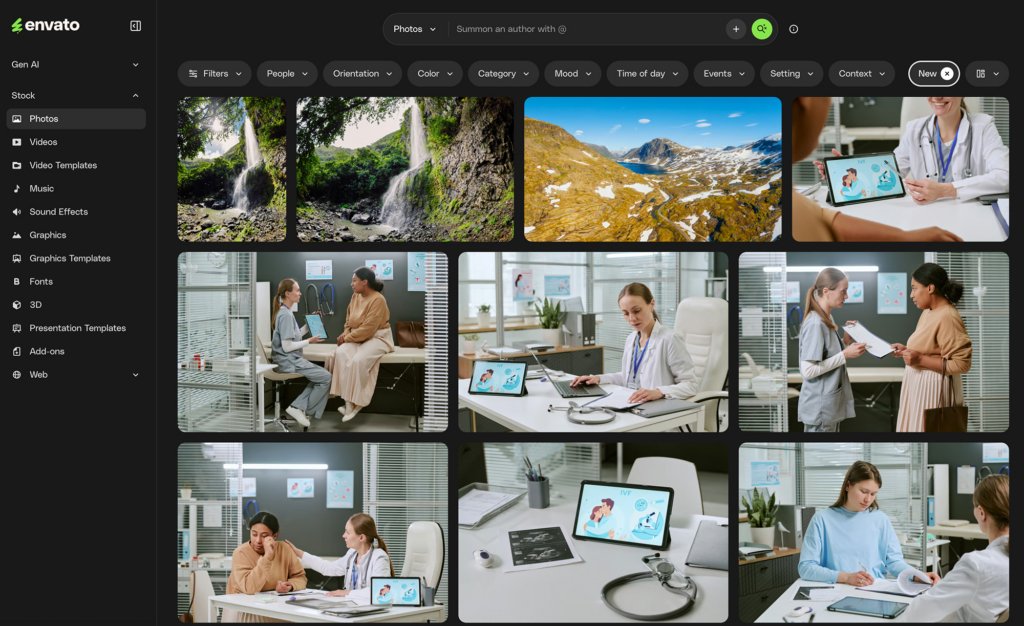
A screenshot of the Envato stock photo platform with a dark theme, showing a sidebar menu, search bar with filters, and a grid of nine diverse images including waterfalls, mountains, and medical consultation scenes with IVF illustrations.
Explore a wide range of stock photos on Envato’s dark-themed platform, from stunning nature landscapes to medical consultation scenes, including IVF-themed imagery.

Cost-effectiveness

Let’s talk about money. Graphic designers usually earn about $22 an hour, which adds up to more than $70,000 a year. If you need to hire several designers, those costs can increase quickly.

Freelancers also face costs for design tools, whether they buy them or subscribe to services. AI tools can be a cheaper option. They help companies work more efficiently with fewer people and allow designers to save time by automating repetitive tasks.

Must-have AI-powered tools for designers

There are plenty of AI tools to choose from. Some of the top picks include:

  • ChatGPT for generating text and design briefs, and critiquing your designs.
  • Looka for designing logos with its generative algorithms.
  • Fontjoy for pairing fonts harmoniously using machine learning.
  • Khroma for experimenting with color palettes.
  • Artbreeder for blending images and creating unique visuals.
Four logos on a white background: Looka, an abstract F/E shape, Khroma, and Artbreeder.
A collection of four distinct logos: Looka, an abstract F/E shape, Khroma, and Artbreeder, displayed on a white background.

How to get the most out of AI for design

Having all these AI tools is great, but using them efficiently is the real key. Here are a few tips:

Leverage AI, but don’t rely on it completely: AI is great for generating ideas and assisting in your process, but the final decision-making should always be yours. Let AI be your creative sidekick, not the lead.

Identify repetitive tasks: Figure out which parts of your workflow are repetitive or time-consuming. Tools like Photoshop and Envato ImageEdit can automate tasks like background removal or image resizing, saving you valuable time.

Choose the right tools: To make your work easier, choose platforms that have all-in-one features. If you need specific tools, integrate them effectively into your process.

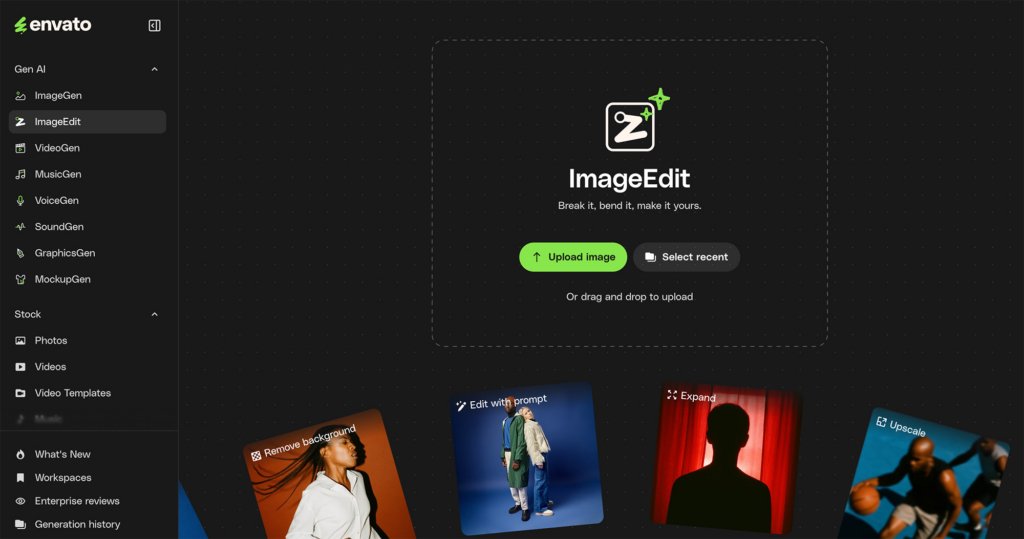
Screenshot of the Envato ImageEdit interface, showing options to upload or drag and drop images, along with feature cards for removing backgrounds, editing with prompts, expanding, and upscaling.
Explore Envato’s ImageEdit feature: upload, drag and drop, or use AI tools like ‘Remove background’, ‘Edit with prompt’, ‘Expand’, and ‘Upscale’ to transform your images.

Using AI for Creative Brainstorming and Story Ideas

Before starting a project, many designers now use AI to help generate ideas. Instead of waiting for one final concept, creatives can quickly produce prompts, themes, campaign ideas, taglines, mood variations, and story concepts in just a few minutes. This lets designers explore more possibilities early on, revealing new visual ideas or storytelling angles that might not come up with traditional brainstorming.

AI is especially helpful during the concept development stage of branding, advertising, and social media campaigns. Designers can test different emotional directions, try various audience tones, or create rough story structures before they spend time on final production. Rather than replacing creativity, AI serves as an idea booster, helping turn vague thoughts into clear starting points that teams can work on together.

AI for Visual Exploration and Style References


AI tools are changing how designers explore visual styles and ideas. Instead of searching for references across many platforms, designers can quickly create different designs, lighting effects, color schemes, font combinations, and artistic directions based on a project brief. This leads to faster feedback between inspiration and actual work.

For example, a designer working on a sci-fi campaign can generate various style options, like cinematic, retro-futurist, minimalist, or hyper-real, before choosing one to develop further. These generated ideas can then be combined with selected assets, photos, templates, and illustrations to create a complete design system. In mixed workflows, AI helps broaden creative possibilities before the final details are refined, rather than producing finished work instantly.

Building a Hybrid Workflow: AI + Unlimited Assets

The most powerful creative workflow in 2026 isn’t AI or assets, it’s AI and assets. Envato’s subscription model is built for exactly this hybrid approach. For $16.50/month (annual billing), you get:

  • Unlimited downloads from 27+ million assets: stock photos, video footage, fonts, graphic templates, UI kits, audio tracks, 3D files, and After Effects templates
  • Built-in AI tools: ImageGen, GraphicsGen, AI Video Generator, and more
  • Lifetime commercial license for everything you download and generate
  • AI video generation is integrated directly into the same environment as stock search and AI image tools

This hybrid model matters because different parts of a project need different things. Need a realistic product photo of a specific object in a specific setting? Stock might be faster and more reliable. Need an impossible scene, like a cat riding a hoverboard through a surrealist landscape? That’s AI’s moment.

A hybrid workflow example:

  1. Brainstorm with Claude or ChatGPT to develop story concepts
  2. Generate initial visual directions with ImageGen
  3. Search Envato’s stock library for reference imagery and base assets
  4. Refine using AI editing tools and GraphicsGen for custom elements
  5. Composite everything using your preferred design software
  6. Animate selected frames with AI Video Generator, using generated images as a reference

Envato’s AI Tools: Built for Real Creative Work

Envato is developing a generative AI suite for professional creative work. This suite is not just for experimentation. Here’s what subscribers can access:

Envato ImageGen

A text-to-image generator that creates up to three images from a single prompt, with automatic multi-model routing in the background. You don’t need to be a prompt engineer. Just describe what you want, and ImageGen handles the rest. Use cases include concept art, character design, storyboarding, and creative exploration. Try this:

Full-body character design of a retro-futuristic woman fighting dragons, hyper-detailed cyberpunk armor, neon-noir aesthetic, high contrast” can spark totally original character designs for branding, animation, or games.

Screenshot of Envato's AI image generation interface displaying six cyberpunk-style images of women fighting dragons in neon cities, with prompt input and navigation.
Envato’s AI image generation platform showcases stunning cyberpunk warrior designs battling dragons in neon-lit cityscapes, generated from detailed prompts.

Envato GraphicsGen

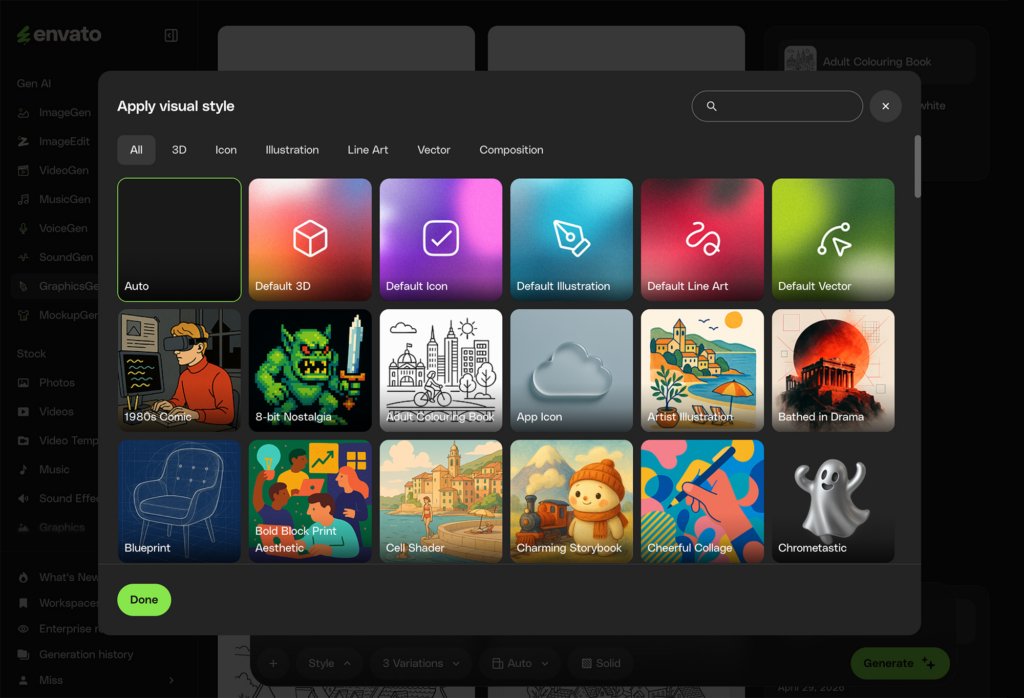
An AI graphics generator creates icons, vectors, illustrations, and branded visuals. It includes over 100 different art styles, like flat blueprints and 8-bit designs. You can select a style, such as “Charming Storybook,” and then add a prompt, like “A cozy cottage kitchen illustration, a friendly little bear baking a pie, warm golden sunlight streaming through a window, soft textures, pastel color palette, crisp vector outline, publishing quality” and generate a commercial-ready PNG in seconds.

A screenshot of the Envato AI interface displaying a 'Apply visual style' modal with a grid of various art styles like '1980s Comic', '8-bit Nostalgia', 'App Icon', and 'Charming Storybook'. The 'Auto' style is highlighted, and a 'Done' button is visible.
Explore a wide array of visual styles for your AI-generated content on Envato, from ‘8-bit Nostalgia’ to ‘Charming Storybook’ and ‘Chrometastic’.

Envato AI Video Generator

Envato has added an AI video generator to its platform. This new tool works alongside stock search, image generation, and editing. You can create multiple videos at once, add dialogue or voiceovers easily, and use images from ImageGen as reference frames in AI Video Generator. It supports several models, including Google’s Veo 3.1, ByteDance’s Seedance 2.0, and MiniMax’s Hailuo 02.

Screenshot of Envato's AI Video Generator AI interface, showing navigation, example images, and input fields for generating video from text descriptions.
Explore Envato’s AI Video Generator, an AI-powered tool to transform ideas into captivating video moments. Describe your vision and let AI bring it to life!

Workspaces and Generation History

All your AI creations are saved in Generation History; a single place to revisit, refine, or repurpose past work. You can save generations to Workspaces to stay organized across projects.

What’s new in 2026

Envato moves fast. Recent updates include:

  • Seedance 2.0 on AI Video Generator, with a more authentic feel, improved text rendering, realistic physics, and better camera movement
  • Luma Ray 3.14, 4x faster with improved prompt adherence
  • Font previews before downloading, with on-site testing of different weights and sizes
  • Author search using @name to find work from favorite creators

Use AI to enhance your creative workflow today!

AI has revolutionized graphic design, making it easier and more efficient than ever before. By automating repetitive tasks and offering creative suggestions, AI tools can help you boost productivity and enhance your designs. Just remember, it’s a tool to support your work—not to replace your creativity. Learn more in our post on the dangers and potential of AI for creatives.

Related Posts

DesignNew

The return of the brand mascot (and how to create your own)

Football teams have them. Your local diner probably has one. Mascots are ever-present, but have rarely taken center stage in mainstream branding over the past decade. That’s all set to change as major brands launch an army of fresh mascot designs, vying to win over our hearts and wallets. In 2026, your brand isn’t really […]

Grace Fussell 12min read