
How to edit with AI using Envato stock photos
Learn how to edit with AI on Envato stock photos, customizing images instantly by removing objects, changing backgrounds, and creating polished visuals without leaving the platform.
Envato: Get every type of asset for any type of project, and access to AI tools. Start now
Explore how Envato GraphicsGen works as an AI graphics generator for creating icons, vectors, illustrations, and branded visuals with better prompts, flexible workflows, and commercial-ready licensing.

Finding the right AI graphics generator used to mean choosing between speed, quality, usability, and licensing confidence. Some tools were great for experimentation but clunky for production, others created impressive images but left teams unsure how to refine, organize, or use them for commercial work.
In this AI graphics generator guide, we’ll explain what an AI graphics generator is, how Envato GraphicsGen works, what makes it different, how licensing applies, and how to get stronger results with better prompting. You’ll also find tables, comparisons, and reusable prompt examples throughout, from early-stage sketching and concept art to fully polished marketing visuals.
Envato GraphicsGen is an AI graphics generator built for creatives who need fast, polished visuals for marketing, branding, social content, and design exploration. It combines prompt-based generation, built-in styles, quick editing, and automatic model selection into a single workflow, so you can go from idea to a usable asset faster. Generated graphics also come with commercial-use clarity, making GraphicsGen a practical choice for professional and client work.
An AI graphics generator is a tool that creates original visuals from text prompts, reference images, style instructions, or edit commands. Instead of starting every design from scratch, you can describe what you want and generate multiple creative directions in seconds. Modern image generation tools interpret language, composition, lighting, subject matter, and mood to produce visuals that can support real creative workflows.
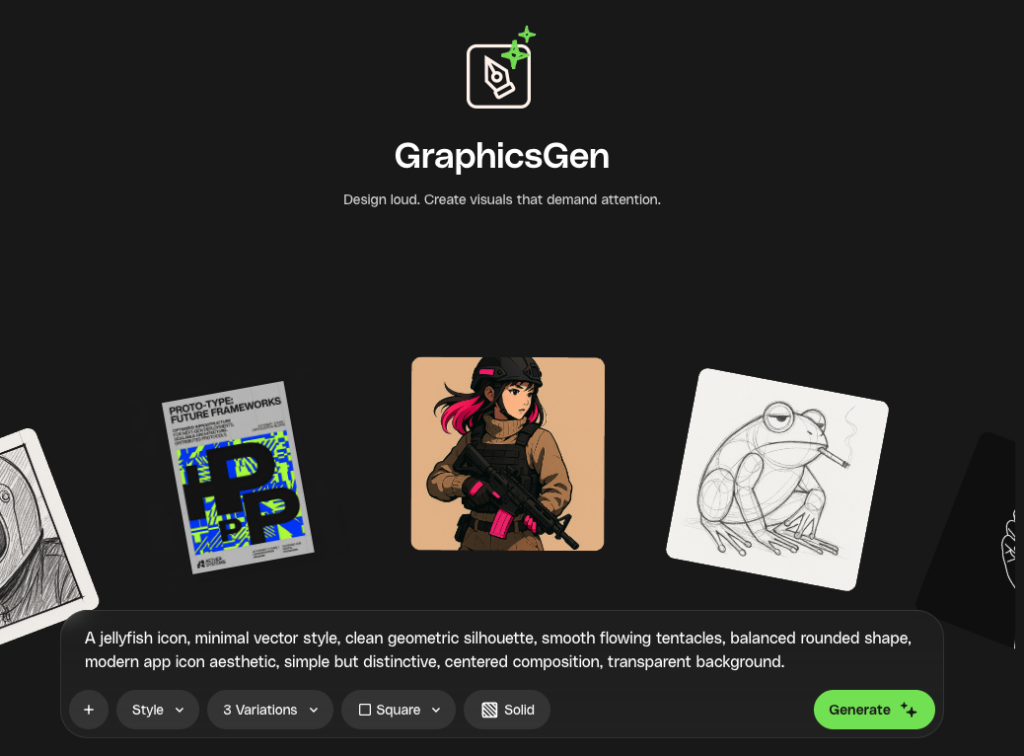
For creatives and designers, an AI graphics generator can help speed up:
That makes an AI graphics generator especially useful when speed and iteration matter.
Envato GraphicsGen is Envato’s AI graphics generator, designed to help you create high-quality visuals from prompts and reference images inside the Envato experience. The product supports prompt-based generation, built-in styles, editing workflows, and connections to adjacent Envato AI tools.
A major advantage is that GraphicsGen does not force you to choose one single image model or manage multiple subscriptions elsewhere. Instead, it uses a multi-model approach and routes prompts to the best engine for the task in the background. That makes the experience feel simpler while still improving the quality and flexibility of results.
Not every tool is designed for professional creative work. Some AI graphics generators are optimized for novelty or experimentation. Envato GraphicsGen is positioned differently: it is built for real workflows, from ideation to refinement to production use. The reference highlights automatic model orchestration, built-in styles, integrated editing, and commercial-use clarity as key points of difference.
| Advantage | What it means | Why it matters |
| Automatic model selection | Prompts are routed to the most suitable engine in the background | Users can focus on creative direction instead of technical model choices |
| Built-in styles | Preset aesthetics help guide the output | Faster ideation and more consistent visuals |
| Quick edits | Small refinements can be made directly on generated results | Less restarting, more iteration |
| Integrated editing | Assets can move into deeper editing workflows | Better suited to real project delivery |
| Production-ready output | Supports realistic, illustrative, editorial, and branded visuals | More useful for marketing and client work |
| Commercial-use clarity | Generated visuals are positioned for professional use | Reduces friction and uncertainty |
For teams evaluating an AI graphics generator, these workflow benefits matter just as much as raw output quality.
One of the most relevant features is that GraphicsGen is model-agnostic. It uses multiple AI image models behind the scenes and automatically routes prompts to the one best suited for the request.
That matters because different creative tasks call for different strengths. A product render might need realistic lighting and material detail. A layout concept might need stronger composition. A branded scene might need tighter instruction following. A reference-based request may depend on better fidelity and consistency.
GraphicsGen simplifies that process by handling the routing automatically, so you can stay focused on the creative brief rather than technical trade-offs. You can work from text prompts, upload reference images, choose styles, set aspect ratios, and generate several variations at once before refining results with quick edits or deeper editing workflows.
Envato GraphicsGen combines several features that make it practical for day-to-day creative work.

| Feature | Description | Why it matters |
| Multi-model generation | Routes prompts across multiple engines | Balances speed, realism, typography, and reference fidelity |
| Variations | Generates multiple options from a single prompt | Helps compare creative directions fast |
| Aspect ratio controls | Supports square, portrait, and landscape formats | Makes outputs easier to use across channels |
| Quick edits | Allows in-place prompt-based refinements | Improves near-miss outputs without a full restart |
| Integrated editing | Extends the workflow into deeper AI editing | Useful for cleanup, expansion, and replacement |
| Predefined styles | Offers stylistic presets | Speeds up prompting and improves visual consistency |
| Send-to-video workflow | Connects still images to motion workflows | Expands one visual concept into richer storytelling |
| Commercial-use clarity | Supports professional usage | Makes adoption easier for client and marketing projects |
These capabilities are why GraphicsGen feels like an AI graphics generator meant for production, not just experimentation.
If you are comparing tools, this side-by-side view helps show where GraphicsGen fits.
| Criteria | Envato GraphicsGen | Basic AI graphics generator |
| Model selection | Automatic, behind the scenes | Often manual or limited |
| Workflow | Generate, refine, and edit in one environment | Frequently fragmented across tools |
| Styles | Built-in presets | Often inconsistent |
| Editing | Quick edits plus deeper editing workflows | May be limited or separate |
| Commercial confidence | Commercial-use clarity emphasized | Licensing can be unclear |
| Ease of use | Designed for creatives | Sometimes requires more technical model knowledge |
| Best fit | Production workflows | Exploration and one-off generation |
Envato’s AI graphics generator is especially useful for people who think visually and need to move quickly: designers, creatives, and teams that want a simple interface for generating and refining visuals without managing a complex tool stack.
That includes:
Getting started with Envato GraphicsGen is straightforward once you know the flow. Here’s a step-by-step walkthrough to help you move from prompt to polished result.
Start with prompting the essentials: subject, style, composition, and mood. Strong prompts are descriptive without becoming overloaded.

Pick a preset style when it helps define the visual treatment, then choose the format that matches your output needs.

| Aspect ratio | Best use |
| Square | Social posts and general digital graphics |
| Portrait | Mobile-first content, vertical promos, stories |
| Landscape | Presentation visuals, website banners, hero sections |
Create multiple options at once to compare interpretations quickly.

Use quick edits for small improvements or deeper editing workflows for more substantial changes such as replacing elements or expanding composition.

Once the image is working, use it in design assets, campaigns, or downstream content workflows.

GraphicsGen can be useful before the final design stage. Instead of jumping straight into polished visuals, you can use it to sketch ideas, test directions, and develop concepts more quickly. This works especially well for wireframes, character concepts, storyboard frames, and early layout exploration.
Use GraphicsGen in four steps:
Using GraphicsGen this way helps you move from rough idea to final visual in a more structured and efficient workflow.
Strong prompts help GraphicsGen create better visuals faster. This gives GraphicsGen clear creative direction and improves the chances of getting a graphic that feels polished, relevant, and ready to refine.
Prompt quality directly impacts output quality. This prompting guide for designers recommends clarity, specificity, and iteration over overly long or cluttered instructions.
A strong AI graphics prompt usually includes:
| Prompt element | What to define | Example |
| Subject | What should appear in the image | “a luxury perfume bottle” |
| Style | The visual treatment | “high-end editorial advertising style” |
| Composition | Layout or framing | “centered with negative space” |
| Lighting | The atmosphere and visual realism | “soft glow with studio lighting” |
| Mood | The emotional direction | “premium, elegant, futuristic” |
| Use case | Where the graphic will be used | “homepage hero banner” |
Use this structure:
[subject] + [style] + [composition] + [lighting] + [mood] + [output context]
This works well because it tells GraphicsGen exactly what to create, how it should look, and what it needs to work for.
A premium skincare bottle, minimalist editorial photography, centered composition, soft studio shadows, calming and modern mood, designed for a homepage hero graphic.

Here are polished versions optimized for an AI graphics generator audience.
Prompt: A minimal logo for a Japanese brand called Omakase, inspired by traditional Japanese hanko and seal stamps, clean circular composition, simple indigo stamp aesthetic, refined negative space, elegant and timeless, subtle handcrafted character, premium minimalist branding, balanced typography, authentic but modern.

Prompt: Vitamin C skincare infographic, modern editorial layout, citrus color palette, minimal icons, clean sections, beauty-brand style, text-friendly, polished, and easy to scan.

Prompt: A colorful poster for an alternative music festival in August 2026 at Union Park in Chicago, bold editorial layout with a large, clear headline area and strong space for lineup text, layered gritty textures, indie aesthetic, Y2K elements, modern typography feel, high contrast, balanced composition, poster-ready.

Prompt: A minimal and bold product packaging concept for a brand called Pali, Hawaii-inspired visual identity, strong oversized graphic shapes inspired by waves and sun, limited tropical color palette, bold contrast, simple geometric forms.

GraphicsGen is well-suited to advertising and social media because it can help teams move quickly from idea to asset. Instead of creating every concept from scratch, you can use it to explore layouts, visual styles, and campaign directions for paid ads, social content, and launch creative. It works especially well when you need multiple variations, text-friendly compositions, and visuals adapted for different formats.
AI graphics can help create fast-turn concepts for performance marketing and campaign testing.
| Use case | Example |
|---|---|
| Facebook and Instagram creatives | Scroll-stopping ad visuals with clear headline space, strong focal points, and mobile-friendly composition |
| Display banners | Wide-format ad concepts designed for web placements and campaign variations |
| Website ads | Branded promotional graphics for homepage banners, hero sections, and conversion-focused placements |
GraphicsGen is also useful for organic and promotional social content where speed, flexibility, and strong composition matter.
| Use case | Example |
|---|---|
| Carousels | Slide-based visuals with clean structure, repeatable style, and room for text overlays |
| Thumbnails | High-impact visuals for video, blog, or content previews with bold contrast and clear subjects |
| Campaign visuals | Branded assets for seasonal promotions, launches, and cross-channel creative systems |
| Launch concepts | Early visual directions for product drops, announcements, or multi-platform rollout ideas |
Here are a few prompt examples for advertising and social media workflows:
To get stronger results for ad and social outputs:
Used this way, GraphicsGen can help speed up concepting for ad campaigns, social content, and launch creative while keeping the workflow simple and flexible.
From bold 3D visuals to clean vector assets, Envato’s AI graphics generator is best used for design workflows. Here are some of the best use cases where GraphicsGen can add the most value.
| Use case | How GraphicsGen helps |
|---|---|
| 3D graphics | Create dimensional graphics, product-style visuals, isometric scenes, and bold campaign assets with more depth, lighting, and visual impact. |
| Icons | Generate clean, simple icon concepts for apps, UI kits, presentations, and branded systems, especially when you need fast variations and consistent visual direction. |
| Illustrations | Develop editorial visuals, branded campaign graphics, storytelling scenes, and concept-driven artwork in a wide range of styles. |
| Line art | Produce minimal, refined visuals with clean outlines and simple composition, useful for packaging, editorial layouts, wellness branding, and decorative assets. |
| Vector | Create bold, scalable graphic concepts with clean shapes and strong composition, making GraphicsGen useful for logos, branding systems, UI assets, and modern marketing visuals. |
Licensing is a major decision factor when choosing an AI graphics generator, especially for creatives, agencies, freelancers, and in-house teams.
Generated images are covered by a commercial license by default, meaning you can create visuals for client work, marketing campaigns, and personal projects without extra licensing friction during download. You can assign assets to projects later, manage licenses from your workspace, and create additional licenses if the same asset is used across multiple projects.
| Licensing detail | What it means |
| Commercial license by default | Generated assets are positioned for professional use |
| No project naming at download | Less friction during creation and export |
| License management options | Assets can be organized later by project or client |
| Additional licensing flexibility | The same asset can be licensed for multiple uses if needed |
That licensing clarity is one of the strongest practical advantages of Envato’s AI graphics generator.
AI can accelerate visual production, but it does not replace design judgment. The first output is not always the final one, and complex scenes or tightly controlled brand requirements may still need additional refinement.
That means the best approach is to use GraphicsGen as a creative assistant:
Envato GraphicsGen is more than a basic AI graphics generator. It is a workflow-oriented creative tool built for teams that need speed, flexibility, refinement options, and commercial confidence in one place. The combination of automatic model routing, built-in styles, integrated editing, and licensing clarity makes it a strong option for modern design and marketing work.
For anyone searching for an AI graphics generator that supports real creative production rather than just one-off experiments, GraphicsGen offers a compelling balance of usability and professional value.
An AI graphics generator is a tool that creates original visuals from prompts, references, and style instructions using generative AI.
Envato GraphicsGen uses multiple AI image models behind the scenes and routes each prompt to the model best suited for the task.
Its biggest differentiators are automatic model selection, built-in styles, integrated editing workflows, and commercial-use clarity.
Generated images are covered by a commercial license by default for professional and client work.
The best prompts clearly define the subject, style, composition, lighting, mood, and intended use case.
Yes. It is especially useful for campaign visuals, social graphics, moodboards, product imagery, and concept development.
GraphicsGen is well suited to advertising and social media because it can help teams move quickly from idea to asset. Instead of creating every concept from scratch, you can use it to explore layouts, visual styles, and campaign directions for paid ads, social content, and launch creative. It works especially well when you need multiple variations, text-friendly compositions, and visuals adapted for different formats.
AI graphics can help create fast-turn concepts for performance marketing and campaign testing.
| Use case | Example |
|---|---|
| Facebook and Instagram creatives | Scroll-stopping ad visuals with clear headline space, strong focal points, and mobile-friendly composition |
| Display banners | Wide-format ad concepts designed for web placements and campaign variations |
| Website ads | Branded promotional graphics for homepage banners, hero sections, and conversion-focused placements |
GraphicsGen is also useful for organic and promotional social content where speed, flexibility, and strong composition matter.
| Use case | Example |
|---|---|
| Carousels | Slide-based visuals with clean structure, repeatable style, and room for text overlays |
| Thumbnails | High-impact visuals for video, blog, or content previews with bold contrast and clear subjects |
| Campaign visuals | Branded assets for seasonal promotions, launches, and cross-channel creative systems |
| Launch concepts | Early visual directions for product drops, announcements, or multi-platform rollout ideas |
Here are a few prompt examples for advertising and social media workflows:
To get stronger results for ad and social outputs:
Used this way, GraphicsGen can help speed up concepting for ad campaigns, social content, and launch creative while keeping the workflow simple and flexible.
Learn how to edit with AI on Envato stock photos, customizing images instantly by removing objects, changing backgrounds, and creating polished visuals without leaving the platform.

Discover how Envato's AI sound generator creates custom sound effects from text prompts so creators can skip library searches and edit faster.
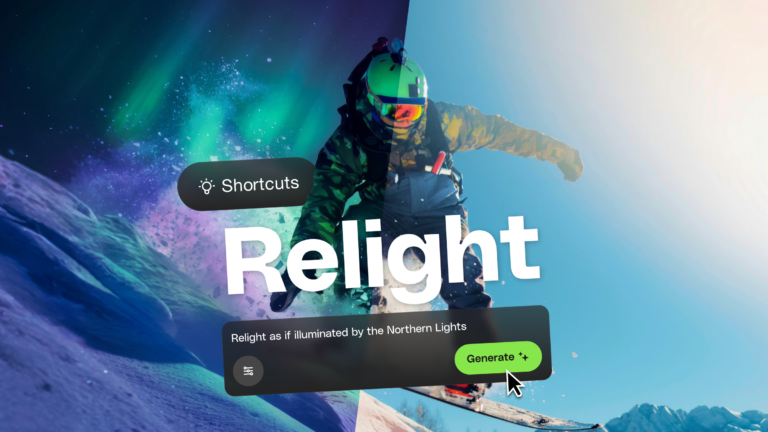
Learn how AI photo relighting works in Envato Shortcuts. Change lighting, mood, and shadows in seconds with guided AI workflows.

Discover how sonic branding AI tools help you create unique brand sounds, from audio logos to UI effects, and build a consistent, memorable sonic identity across platforms.

