How AI is transforming filmmaking today
AI isn't making full movies yet; it's reshaping VFX, editing, and dubbing. Here's where it helps filmmakers today, and where it doesn't.
Envato: Get every type of asset for any type of project, and access to AI tools. Start now
Learn how AI image animation works in Envato Shortcuts. Turn a photo into a video in minutes with guided AI workflows and realistic motion.
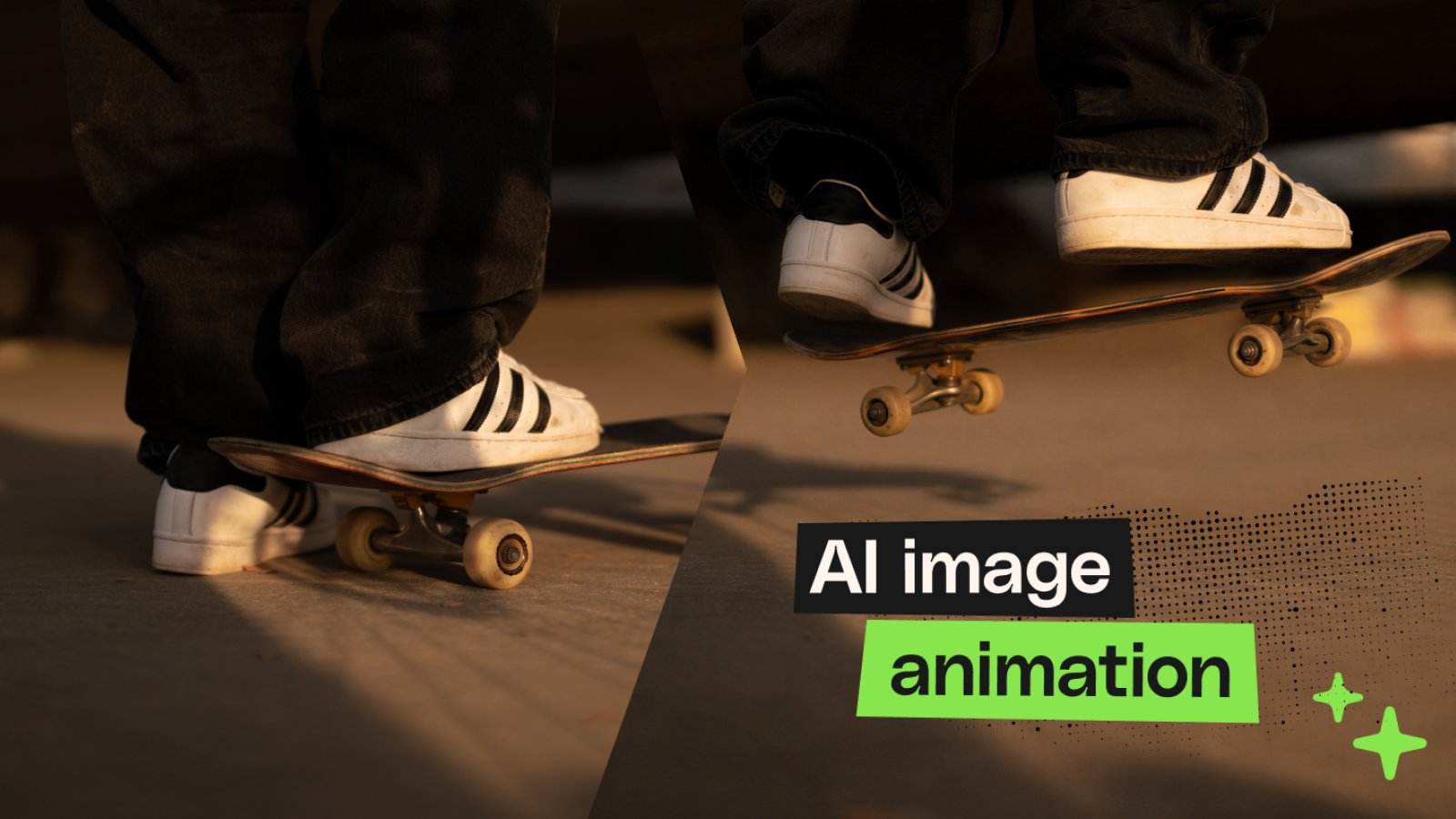
Every great image captures a moment.
But sometimes, one frame isn’t enough.
Whether you’ve created AI artwork, photographed a product, or captured the perfect travel shot, adding motion can completely change how people experience it. A gentle camera move, drifting clouds, rippling water, or subtle character movement can transform a static image into something that feels cinematic and alive.
Traditionally, creating those effects meant learning complex animation software or spending hours building keyframes by hand. Today, AI image animation makes that process dramatically faster.
With the Animate Image Shortcut in Envato’s AI Video Generator, you can turn a single image into a short AI-generated video in just a few steps. Upload an image, optionally describe the motion you’d like to see, choose your output settings, and let AI create natural-looking movement for you.
Whether you’re creating content for social media, bringing AI art to life, or testing creative ideas before a larger production, AI image animation helps you move from still image to video in minutes — not hours.
AI image animation uses generative AI to transform a still image into a short video with realistic movement.
With the Animate Image Shortcut in Envato Shortcuts, simply:
AI image animation is the process of using artificial intelligence to transform a still image into a moving video. Rather than manually animating every frame, AI analyses the image, predicts realistic movement, and generates natural camera motion, environmental effects, or subject animation to create a short video from a single photo or illustration.
Unlike traditional animation, you don’t need to understand timelines, keyframes, or motion paths. Instead, AI handles much of the technical work while you stay focused on the creative direction.
Envato’s video Shortcuts are guided creative AI workflows designed to simplify common video-creation tasks.
Rather than starting with an empty prompt and trying to describe every detail yourself, you choose a creative workflow that’s already designed for a specific outcome. Each Shortcut walks you through a streamlined interface, helping you achieve professional results without building complicated prompts from scratch.
Animate Image is one of several Shortcuts available inside Envato’s AI Video Generator.
Other Shortcuts are designed to help creators complete specific creative tasks more quickly, whether that’s generating B-roll, transforming existing visuals, or accelerating other AI-powered video workflows.
The goal isn’t to replace creativity.
It’s to remove repetitive production work so you can spend more time experimenting with ideas, refining your vision, and telling better stories.

Almost any static image can become more engaging with subtle motion. AI image animation is especially useful when you want to create video content quickly without organizing a shoot or learning complex animation software.
Static posts still have their place, but animated visuals naturally attract more attention as users scroll through busy feeds.
You can transform portraits, travel photography, illustrations, or AI-generated artwork into eye-catching short videos for Instagram Reels, TikTok, YouTube Shorts, or LinkedIn.
Even gentle camera movement can make familiar images feel fresh.
Not every campaign has the budget or timeline for a dedicated video production.
AI image animation lets marketers bring hero images, product photography, lifestyle imagery, and promotional artwork to life, creating engaging assets for landing pages, advertisements, email campaigns, and social media.
Whether you’ve created artwork using Envato, ChatGPT, Midjourney, Flux, or another AI image generator, animation adds another layer of storytelling.
Landscape scenes can gain drifting clouds.
Characters can appear to breathe or shift naturally.
Fantasy worlds can suddenly feel alive.
Product photography often benefits from subtle movement.
A slow camera push, gentle rotation, or atmospheric motion can create polished promotional videos without needing expensive studio equipment or 3D rendering.
Before committing to a full production, many filmmakers, designers, and agencies want to explore how an idea might feel in motion.
Animating concept art or visual references allows teams to evaluate mood, pacing, and composition much earlier in the creative process.
Finding the Animate Image Shortcut only takes a few seconds.
Navigate to Envato’s AI Video Generator.
This is where you can generate videos using prompts, images, and guided creative workflows.
Locate Shortcuts within the AI Video Generator.
Selecting it opens Envato’s library of guided AI workflows.
Select Animate Image to launch the workflow.
You’ll then be guided through the animation process step by step.
Every animation begins with a single image. Upload the image you’d like to animate. This could be:
While almost any image can work, images with a clear subject generally produce stronger results because the AI has a more obvious focal point when generating movement.
For example, a portrait may become a subtle cinematic close-up, while a landscape might gain moving clouds, flowing water, or a gentle camera move.

Next, decide how you’d like your image to move.
This step is optional. If you leave the prompt blank, the AI will generate natural-looking movement automatically based on the image. If you have a specific creative vision, you can guide the animation with a short motion prompt.
For example:
You don’t need to describe every detail. Focus on the overall movement rather than individual objects. Simple prompts often produce the most natural-looking results.
Before generating your video, select the output orientation that best matches where you’ll publish it.
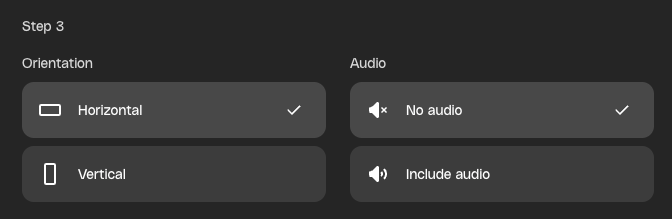
Choose Horizontal for:
Choose Vertical for:
Starting with the correct aspect ratio helps you avoid unnecessary cropping later.
You can also choose whether your generated video includes audio.
Silent animations work well when you’ll be adding music during editing or publishing videos that autoplay without sound. Including AI-generated audio can help establish atmosphere immediately, especially for nature scenes, cinematic visuals, or environmental storytelling.
Consider where your audience will view the final video before deciding which option works best.
Once you’re happy with your settings, select Generate.
Behind the scenes, AI analyses your image to understand composition, subject placement, depth, and perspective before generating realistic movement. Rather than simply applying a zoom effect, the model predicts how different elements might naturally move within the scene while maintaining visual consistency.
The result is a short animated clip that feels much more dynamic than the original still image.
Your first animation doesn’t have to be your last. One of the biggest advantages of AI-assisted creativity is how quickly you can explore different ideas.
Try experimenting with:
Sometimes, a small prompt adjustment can completely change the mood of the final animation.
While many images can be animated successfully, some naturally produce stronger results than others.
These images typically feature a clear subject and visual depth, providing the AI with a strong foundation for generating realistic movement.
If possible, begin with a high-quality image featuring a single, obvious subject.
Even small creative decisions can have a noticeable impact on the final result.
Sharper images provide the AI with more visual information, resulting in cleaner, more believable animations.
In many cases, less is more. A slow camera movement or gentle environmental motion often feels more cinematic than exaggerated movement.
Images with a strong focal point tend to generate more coherent animations than busy scenes with multiple competing subjects.
Instead of writing long paragraphs, describe the primary movement you want. Clear instructions usually produce more consistent results.
Creative exploration is one of AI’s biggest strengths. Generating several variations gives you more options and often leads to stronger creative outcomes.
AI image animation isn’t about replacing creative skills. It’s about removing technical barriers so you can spend more time developing ideas. Creative professionals increasingly use AI image animation because it allows them to:
Instead of spending hours manually building animations, you can focus on choosing the version that best communicates your idea.
Creating realistic motion from a still image has traditionally required specialist software and significant technical knowledge. Depending on the project, creators often need to:
Even experienced motion designers can spend hours producing a short animation.
AI doesn’t replace those professional techniques.
Instead, it gives creatives a much faster way to prototype ideas, create social content, or produce polished motion graphics without having to build every animation by hand.
Every memorable video starts with an idea. Sometimes, that idea already exists as a single image. Instead of rebuilding that image inside complex animation software, the Animate Image Shortcut helps you bring it to life in just a few clicks.
You still choose the image.
You still decide how it moves.
You still shape the creative direction.
AI simply helps transform still images into engaging videos—faster.
Whether you’re creating social content, showcasing products, pitching creative concepts, or bringing AI-generated artwork to life, AI image animation gives you more time to focus on the story you’re trying to tell and less time wrestling with technical workflows.
AI image animation transforms a still image into a video. Using generative AI, it predicts realistic movement, camera motion, and environmental effects to create a short animated clip from a single image.
Yes. AI-generated illustrations, concept art, fantasy scenes, and digital paintings are all excellent candidates for AI image animation. Adding subtle movement can make artwork feel more immersive and cinematic.
No. Envato Shortcuts are designed as guided workflows, making AI image animation accessible whether you’re an experienced creative professional or just getting started.
Upload your image, choose your settings, and generate the animation. With Envato’s Animate Image Shortcut, you can upload a photo, optionally describe the motion you want, select your orientation and audio preferences, and then generate a short AI-powered video in minutes.
Images with a clear subject generally produce the strongest results. Portraits, product photography, landscapes, architecture, and high-quality illustrations typically give the AI the best foundation for generating realistic movement.
Yes. You can describe the type of motion you’d like using a simple prompt, or leave the field blank and allow the AI to generate natural-looking movement automatically.
AI isn't making full movies yet; it's reshaping VFX, editing, and dubbing. Here's where it helps filmmakers today, and where it doesn't.
A practical, step-by-step guide to making a short AI film — from script and shot lists to character consistency, voice, sound, editing, cost, and legal rules.
Create an AI transition between two images with Envato Shortcuts. Set your opening and end frames, then generate the story that unfolds between them.

Discover what Wan3.0 brings to AI video, from longer generations to richer creative references, and what these advances mean for creatives.

