
Movie typography in 2026: why does it suddenly look so good?
Explore movie typography trends shaping 2026, from bold film fonts to cinematic branding, with inspiring examples and practical tips for creating impactful, screen-ready typography.
Envato: Get every type of asset for any type of project, and access to AI tools. Start now
Upgrade your images the easy way with Photoshop actions.
Photoshop can be overwhelming, but you don’t have to be a Photoshop expert to take advantage of the Photoshop Action feature. We are breaking it down and providing the who, what, when, where, why and how of Actions so you can add a wow-factor to your work just like the pros.
You and anyone else working in a creative digital space, who is looking to make photo edits and enhancements. You can build your own action, or you can install an action that’s already been created by a developer. The easiest option is to install and apply a Photoshop action someone else has created. Browse through the GraphicRiver library or check out our curated list of the 30 must-have Photoshop actions to get started. Once you have installed the action, you can apply it to any and all of your images.
Photoshop Actions are time-saving tools that allow you to add captivating effects to your files with just a few clicks. With Photoshop Actions you can easily add a weather or elemental effect, some sparkle, or a watercolor or sketch effect. The possibilities are truly endless.
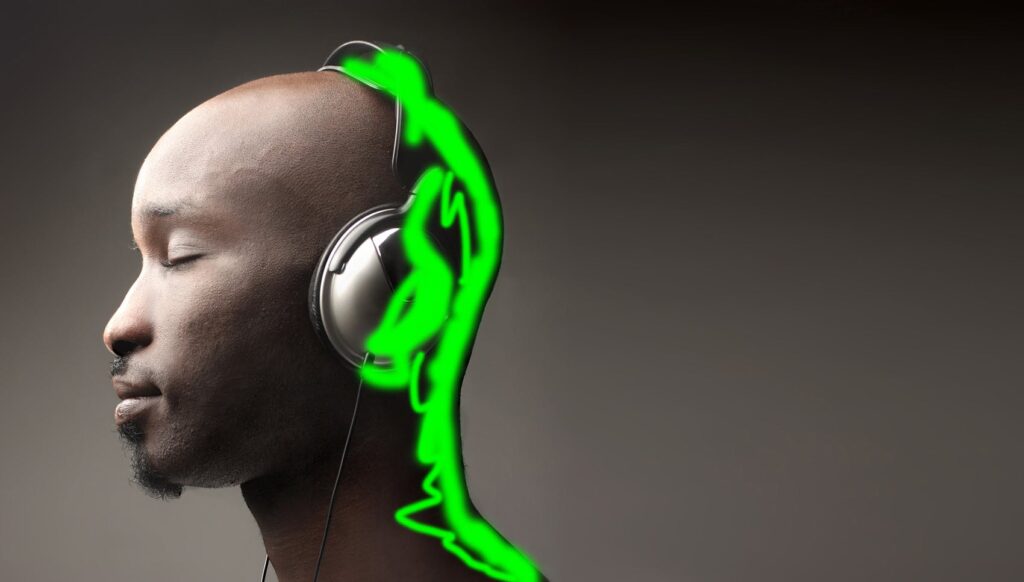
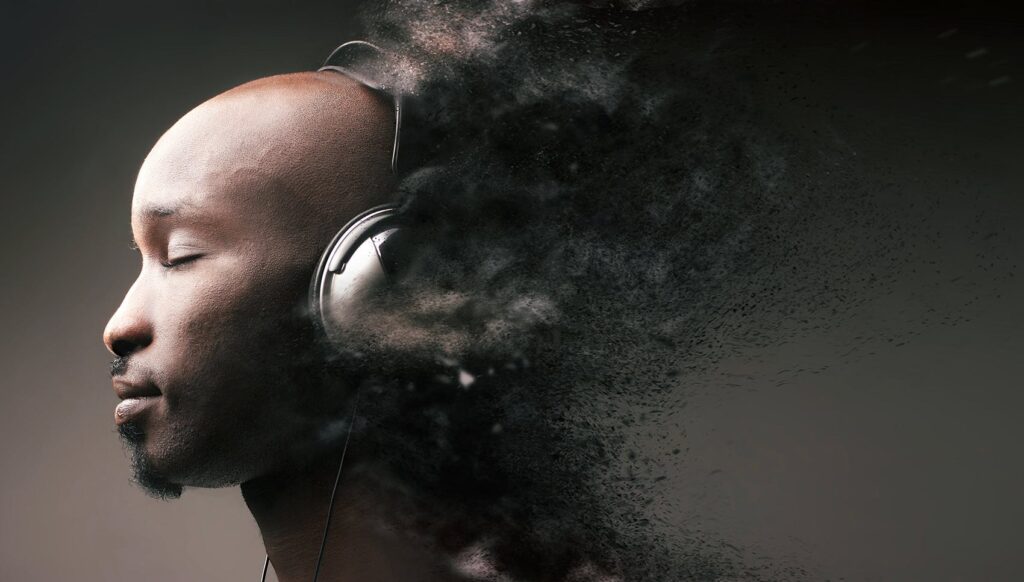
For example, using the Sandstorm Photoshop action, you can add a dispersion effect to take your photo to the next level and transform an image from this:

To this:

But adding a special effect to your file takes a lot of time if you have to run through each step manually every time you want to alter an image. Photoshop Actions combine, save and automate all of the steps you need to take, so that you can add the effect with just a few clicks. They are available for download in the form of .ATN files.
Check out more before-and-after Photoshop actions from our community.
Anytime you want to add a cool effect to your image. With the Action its easy and takes nearly no time at all.
Apply Photoshops Actions to text, images or animations. You can use the tool to enhance any file on any blog or website.
Photoshop actions can save you hours of work and frustration. Use them to speed up your workflow and bypass the arduous process of completing each technical step every time you want to alter your image. Actions are shortcuts for creatives looking to produce stunning professional results quickly.
To take the guess work out of the installation process, graphics guru, Kirk Nelson provided a simple step by step guide you can follow detailing how to install Photoshop Actions.
Once the action is installed, it’s easy to use. The Photoshop Actions available on Envato’s GraphicRiver include demonstrations and customization tutorials so you can make the most of the action.
If you want to get a bit more technical and create your own personalized action, I suggest you check out Kirk’s course about how to build your own Photoshop Action.
For even more information about Photoshop actions, check out the below blog posts and tutorials on Tuts+.
Lightroom Presets and Photoshop Actions are a bit like magic. They can help get a heap of work done in a very short span of time. Here are our top 15 Lightroom Presets and Photoshop Actions, to help you add some amazing visual spice to your images.
Explore movie typography trends shaping 2026, from bold film fonts to cinematic branding, with inspiring examples and practical tips for creating impactful, screen-ready typography.
Explore the bold botanical design trend shaping 2026, from lush patterns and floral design to branding, interiors, and nature-inspired creative projects rooted in biophilic aesthetics.
Learn what font Disney uses, why it’s not downloadable, and discover Disney-style font alternatives to recreate that iconic, playful branding style in your own designs.
Explore PowerPoint templates with professionally designed layouts to create polished, modern, and visually cohesive presentations.