
How to tell your agency’s story effectively via a digital brochure
Want to win over clients with a professional digital brochure?
Envato: Get every type of asset for any type of project, and access to AI tools. Start now
Bar tending, Writing, Python, Bookkeeping, Crocheting. What do these things have in common? These are a list of skills, not all of which are worth listing in your resume.

Wondering “What skills should I put on my resume?” We’ve got you covered.
Your resume will only get noticed if the job skills list matches the job needs. Padding your resume with a list of skills, as impressive as it looks, won’t help your application if those skills aren’t related to the job.
In this article, you’ll learn how the different types of professional skills that are relevant. Plus, we’ll review how to select which of those skills to include in your resume skills section. I also cover how to list skills on a resume so it stands out and fits the job you’re applying to best.
Listing the right professional skills on your resume is important; let’s begin by looking at why that is. The skills section of your resume might just hold the key to a recruiter noticing you.
In the screencast below, you’ll learn more about how many skills to list on resume designs. Check it out if you’re feeling lost about how to make your resume.
If you want to learn more about “What skills should I put on my resume?” then read on. We’ve got even more tips.
You’ll learn the difference between soft and hard skills in your list of job skills. Plus, you’ll get ideas for how to build your own skills and abilities for resume designs.
Having a section dedicated to an applicant’s skills makes it easy for recruiters to check qualifications quickly. For candidates, it’s another opportunity to add keywords and highlight their skills.
The resume skills section is often listed after the professional experience section. However, some resume templates have the skill section in a separate column on the left or right-hand side of the document.
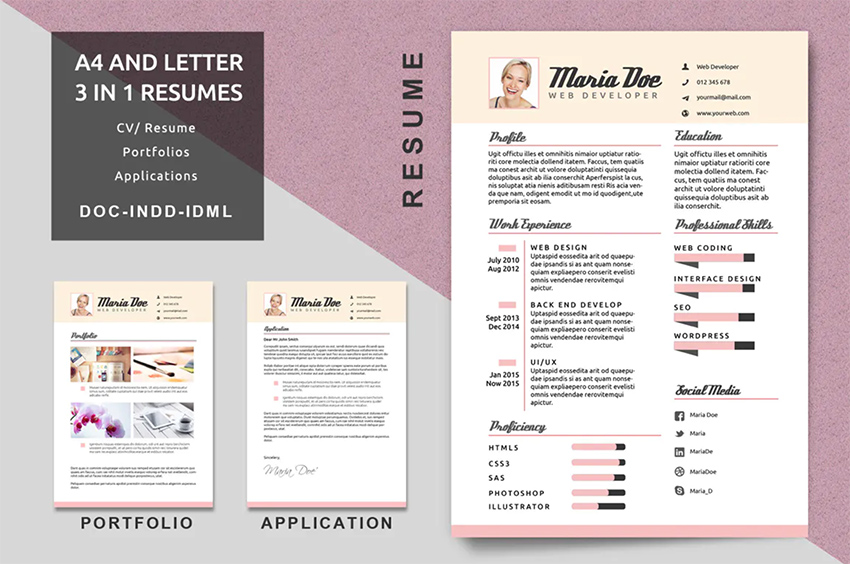
Some candidates group their skills according to the main responsibilities of their job.
Using a template available through Envato makes your professional skills easier to read. Above is an example of how to list programming skills on a resume (based on a template from Envato). It clearly shows the applicant has more experience when it comes to programming compared to graphic design.
There are different kinds of professional skills for your resume, but the two main types are hard skills and soft skills.
Hard skills are quantifiable and often learned from school or on the job. Operating machinery, programming languages, SEO, and data analysis are all hard skills.
Soft skills, also known as ‘”people skills” are subjective. That’s why it’s harder to quantify.
For instance, an applicant’s definition of “good communication skills” might not match what an employer is looking for. Public speaking, communication, patience, decision-making, and conflict resolution are all soft skills.
Both are important to include in the skills section of a professional resume. These types of professional skills can be categorized as transferable or job specific.
As the name implies, job-specific skills are required for a particular job, while transferable skills are relevant in different industries and roles.

For example, an animator has 3D modeling, time management, and communication skills. 3D modeling won’t be useful after changing careers, but the remaining skills might be useful despite switching to a programming or sales job.
Logic suggests hard skills are more important. The answer isn’t so simple.
In a tough economy, applicants with hard skills are hired more quickly. That’s because employers think they can do the job with little or no training.
In a niche or competitive market, applicants with sought-after skills are prioritized. It happened when iOS apps were gaining popularity. Companies had to hire from a very limited pool of qualified candidates. It’s happening again now. Google and other tech companies are fighting over candidates with machine learning expertise.

In industries with a plentiful supply of talent, employers like applicants with strong soft skills. They argue that soft skills aren’t easily learned.
As Peter Schutz, the former CEO of Porsche said,
“Hire character. Train skill.”
A new report from LinkedIn lists the most in-demand skills that employers look for. The top three? Management, communication, and customer service. Note that these are soft skills, not “hard” technical skills. They are innate, and they can be learned while working in any industry or any arena.
Similarly, Bernard Marr lists critical thinking, emotional intelligence, and collaboration as top skills that employers need over the next ten years.
Let’s narrow down how to list skills on a resume so that it makes its way through resume tracking software, stands out professionally, and catches the eye of potential employers. Here are some quick tips to keep in mind:
A resume is more than a list of job skills—it’s your introduction to potential employers. Thus, it’s essential to make a winning first impression.
Premium Microsoft Word resume templates help you do exactly that. They’re designed and styled by creative experts. All you’ve got to do is drop in your own credentials.
Envato is the best source for skills on resume templates for Word. With thousands of designs to choose from, it’s easy to find the perfect option. Browse today!
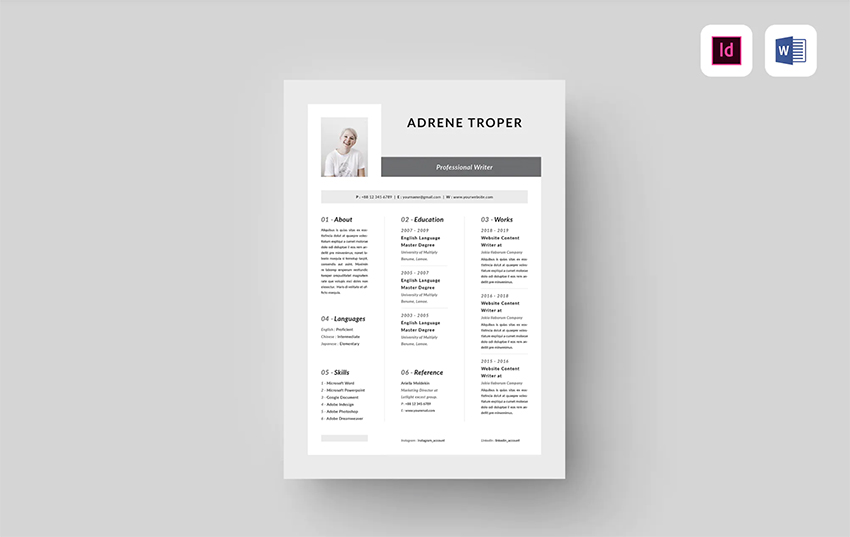
We’ll learn how to customize a resume Word template with the beautiful Resume from Envato. Log in to your Elements account and choose Download. Select a license use, and then click Add & Download.
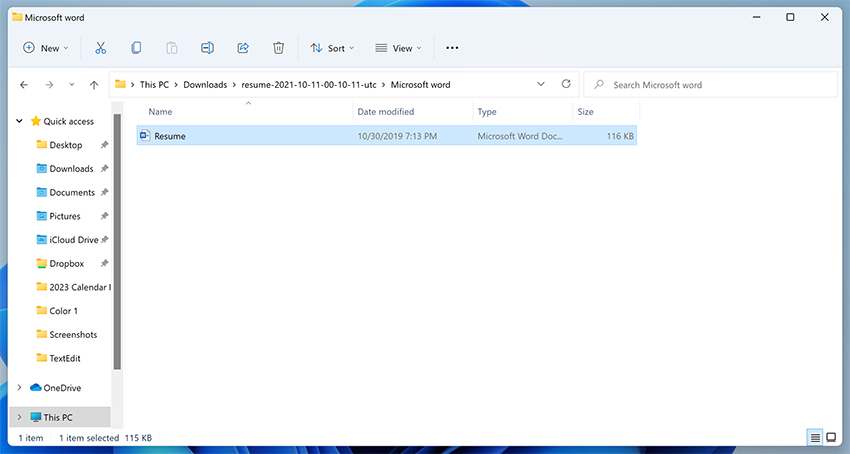
Your premium resume will download. Next, go ahead and open the download folder. Inside, you’ll see a list of other files and folders. Remember, we’re working in Word here, so open the Microsoft Word folder.
Then, double-click on the .docx file to launch your resume template in Word.
Now, it’s time to add your job skills list. The skills section of resume designs is crucial for establishing your credentials.
When you think of how to list skills on resumes, premium templates like this are your best friend. All the content placeholders are already there, and you simply need to replace the existing text with your own details.

Begin by clicking on one of the text boxes to select the contents. Then, start typing! Add your relevant education details, career experiences, skills, and more. Skills and abilities for resume designs like this help you stand out in the stack of resumes many hiring managers see every day.
As you work, keep a few things in mind:
Finished adding your list of job skills? Great! Now it’s time to save a finished copy of your MS Word resume.
Here’s an important note. While Word is a powerful way to edit a resume, it’s not the best way to share one. That’s because formatting can often change from screen to screen. Your best option is to save a PDF copy of your resume.
PDF files are easy to share, and they’re viewable on virtually any device. And they’ll never rearrange your carefully constructed layout. There’s nothing worse than accidentally sharing a messy resume with a layout that you didn’t intend. PDFs avoid this possibility.
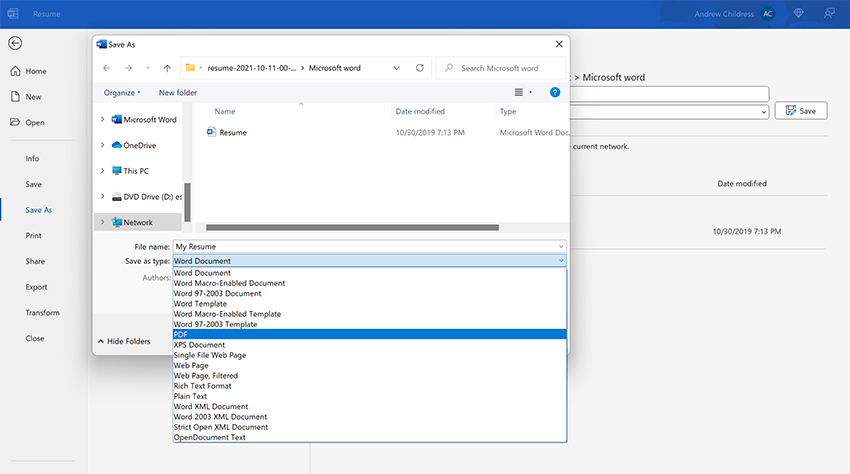
To save a PDF resume in Word, go to File > Save As. Give your resume a name. Then, in the Save as Type dropdown, select PDF. Lastly, click Save.
That’s it! In moments, you’ve created your own beautiful, shareable MS Word resume. You’re ready to land your dream job!
Show, don’t tell. That’s the important rule in making your soft skills believable for a recruiter.
Use numbers, awards, and any other quantifiable metric to make the recruiter see your claims of being a good team player and communicator are real.
Let’s look at a few helpful examples of how to list skills on resume:
“Coordinated with 3 animators to successfully complete a 30-second video animation project before deadline.”
“Organized different team building activities to improve morale after a company merger.”
“Managed a team of volunteers and sponsors to schedule activities, pack giveaways, and conduct a successful community outreach campaign.”
Hard skills are often transferable and job specific skills that a recruiter would input in an ATS. Here’s an example of hard skills for an editor or copywriter:

Taylor Dumouchel, Career Expert at Peak Sales Recruiting, says:
“Top performers in the business and finance sectors understand exactly how their efforts contribute to the company’s bottom line, so a top resume should also include the metrics that quantify their efforts.”
For example, a specific program you used at your old job might be unheard of to your new boss. You should replace it with a generic name to describe what the application does instead.
Customer service and phone sales agents, for example, use software specific to the company they work for. Instead of naming the sales software, it’s better to write “lead management application” or “customer database application” in your resume business skills.
Using numbers to rate your skills might sound good, but it doesn’t clearly convey your skill level.
On a 10-point scale with 10 being the highest, what’s 7? To you, it might mean that you’re ‘proficient’ in that skill, but what if the recruiter thinks ‘proficient’ is more of an eight or nine?
Use an easily understood metric to show levels of proficiency on your resume:
Let’s look at how to list skills on a resume in the right order.
Some jobs require more technical skills than others, like nursing, engineering, video animation, and programming. For jobs like this, it’s important that your skills are listed in a logical manner.

Here’s how to list programming skills on a resume without making it look like a laundry list of jargon:
List the job-specific skills most relevant to your target job, and then move on to the secondary or routine skills expected. This layout makes it easy for recruiters to see that you’ve got the skills required on the job description.
Hard skills can be categorized in different ways, depending on your job title. Below are hard skills examples for graphic designers, grouped according to the skill type:
List hard skills followed by the years of experience. Listing your professional skills in this fashion shows your career’s progression.
Have you noticed how some resume skills sections have the skills listed in a separate column? Others put the job skills list below the main experience details.
There’s no such thing as right and wrong placement; it just depends on your goal. The recruiters and resume experts I talked to have varying but equally logical opinions on this subject.
“Write your skills below the professional summary because the top one-third of the resume is the prime real estate. Since resumes are only read for five to seven seconds, you want your key skills to grab the employer’s attention early,” says Weiner.
Dr. Dawn D. Boyer of Dboyer Consulting advises against using templates with complex layouts.
She continues, “An ATS takes the text it finds and parses it over into data blocks for future searches. Resumes with text boxes, fancy graphics, tables, and weird columns may confuse the ATS system, which can lead it to mix up the text, or ignore it totally.”
According to her, it’s also the reason why putting your information only in the header or footer is a bad idea. ATS often can’t recognize text embedded in headers, so your contact details won’t be included on your application.
“If technical skills are required for the position, I list them after the professional summary then include soft skills in a separate section labeled ‘Areas of Strength’ below it”, says Dr. Heather Rothbauer-Wanish of Feather Communications.
So the order is:
For professional jobs where the hard skills are standard and often transferable to a lot of positions, Dr. Rothbauer-Wanish lists them at the bottom of the resume. Some of these hard skills examples include sales and online research.
Not sure how to structure your resume? Check out this guide.
Wondering “What skills should I put on my resume?” This list has all the answers you need.
Here are lists of professional skills for resumes, which you can use to write your resume skills section.
Below are some soft professional skills for your resume:
Here are the must-have professional skills for the resume of anyone interested in a management role:
Here are some professional skills examples for design professionals:
Below are different hard skills examples for IT and programming professionals:
Different types of professional skills you may want to include in your resume:
Below are some of the most in-demand hard skills for 2023, according to data from LinkedIn:
Here’s the thing: it can be challenging to know how to add your skills and abilities to resume designs. That’s why I love resume templates. They make it easier to know how to list skills on resumes.
Resume templates have pre-built placeholders for you. That means that you’ve got cues on how to add professional skills for resumes. Check out more of our favorite templates with skills and abilities for resume prompts below:
Conserve space on your resume and write only the skills related to the job opening you’re applying to. Remember, every skill you include in your resume skills section comes with an opportunity cost. You risk losing the attention of the hiring manager.
Use a well-organized resume template from Envato. These help you showcase your skills and abilities for resume designs, and they avoid messy, cluttered layouts.
Now that you know how to list skills on a resume for best results, and what technical and soft skills are important to include, you’re ready to take action. Why not download a professional resume template to show off your professional skills today?
Want to win over clients with a professional digital brochure?

Here's everything you need to develop successful product branding.

A practical take on lead generation for creative agencies.

Get the most out of SXSW London with this guide to key events.