
How to improve email deliverability: design and technical fixes
Learn how to improve email deliverability with better email design, sender authentication, list management, and inbox placement strategies that help more campaigns get seen.
Envato: Get every type of asset for any type of project, and access to AI tools. Start now
In this tutorial, learn how to start a professional email and end it effectively. How you start and close a professional business email makes a difference.

Does it seem like you’re constantly reading email? Maybe that’s because you are.
Over 333 billion emails are sent each day. An average office worker sends out 40 emails a day and receives between 100 and 120.
Email is an important part of the way we conduct business and our lives. Not everybody knows how to start and end a professional business email to get the best results.
In this tutorial, we’ll cover the best way to begin an email and how to end a professional email. You’ll also learn about email style, and we’ll discuss the importance of identifying your target audience.
Before jumping into this post, learn professional email strategies in our ebook, The Ultimate Guide to Inbox Zero Mastery (grab it now for free):

Take your email learning further so you can not only write better. Also keep your email inbox organized and be productive.
Timely responses and keeping on top of the mass of email you receive. These are just as important as effective email writing techniques.
Want to learn how to start a business email? Before you can write an effective start and ending to your email, identify the target audience for your email.
A target audience is who you are trying to reach with your email. It can be a specific individual or a group of people.
Your target audience affects your email writing style, including your email beginning and ending. Here are the two most common email target audience distinctions:
It’s a good idea to learn as much as you can about your target audience. If you can, address your email to someone known to you within the business organization you are writing to.
If you don’t know anyone in the organization, try to learn the name and title of the person you are writing to and use them in the email. People are more likely to respond when addressed directly.
There are times when you may need to send an email to an unknown audience. For example, you may be answering an ad for a freelance gig, and the ad does not include a person’s name. Despite your best research on the company, you can’t figure out who to address the email to.
In these cases, it’s usually best to start your email with a generic, but friendly, opening such as “Hello.” Avoid “To Whom It May Concern”. It sounds too stiff and formal.
Your audience also affects the style and tone of your email. A professional business email you send to a friend can be less formal. It can be more personal than a business email you send to someone you barely know.
Whenever possible, address your email to an individual. But there are some business situations where you may need to send a group email.
Here are just a few examples:
I’m sure you can think of other examples that apply to your own business. If you’re sending an email to a group, it’s a good idea to picture common characteristics of the group. That can help you decide how to address your email and what tone to use.
For example, an email sent to a group of lawyers would be more formal than an email sent to a group of college students.

The style you use to write your email affects how effective your email will be. Also, the start and end of your email will be different depending on the style you choose.
There are three things you need to know about email style:
Let’s take a look at each email style issue.
Want to learn how to start an email to a company? Years ago, all professional business emails were sent using a formal style. You may have been taught to use a formal style to write all your business emails.
The main problem with many formal email greetings is that they sound stiff.
Do pay attention to the conventions in the organization you’re writing to. Many organizations prefer a casual email style, even for professional business emails.
A formal email style works with many businesses, but some businesses prefer a less formal tone. Here are some signs that it’s appropriate to use less formal language in your email:
One of the biggest problems with emails is that the recipient can’t see your body language. This can cause misunderstandings.
For example, I used to write what I thought were professional emails. I got right to the point after addressing the recipient and only addressed the topic I wanted to cover.
I was shocked when one of my clients wrote back and asked me why I was being so unfriendly in my emails. I had to rethink the way I wrote emails.
For emails to that client, I added a friendlier sentence at the start of each email, such as:
This resulted in a positive response. Keep in mind, though, that you should avoid opening phrases that feel too stiff, like:
The goal is to connect with the recipient before jumping into the topic of your email. We recommend rereading your email to see if you can gauge the recipient well enough. If a sentence or paragraph seems off, rewrite it to achieve better tonal consistency throughout your message.

How do you start a business email? Your email beginning is the first thing a recipient sees. A good beginning means that you leave a good impression. A bad email beginning, on the other hand, could mean your business email goes straight to the trash.
Here are the three elements of how to begin an email:
Let’s look at each element in turn.
When learning how to start an email professionally, you need to start with the subject line. Most email recipients scan the subject lines in their email inbox. They do this to decide which emails are important and which can be dealt with later or deleted. If you want your professional business email to be read, a good email subject line is vital.
Wondering how to start an email to your boss? Start with the salutation. The salutation of an email is who the email is addressed to. This is another key part when learning how to start a business email. In more formal emails, it’s often preceded by the word “Dear.”
Some example openings for formal business emails include:
“Dear Sir” and “Dear Madam” used alone could be offensive if you don’t know whether you are writing to a man or a woman.
Keep in mind that using Sir and Madam assumes a binary approach to gender. If you’re unsure of the gender of the person(s) you’re writing to, a more general approach is better.
Try using the group that the person is a part of in the address. For example:
“Hello,” while less formal, is also less likely to offend and is a good way to start an email when you don’t know the name of the recipient.
When writing to someone who is in a position of authority, start the email with something like “Dear Mr. Jones” or “Dear Ms. Lopez,” if you know their gender.
If you don’t know their gender, try using their title. “Dear Dr. Smith” or “Dear Professor Smith” would be a respectful way for a student to start an email to a college professor.
If you don’t know much about the person (including gender), it’s acceptable to use the person’s first and last name. Try “Dear Marti Smith,” for example (where Marti is the person’s first name). Avoid using “Miss” or “Mrs” since marital status is not usually relevant.
When using a person’s first or last name, always double-check the spelling of the name. A misspelled name leaves a bad impression.
If the organization encourages less formal emails, it could be appropriate to start an email with a simple “Hi.” If you know the person’s first name, include it. For example, “Hi John.”
Be careful, though. While informal greetings are perceived as being friendlier, you can be too casual. If you’re uncertain, it’s better to be slightly too formal with your email salutation.
There is such a thing as being too informal with a business email. Most experts agree that text messaging abbreviations are not ever a good way to start or end a business email.
Here are some text messaging greetings you shouldn’t use in a professional business email:
The first sentence of an email determines whether the recipient will continue reading. This is crucial to master when learning how to begin a formal email.
I can’t begin to tell you how many emails I’ve deleted, all because the first line told me the person had no business writing to me.
Here are some examples of bad opening lines and how to fix them:
When writing to someone you don’t know but have a connection with, refer to that connection. For example, you could say “I enjoyed your presentation on usability at last month’s [organization name] meeting” or “I read your recent article on [subject] in XYZ publication.”
However, don’t pretend there’s a connection when there isn’t. If you didn’t attend the recipient’s presentation or didn’t read their article, it will be easy for them to discover. As a writer, I often get emails from people who claim to have read my article, but further discussion with them makes it obvious that they only looked at the headline.
Did you ever get to the end of an email and feel unsure about how to end it? You’re not alone. The closing of an email is very important.
Here’s an example design of an email signature that will work great for business emails.

I remember being startled a few years ago by a client who closed his email to me with the words “Love Ya.” I had just finished a huge rush job for him, but I didn’t actually know him well. It turns out he was just grateful that I’d been available to do such a big job on such short notice. But his familiar ending made me slightly uncomfortable at the time.
Here are the elements of the right way to close an email:
As with the opening section of the email, text message terms aren’t acceptable in a business email. Here are some examples of closings to avoid:
Now you know how to start an email to a company. We’ve also covered how to start an email professionally.
Want to learn more email tips that can help you in your personal and professional life?
Check out these other great Envato Tuts+ resources:
Now you know how to begin a formal email.
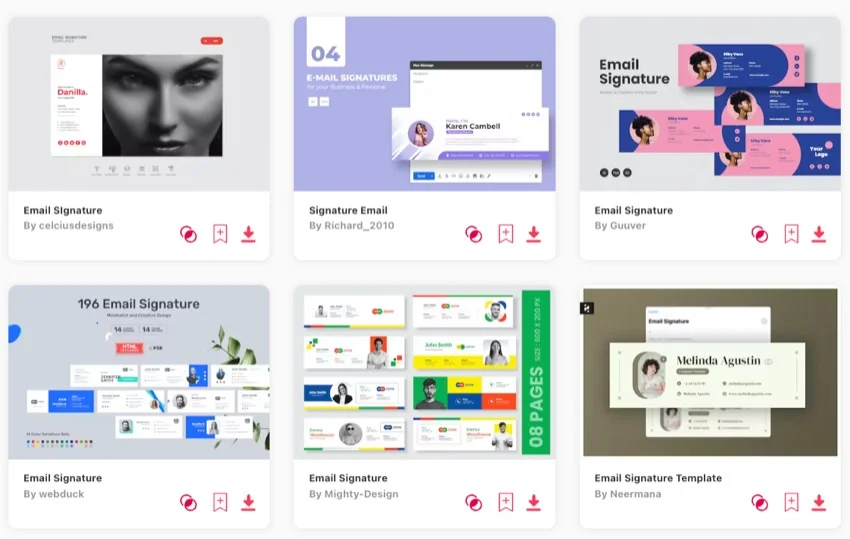
Without a high-quality email signature, your emails will come across as unprofessional. This will lead to subpar results for any of your business communications.
Envato Elements offers tons of high-quality email signatures that you can download. Also find countless other resources such as fonts, stock photos, and more—all for a single flat rate.
Every Elements template is designed by experts with you in mind. Pick your favorite design, download it, drop in your content, and go!
Grab our free ebook: The Ultimate Guide to Inbox Zero Mastery. It’s packed with actionable strategies to help you manage your email more professionally.

In this article, we covered how to start an email and how to end a professional email.
We’ve also covered how to identify your target audience. Choose the right email style and how to effectively open and close and email.
To end your emails in the most professional way possible, you’ll need a high-quality email signature. Envato Elements has some of the best email signature designs that you can download.
Learn how to improve email deliverability with better email design, sender authentication, list management, and inbox placement strategies that help more campaigns get seen.

Curious about what’s next in email? Explore the top email marketing trends for 2026, from AI personalization to interactive designs you can’t ignore.

How to build emails people actually want to open — with examples, ideas, and tricks that actually work.

Follow these six techniques for better email lead generation.

