Envato: Get every type of asset for any type of project, and access to AI tools. Start now

Learn How to Use Photoshop Brushes in Our Free Course

Our free video course, 10 Tips to Master Adobe Photoshop Brushes, helps you get the most out of Photoshop brushes and take your artwork to the next level.

Envato 2min read
Design

Learning how to use Photoshop brushes will help you get the most out of Adobe Photoshop. Whether you’re a graphic designer, a digital artist, an illustrator, or just a beginner who wants to learn more, mastering all the features of Photoshop brushes will take your work to the next level.

And the good news is that you can learn everything you need to know in our free course, 10 Tips to Master Adobe Photoshop Brushes.

What You’ll Learn

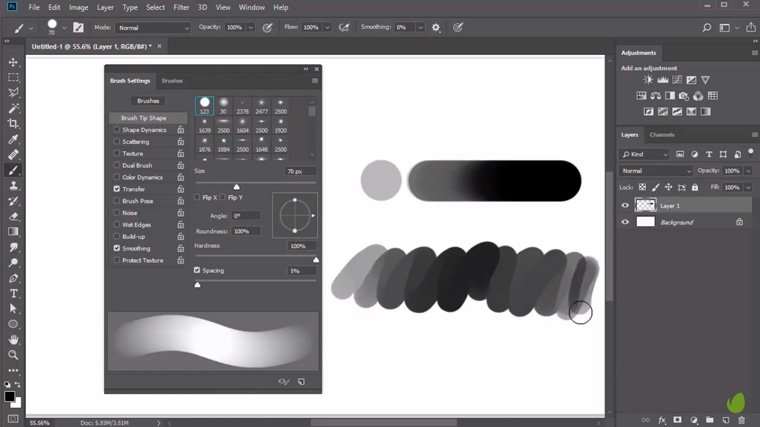
In this half-hour course, experienced designer Melody Nieves will take you through everything from installing Photoshop brushes through to mastering the use of hard and soft brushes.

Photoshop brushes

You’ll get the inside scoop on how she created some of the effects in her stunningly detailed digital paintings.

Digital painting of a horse

And you’ll see how to use different brushes to create very different effects.

Digital painting of a horse

You’ll also learn about pen pressure, how to blend with brushes, and installing and using custom brushes. This really is a comprehensive introduction to the Photoshop brush tool, and it’s perfect either for complete beginners or for more experienced designers who need a refresher.

Start Mastering Photoshop Brushes Today!

Although the brush tool seems like one of the simpler options that Photoshop has to offer, there’s more to it than meets the eye. If you want to be a successful artist or designer, you’ll need to master all the ins and outs of this powerful and essential tool.

So set aside half an hour to get up to speed, either by watching the video above or by clicking through to watch 10 Tips to Master Adobe Photoshop Brushes over on YouTube.

Digital portraits using photoshop brushes

When you’ve done that, why not try experimenting with the different Photoshop brushes available on Envato Elements? You can use your newfound brush skills to create ice, snow, dust, and all kinds of super-realistic effects.

Unlimited Creative Assets. Access to AI Tools.

50 Watercolor Brushes

orcacreative
50 Watercolor Brushes

For more Photoshop brushes, visit Envato Elements.

Here are other articles related to Photoshop that you’d want to check out:

Related Posts

DesignNew

The return of the brand mascot (and how to create your own)

Football teams have them. Your local diner probably has one. Mascots are ever-present, but have rarely taken center stage in mainstream branding over the past decade. That’s all set to change as major brands launch an army of fresh mascot designs, vying to win over our hearts and wallets. In 2026, your brand isn’t really […]

Grace Fussell 12min read