

Envato: Get every type of asset for any type of project, and access to AI tools. Start now

14 Useful Excel Templates for Freelance Designers

There are many tools for managing freelance income, but sometimes doing things the old-school way is best.

Envato 6min read
Design

I know what you’re thinking. Excel? Really? But believe it or not, Excel is still a dominant force in the spreadsheet-making world and can allow for numerous possibilities in managing information. This is really important for freelancers.

When you’re in charge of pretty much everything related to your business, staying organized is essential. Keeping track of income, expenses, receipts, payments, and more can be exhausting when you don’t have a good organizational system.

TL;DR

For freelance designers, the right Excel template can handle income tracking, expenses, invoicing, project scoping, and scheduling without paying for extra software. Below are 14 free and low-cost Excel templates covering sales tracking, expense reports, editorial calendars, Gantt charts, timesheets, invoices, and to-do lists, a starter kit for running the business side of your design work.

Managing your Freelance Income

Plenty of services exist for managing freelance income. But sometimes the old-school way is best. Here are 14 Excel templates that make running the business side of a design practice a little easier.

1. Online Sales Tracker

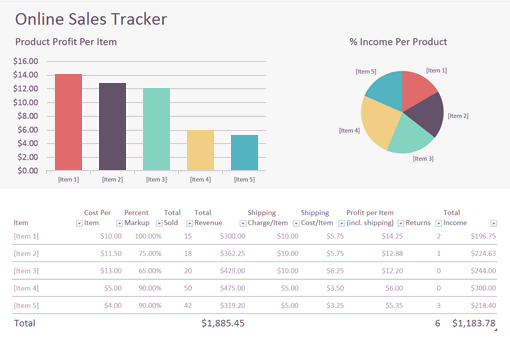
Nothing like a template from the official Excel source, right? This Office template makes it easy to keep track of your sales and your profits all in one place.

Screenshot of an Online Sales Tracker

Alternatively, here are some Excel expense reports that allow you to track income and expenses together.

2. Expense Reports

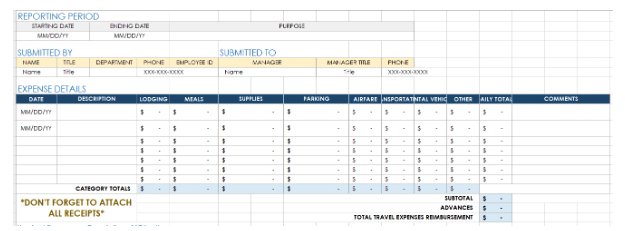
Excel expense reports come in handy for freelance designers looking to track their expenditures efficiently. With meticulously organized spreadsheets, you can effortlessly monitor your financial activities, ensuring clarity and accuracy in budget management.

Screenshot of an Excel expense report

3. Idea Planner

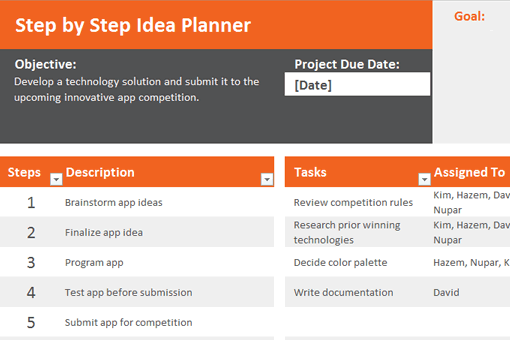
The Idea Planner is another offering from Office that allows you to plan any project in detail. It breaks down the project by steps, which you can then assign to members of your team (if you have them), assign deadlines, and more.

Screenshot of an Idea Planner

4. Editorial Calendar

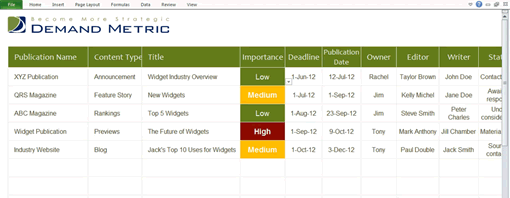
Here’s a template from Demand Metric that’s super useful. It makes it easy to develop and stick to an editorial calendar for your blog, a newsletter, or even for publication opportunities at other magazines.

You can input all the details about each publication, assign deadlines, and see exactly where everything stands at a glance.

Screenshot of an Editorial Calendar

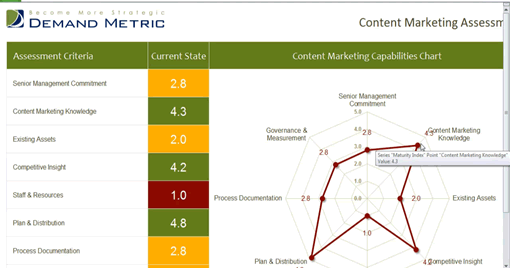
5. Content Marketing Assessment

Most freelancers do business online nowadays, which means you most likely need to have a content marketing plan in place. This ensures you’re getting your content (and your message) in front of as many people as possible.

This template allows you to assess how your content is doing across numerous metrics.

Screenshot of a Content Marketing Assessment Template

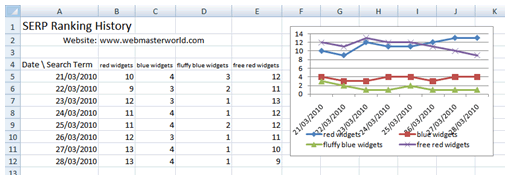
6. Google Position Tracker

This template is perfect for those freelancers that prioritize SEO as a part of their overall marketing strategies. It allows you to keep track of your search engine rank for specific keyword phrases.

It’s fairly easy to configure and can save you a lot of money on professional services that do the same.

Screenshot of a Google Position Tracker Template

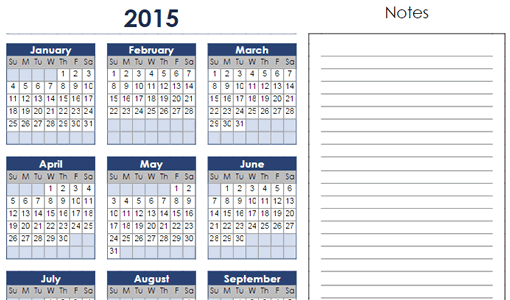
7. Calendar Template

A simple calendar template is a staple in any freelancer’s toolbox and this fills that role nicely.

Screenshot of a Calendar Template

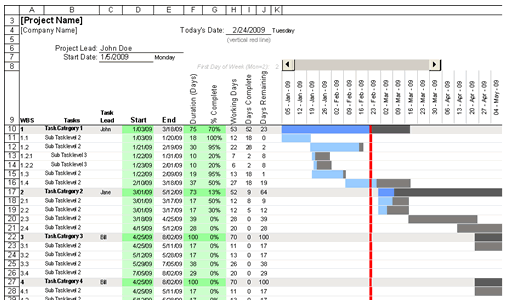
8. Gantt Chart

The Gantt Chart has a long-standing reputation as a must-use for project managers everywhere. This template gives you a convenient way to visualize project progress.

Screenshot of a Gantt Chart Template

9. Timesheets

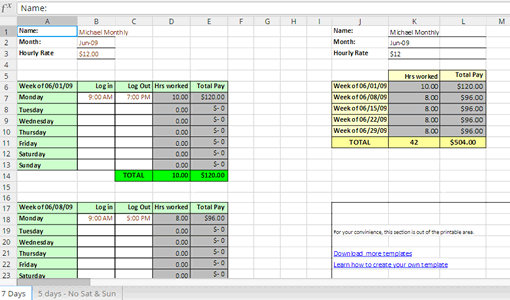
If you bill by the hour as many freelancers do, this Timesheet template makes doing so simple without having to sign up for a premium service.

Screenshot of a Timesheet Template

10. Work Schedule

If you need help managing your workday, day by day and week by week, this work schedule template allows you to set up your schedule and then access a bird’s eye view of everything you need to accomplish.

11. Billing Invoice

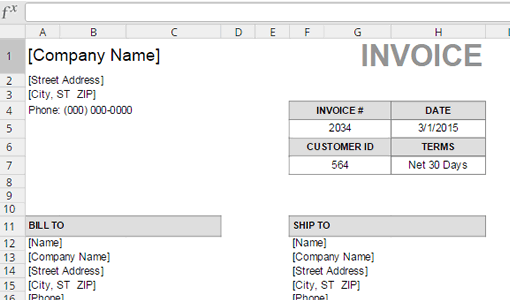
This spreadsheet template is an excellent tool for creating invoices on the fly, offering a print-friendly format and the flexibility to adjust the color scheme according to your preferences or brand identity. Alternatively, if you prefer even more convenience, explore the functionalities of an invoice generator or an invoice app. These cutting-edge tools enable you to swiftly generate professional invoices with your brand elements, ensuring a distinctly branded appearance, and empowering small business owners, freelancers, and contractors with the ability to create polished, branded invoices

Screenshot of an Invoice Template

12. Job Estimate Template

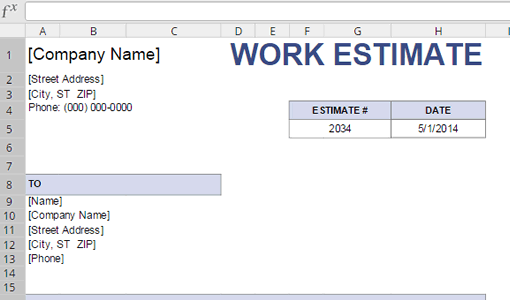
If you want to provide a potential client with an estimate of how much it’ll cost him, you can use this job estimate template.

The estimate is just a guess as to how much a project will cost but it’s an essential component of landing new gigs.

Screenshot of a Job/Work Estimate Template

13. Project Budget

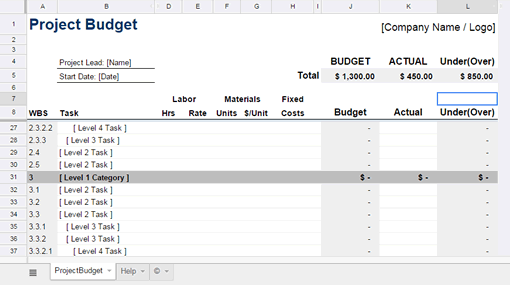
Still another template you should check out is the project budget, which allows you to create a line by line budget for your next project.

With it, you can figure out your expenses in advance and ensure your profit margin is as good as it can be.

Screenshot of a Project Budget Template

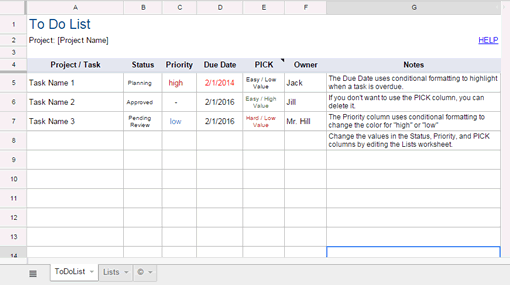
14. To-Do List

The last template I’ll talk about here is the to-do list. Everyone needs them, but freelancers especially so since there are so many things to account for outside of completing project-related tasks like balancing your budget, invoicing clients, running a marketing campaign, and so forth.

Screenshot of a To-Do List

There are many more Excel templates out there that can make a freelancer’s job easier (and cheaper!) but these should be enough to get you started. Besides, if you use some templates in Google Sheets others in Microsoft Excel, you should be aware that there are ways to import Google Sheets to Excel and to synchronise data between those platforms effortlessly.

For more great freelancing content, check out The Ultimate Guide to Freelancing as a Creative, 7 Habits Every Freelance Designer Should Live By and 8 Expert Tips to Boost Your Career as a Freelance Graphic Designer.

FAQs

What is the best Excel template for freelance designers?

The best Excel template depends on what you’re trying to solve. For daily business admin, a combined income and expense tracker plus a simple invoice template covers most needs. For project work, pair a Gantt chart with a job estimate template. Timesheets matter most if you bill hourly rather than by project.

Can I use these templates in Google Sheets instead of Excel?

Yes, in most cases. Upload the .xlsx file to Google Drive and open it with Google Sheets. Some formulas or macros may need adjusting, but the layout typically translates cleanly. If you want to keep both platforms in sync, tools like Coupler can automate the data flow.

Do I need Microsoft Excel to open these templates?

Not necessarily. You can open .xlsx files in Google Sheets, LibreOffice Calc, Apple Numbers, or the free web version of Excel. Feature parity isn’t perfect, though — pivot tables and macros work best in desktop Excel.

What should a freelance designer’s Excel stack look like?

A minimum viable stack for a solo freelance designer is: an income and expense tracker, an invoice template, a job estimate template, a project schedule (Gantt or calendar), and a to-do list. Add a rank tracker or content assessment sheet only if you’re actively running your own marketing.

Related Posts

DesignNew

The return of the brand mascot (and how to create your own)

Football teams have them. Your local diner probably has one. Mascots are ever-present, but have rarely taken center stage in mainstream branding over the past decade. That’s all set to change as major brands launch an army of fresh mascot designs, vying to win over our hearts and wallets. In 2026, your brand isn’t really […]

Grace Fussell 12min read